Archive for the ‘Avid’ category

Avid’s Fourth Quarter Numbers

February 5, 2007

Avid released lackluster quarterly numbers on Thursday, and the stock price fell about 5% on Friday and seems headed for another drop today. Revenue is down from last year and the company showed a net loss for the period. Even if you subtract a $53 million charge for “the impairment of goodwill associated with the acquisition of Pinnacle Systems,” (whatever that means!), you’re still looking at a company that just barely broke even.

For the year, revenues were up relative to 2005, but the company still showed a net loss.

CEO David Krall called the results “mixed” and pointed to a “shortfall in our video business in the fourth quarter.”

One has to wonder how much the slow adoption rate for Adrenaline here in Hollywood influenced these results. Adrenaline is nearly four years old, but you still don’t see very many systems in editing rooms here. Personally, I would use Adrenaline every time over Meridien. But it’s been hard for me to find others who strongly recommend it.

Adrenaline, like Meridien before it, simply doesn’t offer enough for feature and television editors. The product is less expensive than Meridien, does a lot more in terms of visual effects, and this year runs without extra hardware. But there isn’t much in it that makes editors like me say “I gotta have this.” And it was much too buggy for far too long.

Editors in the “longform” world represent a significant portion of Media Composer sales, and upgrades here could certainly contribute to Avid’s bottom line. But that won’t happen until the company makes a concerted effort to understand what we need and create features that make us sit up and take notice.

Next Bin

February 2, 2007

Another easy-to-do feature that would make it a lot easier to work on a laptop: a keyboard shortcut that would cycle you through all open bins. On a small screen your windows are inevitably overlapped, and the result is that bins tend to get covered up. It would be great to be able to hit a key and go to the next open bin. It would save a lot of mouse clicks and menu picks.

Many other applications offer this. In Word it’s Command-F6. In Photoshop it’s Control-Tab. And the Finder lets you switch applications with Command-Tab. The MC needs it, too.

Running the MC at Home

February 2, 2007

Overlapping WindowsI’ll be buying a new machine to replace my aging G4 shortly. My goal is to make this my primary computer at home — and I’d also like to be able to do some editing with it. Avid doesn’t make this easy, in at least two ways.

First, the company is always late to the party with operating system compatibility. With an Avid installed on your machine you are well advised to upgrade the OS with great care, lest you make your Avid flaky or nonfunctional. Avid blames this on Apple and I’m sure there’s something to that, but it still feels less and less acceptable these days. I just don’t have other applications that are this fussy. Somehow, virtually every other software manufacturer is able to deal with changes in the OS more quickly than Avid. Even Digi does a better job.

The second problem lies in the way Avid handles non-standard monitor configurations. The Media Composer was designed to work with two monitors, each with a 4:3 aspect ratio. You put your bins on one and the composer (the source/record monitor) and the timeline on the other.

Two 4×3 monitors was state of the art in 1991, but not today. We’ve got much bigger screens available and it ought to be possible to work comfortably with just one of them. Both Avid and Apple allow you to put your windows wherever you like them, so — problem solved, right? Wrong.

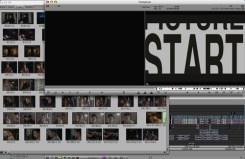
The trouble lies in window activation. Apple’s laptops and big monitors all have aspect ratios of about 16×10. But two 4×3 monitors next to each other have, in total, an aspect ratio of 16×6. In other words there’s a lot more width. If you try to jam bins, composer and timeline into 16×10 what you get is overcrowding. Either you make your bins very tall and narrow, or you overlap your windows. Overlapping shouldn’t be any big deal — except when you try double clicking on a clip. Your shot opens in the appropriate monitor, and the composer window comes forward. But the timeline stays where it is, behind the bin, creating the mess you see in the image above. So every single time you put a clip in a monitor, you’ve got to click again on the timeline in order to actually do anything with that clip. This may seem like a small thing, but anybody who has tried to cut on a laptop, and look at their bins in frame view, knows how annoying this can be.

Final Cut works differently, but isn’t much better. In FCP the viewer and the canvas are separate windows. That can be helpful in certain situations. But in this case, it just confuses things. If you double click on a source clip the viewer comes forward — but not the canvas and not the timeline. If you double click on a sequence, you get the canvas and the timeline, but not the viewer. In each case you have to click again to to do something useful.

People who work with their bins in text view are probably okay with this setup — tall and narrow bins are fine when you’re just looking at text. But I don’t work that way and neither do a lot of people I know. It shouldn’t be much of a challenge for the engineers to change this kind of behavior. The question is, as always, “What does the customer want?” This one is easy — just make window activation a preference. That would make it a whole lot simpler to work on diverse displays and it would make it a lot easier for me to buy a new monitor, too.

Avid on Mac-Intel Beta

January 8, 2007

According to an article in AppleInsider on Saturday, sources are saying that Avid will announce an open beta program for Mac-Intel products today. The idea is that if you already have a license for Adrenaline, Media Composer Software Only or Xpress Pro, then you’ll be able to download and use the Intel beta.

This comes on the heels of an Adobe open beta program for Photoshop CS3, which operates in much the same way — licensed customers only.

Avid had originally announced that Mac on Intel products would be shipping by the end of 2006 or in early 2007. Betas were demoed at DV Expo in November and one person I know who briefly played with MC-software at the show said it was surprisingly fast and responsive.

The announcement could have benefits for the long-form community, which has been underrepresented in Avid’s testing program for a long time. Beta in Hollywood has usually meant, at best, a couple of shows, or perhaps a system or two running at a rental company, and bug-fixes have been slow to materialize. If individual editors sign on to this program and give Avid articulate feedback we might see some real change in areas are important to us.

If the announcement is made as the story predicts, I hope A.C.E. and Editors Guild members will participate.

Video Games

January 5, 2007

jeff_han_image.jpgComparing the new Sony PS3 and Nintendo Wii game players has become commonplace in the computer press now and for good reason. It’s always fun to see the mighty felled. I haven’t used either of these things, but the PS3 is about as high-tech as Sony could make it with fantastic graphics and a Blu-ray disk player. The Wii is far less expensive and can’t compare on the graphics. But it has one truly unique feature that’s got a lot of gamers’ attention: its controller is motion sensitive. So to play the tennis game, you actually swing the controller around and it registers your movement in space and reproduces it on screen. It’s so compelling that Nintendo recently recalled the straps on the controllers because people were using them so hard they broke.
The more sensory modalities a digital system can connect to, the better it is. A mouse with its two dimensional interface did this a lot better than an old PC running DOS and that’s one reason why the Mac was so much more fun to use.

We’ve been using a mouse-based graphical user interface to edit with for a long time now and it has proved itself remarkably flexible and resilient. You can control just about anything you want with it. The Ediflex light pen, the Lightworks controller and the Avid MUI all seem inflexible by comparison.

As I’ve mentioned before, it seems ridiculous that with the processing power we have that we need to stop video in order to make a change. But more to the point, it ought to be possible to manipulate the interface in more organic ways.

Here’s an example of something that’s possible today. It’s an interface that can sense multiple touch points on a screen, so you can manipulate it using your hands. It’s so intuitive that there’s almost no interface needed. It comes from a guy named Jeff Han, working at New York University’s Courant Institute of Mathematical Sciences and you can see a video demonstration here. The demo is so compelling that the audience breaks out in spontaneous applause many times as they watch. Take a look and tell me whether you still think your favorite editing system is up to date.

Wish List #3 – Segment Mode

December 18, 2006

Editors using Final Cut live in segment mode all the time. Whenever you click in the timeline you’ve selected a clip and you can move it around. That feels like a convenience to Final Cut users, but to me, and to other Avid people, the “segment mode all the time” approach is hard to get used to. I tend to move around in the timeline very quickly and it’s just too easy to grab something and move it unintentionally.

But Final Cut’s segment mode was developed years after Avid’s and in some other ways, it has advantages. Given the war that both sides are engaged in, I have to guess that Avid’s engineers are considering some changes to segment mode. I hope that wholesale alterations are not being considered, but some smaller ones would certainly be nice.

Here are my suggestions:

  1. Clicking in a time track should not turn off segment mode.
    Some people like this feature, but Xpress doesn’t work this way and after cutting a show with it, I have to say I like it better. Sometimes you just want to leave segment mode on for awhile and with MC there’s no way to do that. It should be a preference.
  2. Make sync locks work properly in segment mode.
    Sync locks are supposed to prevent you from throwing your sequence out of sync. I leave them on all the time, because they make trimming so much easier. But sometimes they break down in segment mode, and when they do, you have to turn them off to do what you want to do.
  3. Insert black into the middle of a complex cut.
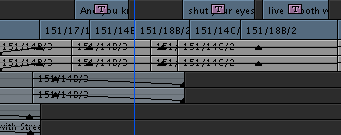
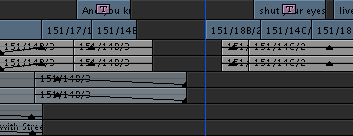
    If I want to open up room in the middle of a complex sequence to add a shot, I’ve got to add an edit in the middle of a clip, insert black, and then drag all the pieces back together. Final Cut allows you to select all clips to the right or left and then drag them. This makes it much easier, but it takes a certain kind of nerve to drag every clip in your sequence just to open up a little space somewhere. Avid’s trim mode lets you trim and add black at the same time (control+option+drag). That’s a great idea, but it was implemented so that you don’t actually add black, you trim material away and replace it with black. That never makes sense to me. I simply want to go from this:
    open-segment-mode-2.png
    to this:
    open-segment-mode-1.png
    It ought to be a lot easier to do.
  4. Slip or slide into sync
    It’s not strictly segment mode, but it sure would be nice if we could option click on an out of sync clip to either slip it or slide it into sync. You can do this in FCP and when you’re moving stuff around in the timeline, it would be very helpful.
  5. Linked selection.
    Finally, in FCP, you click on a picture clip and if it’s associated with sync audio, the audio gets selected too. The problem is that you have to turn linking on globally and that tends to tie your hands. Avid could easily do much the same thing, but in a simpler and more practical way. If you held down a modifier key while selecting a clip, nearby sync audio or video would be selected at the same time.

That’s it. Like I said, Avid’s segment mode generally works quite well. With a few little improvements it could be even better.

