Archive for the ‘User Interface’ category

Too Suite?

September 25, 2007

Adobe and Apple are pushing suites of applications in their quest to dominate retail post production. You make a single purchase and get a studio in a box, a studio that’s supposed to, by itself, serve the needs a diverse group of editors. That’s the competitive environment that Avid finds itself in, and it looks like there’s no going back to the old world of high prices and neatly defined market segments. However, just how these suites should function is still up for grabs.

Working with Final Cut, you end up creating separate projects in each application, and this can be problematic. Getting data between them is quirky and inconsistent. Dealing with an underlying Final Cut sequence that keeps changing isn’t easy. Hooks to make it easy to conform your work outside the suite don’t necessarily work. And not all the applications are consistent in terms of look and feel.

It’s arguably easier for software engineers to add functionality via the suite, but it’s not at all clear that we editors want so many separate applications. Take a look at Microsoft Office. Yes, they’ve kept spreadsheet and word processing separate. But Word now includes all kinds of desktop publishing features, and HTML and graphics are included via modules. Double click on an image and your toolset changes — but you stay inside Word.

One of the key questions application designers now face is how much functionality to put in the main ap and how much goes into the suite. Personally, I skew toward putting more power in the central program where I can get at it easily. I don’t particularly want to learn Pro Tools to do temp mixes — I want more power in Media Composer. But when the time comes to do full-bore final mixing, I sure want to know that everything I do is going to move over to the big sound ap, easily, transparently and intact.

There’s no magic to this — some things are better done in the editing application and some are better done via the suite. Figuring out which is which might turn out to be a big part of what separates the winners from the losers in the next round of post production competition.

Technorati Tags: , , , , ,

Toward a Unified Product Line

September 24, 2007

In recent years, Avid has added many new companies to its roster, creating an overabundance of editing applications. What does the Avid brand represent? Professional post-production, hopefully. But in terms of a point of view about editing tools, I’m just not sure.

Depending on how you divide them up, the company offers half a dozen lines of picture editing software, including Media Composer, Newscutter, Xpress, DS, the Liquid line and Pinnacle Studio. And within families there are typically several variants that have to be supported and tested. The total number of discrete pieces of software is up around 15, depending on how you count. That makes no sense to any kind of buyer, and it’s draining resources from a company that can ill afford inefficiency.

Avid needs roughly four products: something for consumers, something for high school kids and wedding videographers, something for pros, and a full-bore finishing application.

More or less like this:

  • Pinnacle Studio (competing with iMovie)
  • Xpress Pro lite (competing with Final Cut Express)
  • Media Composer (with Newscutter and Liquid functionality rolled in)
  • Nitris or DS (a full-bore finishing application)

But I don’t mean to imply that these applications, in their current incarnations, fit together effectively. To varying degrees, they all need to be rewritten in order to provide a single, unified user experience and full media and project compatibility. Learning one would help you understand the others. If you start your project on one system, it should move with you up the price ladder.

With a lineup like that customers would have an easy time figuring out which application they need, and Avid would have a fighting chance of defining itself both internally and to the market. They’d stop wasting resources competing with themselves, and they’d be able to combine all the great engineering talent within the company and focus it. In short, they’d be able to lead.

Technorati Tags: , , , ,

Throw Out the Old

August 27, 2007

The debate over iMovie ’08 continues — with many people expressing disappointment over the loss of timeline, visual effects and sound functions. I haven’t used it and I’m not sure if I ever will. But I love the idea of it. Why? Three reasons:

First, it embodies a clear and uncompromising point of view about what the “end user” really wants. And it fearlessly throws away old ideas to get there.

Second, it comes from the mind of one person. According to Apple, it was initially developed by one engineer, who, frustrated with current tools, including iMovie, created something else, at first just for himself. Groups rarely design great software. People do.

Third, it includes new user interface elements (skimming) that increase human/machine bandwidth. You feel a connection to the software because it does a better job of connecting to your nervous system. Think of the mouse, the iPod’s scroll wheel, or the iPhone’s multi-touch screen. They all connect you to the machine much more closely than what came before. You have a greater sense of control, and you enjoy using the machine more.

Frankly, I’m also unmoved by all this nostalgia for the old iMovie. The notion that it allowed for precise editing is silly. It was impossible to trim a cut carefully or do all kinds of things professionals expect. And it was slow. The idea that there wasn’t a better way was never credible to me.

Finally, the new iMovie is designed to shine in all-digital work environments, which frankly, is where the consumer (and everybody else) is going, sooner rather than later. I’d be very surprised if any home user is shooting on tape five years from now.

Apple now has a new platform. And they’ll add all kinds of features as time goes by. Creative destruction is what new things are made of.

Technorati Tags:

iMovie as a Gateway Drug

August 19, 2007

The new iMovie seems to represent a different paradigm for consumer editing — faster, less precise, designed for a tapeless workflow. It was discussed in some depth on last week’s MacBreak Weekly podcast and the consensus there was that it might be very useful for quickly throwing together a super-rough cut. It has one very important secret weapon: “Export to Final Cut Pro.” If you’re missing something, and iMovie ’08 is missing a lot of things, then you get yourself Final Cut Express or Final Cut Studio and move your project straight into it, courtesy of XML and Quicktime.

The program seems to be extremely easy to learn. It doesn’t offer a lot of options — it just does the right thing. For example, if it sees a mounted digital video source it just starts importing video from it, no questions asked. We may see producers or directors creating rough “idea” cuts in iMovie, and then handing the thing off to real editors who can make it work. (But there are problems, too. Scott Simmons has posted some interesting observations on his site.)

Rhetorical question: Is there an upgrade path from Pinnacle Studio to Media Composer? I don’t know for sure, but I’d have to wager that the answer is no. You can move a project from Studio to Pinnacle’s Liquid line. But that just begs the question. Doesn’t Avid want to see young editors moving all the way up to Media Composer?

Technorati Tags: , ,

Consumers, Students and Editors

August 17, 2007

One key issue that Avid and Apple are both facing is the synergy between different groups of editors. Based on the applications they sell, Apple thinks there are three groups: consumers, “prosumers” and professional editors (of all types) — iMovie, Final Cut Express and Final Cut Studio. There’s a clear migration path from FCE to FCS but iMovie is separate.

Avid also has a consumer product that’s completely separate from its other offerings — Pinnacle Studio. And with at least three families of professional editing applications and many subtle variants, Avid wants to view the pro world as heavily segmented. (I’ve argued before that all these offerings confuse and frustrate customers and hurt the brand.)

Most of the young editors arriving in Hollywood already know FCP. Generally, my advice to them is that if they want a career editing long-form, narrative films they need to learn Media Composer. There just aren’t many high-end projects that are cutting with FCP. You can argue that this is because us Hollywood types are old curmudgeons, but I’d counter that, for all its many strengths, FCP is just not as good as MC with narrative material.

Nevertheless, FCP has made editing sexy to young filmmakers and the fact that they all seem to know that application represents a tide that will inevitably have its effect at the higher end.

But consider the consumer market for a moment. Wouldn’t Apple and Avid want to see young people learning their preferred interface as early as possible? Apparently not. Both companies seem to think that whatever people are using at home, when they get serious they’ll be willing to learn something new — and hopefully something that isn’t made by the other guy. iMovie at least shares the look of Apple’s pro aps, which might engender some brand loyalty. But mostly, it’s a radical redesign. Pinnacle Studio has next to nothing in common with Media Composer.

Does this represent a failure of imagination? Or … is the new iMovie so fast and intuitive that kids who cut their teeth with it will expect something equally slick when they need more — something that nobody makes yet?

Technorati Tags: , ,

How much editing does the average person need?

August 15, 2007

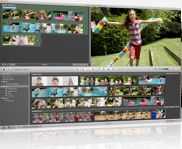
imovie screen shotWhen Apple didn’t release an upgrade to the iLife suite at this year’s Macworld, some people speculated that an announcement would have stolen focus from the iPhone, or that perhaps the new version was only going to work with Leopard. But now that iLife ’08 has been released, I think the reason might have been that it just wasn’t ready. An awful lot of work has gone into these applications — a new level of interface slickness and integration.


You can watch an excellent introduction to the new features here: iLife 08 Guided Tour. Apple has been moving to slick, highly produced, video-based tutorials. This one not only gives you a look at all the new features, but offers useful information and training. (Avid is putting up free training videos, too. Check them out here: Media Composer videos.)

My first impression of iLife is its user focus. They’ve consistently asked “what does the customer want to do” and answered it throughout the program. From a development standpoint, It’s always easier to ask “what can the machine do?” Apple’s approach can limit choices, but if done right, it’s much more intuitive for the user. That takes time, money and vision.

iLife, like the recent changes to the Final Cut Suite, focuses on high-bandwidth visual feedback. For example, they now offer something called “skimming.” Click and drag on a clip in iMovie to shuttle through it. Move your cursor over an image in iPhoto to flip through all the images in a gallery.

Overall, iMovie is the biggest surprise, because it’s been completely rewritten. It’s now designed as a library manager, more like iPhoto and iTunes, and as a way to quickly slam cuts together, add some music and automatically publish the results to the web. The old iMovie was very DV-centric. The new version seems to be format-agnostic. And it adopts Apple’s new media application look and feel — dark backgrounds, lighting effects on surfaces.

There’s been a lot of debate (for example, here and here) about the new iMovie, primarily because many capabilities have been eliminated. For starters, there’s no timeline at all. And there are far fewer visual effects (but none require rendering). You select material by simply dragging over a clip icon, so precise editing is nearly impossible. My sense from the guided tour is that the program excels in the kind of quick and dirty editing we see more and more now, and I suspect that it will appeal to many people.

Though I like the browsing and publishing features, with such limited editing controls I doubt that I’ll have much use for it. But it represents a vision of what the consumer wants, and whether it succeeds or fails I have to give Apple credit for aggressively rethinking entrenched ideas and trying something new.

Technorati Tags: