Archive for the ‘Workflow’ category

Is Automatic Script Mimic a Killer Feature?

March 21, 2007

A friend of mine is working on a well-known series that’s being shot on HD video. He gets four to five hours of dailies — every day. The show employs several Meridien systems for off-line editorial.

He’s very eager to get his hands on Avid’s upcoming “automatic script mimic” software, which listens to your tracks and quickly lines up your dailies with an on-screen script. He thinks that’ll make it a lot easier to sort through all the material he receives.

And that got me thinking. He’s certainly not alone. Many shows, particularly those originated on video, are shooting more now. Is automatic script mimic the killer feature that will finally push editors, especially TV editors, to upgrade their old Meridien systems?

Also, keep in mind that script integration, which was originally created by Ediflex, is patented. It’s not likely to be seen on a Final Cut system any time soon. So is script integration destined to become an important differentiator between FCP and Media Composer — a reason that editors will stick with their Avids?

What do you think?

Technorati Tags: , , , ,

What’s Avid Up To?

March 15, 2007

What does the recent Avid Insider seminar mean to editors? That depends on how you think it fits into Avid’s plans for NAB next month. The seminar itself was well done, and the company certainly has been busy, but what we saw was mostly focused on workgroups.

It’s possible that will be some surprises in April, but if this was an NAB preview then there just isn’t that much in the way of bread and butter features for editors to get excited about. Specifically:

Avid Interplay is an interesting product but it wasn’t designed for typical feature and TV cutting rooms. For reality TV and large installations it’s another story. If you are trying to coordinate the work of dozens of editors, producers and writers, or have to handle lots of new visual effects every day, then you need something to help you, and Interplay might be that thing. Unfortunately for editors, it requires the learning of yet another user interface and frankly, one that looks awfully crude and Windows-centric.

DNx36 is probably going to be adopted in a lot of cutting rooms and for Avid folks it’s going to represent a small revolution. But editors have been cutting compressed HD for some time with Final Cut, using DVCPRO. Avid’s codec is arguably superior, but the process is nothing new. It requires Adrenaline, so adopting this format will nudge editors and facilities to trade in their old Meridien machines.

Automatic script mimic is a very slick idea and I certainly plan to try it out. But, so far, the large majority of editors haven’t been attracted to Avid’s script tools and I’m not sure whether this will sway them.

A realtime burn-in effect for timecode and footage would save cutting rooms a lot of time, but it’s not here yet and we’ve been waiting for a long time.

Avid running on Intel-Mac should be released any day now. That’s probably the biggest news for editors and it should help make our machines, particularly our portable machines, run a lot faster. But like all Avid products, it’s probably going to be buggy at first, and for that reason, the adoption rate is going to be slow.

That leaves Avid Satellite, which seems like a good solution for Pro Tools video until you realize that it costs roughly $6,000 per seat. I expect that many sound and music editors, when told what the ante is, are going to decide that Quicktime is plenty good enough.

What was missing in all this were new usability features for editors. A new title tool, new mixing tools, a live timeline, background saves, automatic backups — the list is long, and I’m sure you all have your favorite items for it.

Instead, the changes we’re seeing mirror the kinds of things that came in with Meridien, namely improved speed and image quality — along with a lot of new bugs and quirks. Editors never got excited about Meridien, and we’ve largely been staying away from Adrenaline for the same reasons. That can’t be good for Avid’s bottom line.

There’s plenty on this list to think about and some of it will certainly be used widely. But at the same time. I’m struck by the fact that while Avid continues to avoid changing the core application, Apple pushes the envelope, bringing out major new features, or whole new applications, almost every year. To some extent they have to do this, because they’ve been coming from behind. But that time is ending. Though I still prefer Media Composer, both applications are now roughly similar. And with Final Cut you get DVD Studio Pro, Motion, Compressor and Soundtrack.

The question now is what each company will offer at NAB. Rumor has it that Apple will show a beefed up Final Cut, able to play, cut and conform 4K materials, perhaps running on an 8-core Mac Pro. That’ll be a show-stopper for sure.

Technorati Tags: , , , ,

Avid Insider Seminar (Part 3 – Video Satellite)

March 10, 2007

The last item described at Avid’s Tuesday night seminar was a new Digidesign product called “Avid Satellite.” It’s a stripped-down Media Composer designed as a video player to be used in conjunction with Pro Tools.

Digi has been encouraging sound editors to buy Mojo boxes in order to play picture. Not only is this expensive, but it restricts your track count to 48, which, for many editors, is a non-starter.

This new system puts the picture on its own machine, which is a software-based Media Composer with most editing functions disabled. So sound editors will have to buy the Satellite software along with a computer and monitor to run it on. The system can play anything a Media Composer can play. And track level editing is possible, so a sound editor can create a mix and attach it to picture and send it back to the picture editing room.

The advantage for the picture department is time — you don’t have to make Quicktimes. With a simple menu pick, you create an aaf file and consolidated media to match. You then send it to the sound department any way you like. If you make changes and need to send the sequence again, the system is smart enough to only send the extra media needed for the changes — it knows what you’ve already sent, though I wasn’t quite sure how this works.

For sound, this approach is a mixed bag. The good news is that since video is running on its own machine, the sound system can devote all its resources to audio — no slowdowns or track limitations due to video overhead. Quality is very good, of course. Sound editors see the same image that the picture editors do and can play it full screen, if desired. They can also see all picture cuts and jump to them as needed. The bad news is that editors will have to buy new computers just to play picture, along with the Satellite software. And they’ll have to make sure they have space for the new hardware. Satellite software pricing isn’t set, but it will probably be somewhere around $3500.

Interlock between the two systems runs over an Ethernet connection and seemed very tight in the demo, with near instantaneous back and forth play via JKL — much better than a typical Media Composer alone. Scrubbing wasn’t demonstrated.

I’ll have some thoughts about what all this means in the next post.

Technorati Tags: , , ,

Avid Insider Seminar (Part 2 – Media Composer)

March 8, 2007

Though most of Avid’s Tuesday night Insider Seminar was devoted to Interplay, several other technologies were demonstrated that in the short term might mean more to feature and TV editors.

The first is DNxHD-36 compression. This is a highly compressed HD codec that’s looking more and more like an upcoming standard for our editing rooms. At 1080p, it takes up roughly triple the space on disk that our trusty 1:14 media did (100,000 feet of film would use 300 GB), but in exchange, you get images that look dramatically better and can be projected and used for previews. Real-time visual effects are said to work well with this codec and Michael Phillips, who did the demo, indicated that you could play six multi-cam images simultaneously with it.

We saw some comparisons on a projector but the system was downrezing everything to 720P and that, more than anything, limited our ability to see differences. Nevertheless, DNx36 is a huge improvement over our old standard-def editing materials and I, for one, am eager to start using it. The catch, for those of you still hanging on to your Meridien systems, is that you can’t do this with your old machines.

Phillips also demonstrated automatic voice recognition for Avid’s venerable script-integration tools. You load your script from a word processing file and attach a shot to the script. Then, you tell the software to listen to the audio and, in just a couple of seconds, it automatically “lines” the take, indicating the place where every line of dialog begins. Once your dailies are loaded this way, you can instantly and easily listen to all the coverage for a particular line or group of lines, back to back. The software is amazingly effective and very fast.

Avid’s script-integration has never caught on here, partially because the extra time and effort required to line the film. That issue has now been eliminated and we may see more people using these tools. Again, Adrenaline or MC-software is required for this feature.

Both of these things will be available shortly. Another Media Composer technology, and perhaps the most important one, wasn’t actually demonstrated. That’s Media Composer for the Mac-Intel platform. The company has been working on this for a long time and many of us are eager to get our hands on it. It’s now slated for release in mid-March, just a week or two from now.

Another long-awaited feature, Avid’s real-time footage and timecode burn-in tool, is slated for release in the next couple of months. The current version works pretty well but is awkward to use, and the fact that it has to be rendered makes it useful only to the most patient. A real-time version would do a lot to streamline the turnover process for many cutting rooms.

Tomorrow — a new Avid-centric video player for Pro Tools.

Technorati Tags: , , ,

Avid Insider Seminar (Part 1 – Interplay)

March 7, 2007

Avid Insider Series banner

Avid presented the latest in their “Insider” seminar series last night, this time at the Skirball Center at the top of the Sepulveda pass. The session was presented by Michael Phillips and Matt Feury from Tewksbury, along with Scott Wood of Digidesign and Michael Krulik and others from Avid Burbank.

Though it might seem like an odd place for a post-production seminar, the Skirball turned out to be a great venue. It’s a beautiful facility with a modern, spacious screening room, and a big, inviting lobby area where good food and drink was served. It’s equidistant from the valley and the west side, very close to the freeway and has plenty of parking. The rush hour drive wasn’t great but it was considerably easier than I expected.

Four technologies were demonstrated:

  • Avid’s Interplay “asset manager”
  • DNxHD 36 for offline high definition editorial
  • automatic voice recognition for script integration
  • and a new video player for Pro Tools

The presenters worked together to show off the way the different systems interacted and, in general, did a very good job. There was a lot of equipment involved, all routed into a central projector, and I suspect that it took plenty of time and elbow grease to set everything up and make it work seamlessly. There was enough material presented to cover several seminars, so there’s much to talk about, and it will take me several posts to cover it all.

I’ll start with Interplay. It’s an entirely new suite of products designed to make it easy for a group of people to work with almost any kind of digital media. Physically, it’s a server that sits on top of Unity, along with a software-only player and an extension to the Media Composer. The server costs $18,000. Mike Cavanagh, from Keycode Media, thought it might rent for about $600-700 a week.

The idea is that a modern production is dealing with an avalanche of files: stills, video, audio, visual effects. They live in different places and lots of people need access to them. Each file is typically a modification of something else, and you need a way to organize all those versions. The Interplay server manages all this stuff and makes it available to various people, either in your facility or over the Internet. Each person gets a specific amount of access, and the Interplay engine creates and handles a history for each file. Producers, directors and others can view files, and log them or annotate them with comments via a software-only player. Editors interface with the system using their Media Composers, which will include a set of tools to deal with the Interplay server.

This is a whole new idea for feature film folks and it’s going to take a while for people, me included, to digest it all. It allows you to do an unprecedented amount of media sharing, and that means it will change the way we relate to producers and directors and others. Whether that’s good or bad depends on your point of view. Editors will have to make use of a new tools that seem quite powerful, but they have a techie, Windows-centric feel that isn’t particularly familiar. (For the moment, all the software is Windows-only.)

The versioning tools allow you to work on a sequence and periodically check it in to the server, which will register your latest creation as a version, complete with a set of comments that you add. You can then use the server to step through the versions or “roll back” to a previous one. I like the idea — I think we all spend way too much timing dealing with versions — but whether this approach simplifies things remains to be seen.

In general, the system seems to make the most sense for a large workgroup, say a crew working on a reality show. Eric Rigney from Sony suggested that it might also be valuable for a big feature with lots of visual effects. It’s harder to see how all that horsepower would work for an independent feature film. And the fact that right now there are no Mac versions is going to slow adoption in Los Angeles.

The other technologies shown last night seemed more immediately interesting on a typical feature film or TV show. More on that tomorrow.

Technorati Tags: , , ,

Importing with Media Composer and iMovie

March 5, 2007

Last night I spent a few hours trying to cut together some videos I made with a couple of still cameras. I’ve come to love these things for informal recording. They’re so small that they’re always with you, and since the size of the memory card is limited, you tend to be more selective and often produce better material.

The videos live in iPhoto, so I decided to try cutting them with iMovie and, since I have it handy, with Media Composer software, as well. The source files were in two sizes: 640×480 and 848×480. Both iMovie and Media Composer insist on converting them during import.

That’s the first frustration — if you uprez to DV, you’ll more than double the size on disk just to get started. I’d much prefer to leave the sources untouched.

The second frustration regards import settings. iMovie did a good, automatic job resizing the videos to DV dimensions. Media Composer worked well, too, but only after lots of experimentation. That’s because the import settings dialog, while very flexible, is damn near incomprehensible. For starters, video settings are perversely labeled “image,” so at first you think you’re in the wrong place. Then you come to the choices themselves:

Import Settings

I have yet to meet anyone who knows what they actually mean. What’s the difference between “Maintain, square” and “Maintain and Resize, square?” How the heck can you maintain and resize at the same time? Everybody I know just tries these things one at a time until they get what they want. A built in preview sure would save time and frustration.

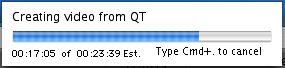
Once you’ve figured out the settings, it’s time to import. And therein lies my third gripe: Avid’s progress bar. This has been with us for so long we barely notice it anymore, but humor me for a second. What is the key piece of information you want this thing to tell you? You want to know how long you’re going to have to wait, right?

In the world of Media Composer that is not readily available. First you have to know to press the T key. Then you must do a timecode subtraction. Oh heck, that’s easy. Let’s see, 23:39 minus 17:05…6:34. No problem!

Import Progress

This is particularly important since both programs can’t import in the background. But wouldn’t that be wonderful? You could actually get something done during an import.

I was actually importing several videos, and iMovie very helpfully told me how long the whole process was going to take. Media Composer, designed in an age where imports were relatively rare, only tells you about the current clip. You learn nothing about how long the whole job might take or even where you are in the list.

Bottom line, iMovie is much more friendly during clip import. Of course, Media Composer wasn’t designed for consumer video and most people aren’t using it that way. But we’re entering a world where everything is going to be file-based, where we’re all going to spend an increasing portion of our time dealing with these things. The process is badly in need of a refresh.

In the end, bringing the files in took so long that I was only able to make a couple of cuts before calling it a night. And here, of course, there was no contest whatsoever. The kind of precise work we do all day long in our editing rooms is simply impossible with iMovie. Heck, you can’t even make an overlap, let alone an audio dissolve.

I’ll be putting this project together over the next couple of weeks and I imagine there will be a few more lessons. If so, I’ll post them here.

Technorati Tags: , ,