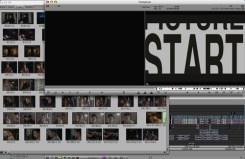
 I’ll be buying a new machine to replace my aging G4 shortly. My goal is to make this my primary computer at home — and I’d also like to be able to do some editing with it. Avid doesn’t make this easy, in at least two ways.
First, the company is always late to the party with operating system compatibility. With an Avid installed on your machine you are well advised to upgrade the OS with great care, lest you make your Avid flaky or nonfunctional. Avid blames this on Apple and I’m sure there’s something to that, but it still feels less and less acceptable these days. I just don’t have other applications that are this fussy. Somehow, virtually every other software manufacturer is able to deal with changes in the OS more quickly than Avid. Even Digi does a better job.
The second problem lies in the way Avid handles non-standard monitor configurations. The Media Composer was designed to work with two monitors, each with a 4:3 aspect ratio. You put your bins on one and the composer (the source/record monitor) and the timeline on the other.
Two 4×3 monitors was state of the art in 1991, but not today. We’ve got much bigger screens available and it ought to be possible to work comfortably with just one of them. Both Avid and Apple allow you to put your windows wherever you like them, so — problem solved, right? Wrong.
The trouble lies in window activation. Apple’s laptops and big monitors all have aspect ratios of about 16×10. But two 4×3 monitors next to each other have, in total, an aspect ratio of 16×6. In other words there’s a lot more width. If you try to jam bins, composer and timeline into 16×10 what you get is overcrowding. Either you make your bins very tall and narrow, or you overlap your windows. Overlapping shouldn’t be any big deal — except when you try double clicking on a clip. Your shot opens in the appropriate monitor, and the composer window comes forward. But the timeline stays where it is, behind the bin, creating the mess you see in the image above. So every single time you put a clip in a monitor, you’ve got to click again on the timeline in order to actually do anything with that clip. This may seem like a small thing, but anybody who has tried to cut on a laptop, and look at their bins in frame view, knows how annoying this can be.
Final Cut works differently, but isn’t much better. In FCP the viewer and the canvas are separate windows. That can be helpful in certain situations. But in this case, it just confuses things. If you double click on a source clip the viewer comes forward — but not the canvas and not the timeline. If you double click on a sequence, you get the canvas and the timeline, but not the viewer. In each case you have to click again to to do something useful.
People who work with their bins in text view are probably okay with this setup — tall and narrow bins are fine when you’re just looking at text. But I don’t work that way and neither do a lot of people I know. It shouldn’t be much of a challenge for the engineers to change this kind of behavior. The question is, as always, “What does the customer want?” This one is easy — just make window activation a preference. That would make it a whole lot simpler to work on diverse displays and it would make it a lot easier for me to buy a new monitor, too.
 The months of rumors are over, the iPhone has been revealed, and once again it looks like Apple has created a game-changer. Steve Jobs was reported to be more excited over this device than anything since the original Mac, and despite the obvious marketing hyperbole in such a statement, the parallels between the first Mac and the iPhone are pretty strong. Both represent a new platform — the iPhone is really a portable, Internet-connected, telephony-enabled Mac — and both represent the first commercialization of a powerful user-interface technology that was previously seen only in research labs. It’s that last bit that people are raving over.
 Comparing the new Sony PS3 and Nintendo Wii game players has become commonplace in the computer press now and for good reason. It’s always fun to see the mighty felled. I haven’t used either of these things, but the PS3 is about as high-tech as Sony could make it with fantastic graphics and a Blu-ray disk player. The Wii is far less expensive and can’t compare on the graphics. But it has one truly unique feature that’s got a lot of gamers’ attention: its controller is motion sensitive. So to play the tennis game, you actually swing the controller around and it registers your movement in space and reproduces it on screen. It’s so compelling that Nintendo recently recalled the straps on the controllers because people were using them so hard they broke.



 Splice Now
Recent Comments