Archive for the ‘Workflow’ category

Throw Out the Old

August 27, 2007

The debate over iMovie ’08 continues — with many people expressing disappointment over the loss of timeline, visual effects and sound functions. I haven’t used it and I’m not sure if I ever will. But I love the idea of it. Why? Three reasons:

First, it embodies a clear and uncompromising point of view about what the “end user” really wants. And it fearlessly throws away old ideas to get there.

Second, it comes from the mind of one person. According to Apple, it was initially developed by one engineer, who, frustrated with current tools, including iMovie, created something else, at first just for himself. Groups rarely design great software. People do.

Third, it includes new user interface elements (skimming) that increase human/machine bandwidth. You feel a connection to the software because it does a better job of connecting to your nervous system. Think of the mouse, the iPod’s scroll wheel, or the iPhone’s multi-touch screen. They all connect you to the machine much more closely than what came before. You have a greater sense of control, and you enjoy using the machine more.

Frankly, I’m also unmoved by all this nostalgia for the old iMovie. The notion that it allowed for precise editing is silly. It was impossible to trim a cut carefully or do all kinds of things professionals expect. And it was slow. The idea that there wasn’t a better way was never credible to me.

Finally, the new iMovie is designed to shine in all-digital work environments, which frankly, is where the consumer (and everybody else) is going, sooner rather than later. I’d be very surprised if any home user is shooting on tape five years from now.

Apple now has a new platform. And they’ll add all kinds of features as time goes by. Creative destruction is what new things are made of.

Technorati Tags:

iMovie as a Gateway Drug

August 19, 2007

The new iMovie seems to represent a different paradigm for consumer editing — faster, less precise, designed for a tapeless workflow. It was discussed in some depth on last week’s MacBreak Weekly podcast and the consensus there was that it might be very useful for quickly throwing together a super-rough cut. It has one very important secret weapon: “Export to Final Cut Pro.” If you’re missing something, and iMovie ’08 is missing a lot of things, then you get yourself Final Cut Express or Final Cut Studio and move your project straight into it, courtesy of XML and Quicktime.

The program seems to be extremely easy to learn. It doesn’t offer a lot of options — it just does the right thing. For example, if it sees a mounted digital video source it just starts importing video from it, no questions asked. We may see producers or directors creating rough “idea” cuts in iMovie, and then handing the thing off to real editors who can make it work. (But there are problems, too. Scott Simmons has posted some interesting observations on his site.)

Rhetorical question: Is there an upgrade path from Pinnacle Studio to Media Composer? I don’t know for sure, but I’d have to wager that the answer is no. You can move a project from Studio to Pinnacle’s Liquid line. But that just begs the question. Doesn’t Avid want to see young editors moving all the way up to Media Composer?

Technorati Tags: , ,

How much editing does the average person need?

August 15, 2007

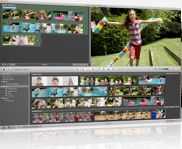
imovie screen shotWhen Apple didn’t release an upgrade to the iLife suite at this year’s Macworld, some people speculated that an announcement would have stolen focus from the iPhone, or that perhaps the new version was only going to work with Leopard. But now that iLife ’08 has been released, I think the reason might have been that it just wasn’t ready. An awful lot of work has gone into these applications — a new level of interface slickness and integration.


You can watch an excellent introduction to the new features here: iLife 08 Guided Tour. Apple has been moving to slick, highly produced, video-based tutorials. This one not only gives you a look at all the new features, but offers useful information and training. (Avid is putting up free training videos, too. Check them out here: Media Composer videos.)

My first impression of iLife is its user focus. They’ve consistently asked “what does the customer want to do” and answered it throughout the program. From a development standpoint, It’s always easier to ask “what can the machine do?” Apple’s approach can limit choices, but if done right, it’s much more intuitive for the user. That takes time, money and vision.

iLife, like the recent changes to the Final Cut Suite, focuses on high-bandwidth visual feedback. For example, they now offer something called “skimming.” Click and drag on a clip in iMovie to shuttle through it. Move your cursor over an image in iPhoto to flip through all the images in a gallery.

Overall, iMovie is the biggest surprise, because it’s been completely rewritten. It’s now designed as a library manager, more like iPhoto and iTunes, and as a way to quickly slam cuts together, add some music and automatically publish the results to the web. The old iMovie was very DV-centric. The new version seems to be format-agnostic. And it adopts Apple’s new media application look and feel — dark backgrounds, lighting effects on surfaces.

There’s been a lot of debate (for example, here and here) about the new iMovie, primarily because many capabilities have been eliminated. For starters, there’s no timeline at all. And there are far fewer visual effects (but none require rendering). You select material by simply dragging over a clip icon, so precise editing is nearly impossible. My sense from the guided tour is that the program excels in the kind of quick and dirty editing we see more and more now, and I suspect that it will appeal to many people.

Though I like the browsing and publishing features, with such limited editing controls I doubt that I’ll have much use for it. But it represents a vision of what the consumer wants, and whether it succeeds or fails I have to give Apple credit for aggressively rethinking entrenched ideas and trying something new.

Technorati Tags:

DNXHD-36 Without Adrenaline

July 26, 2007

I got a demo yesterday of a software-only Media Composer playing DNXHD-36 media. We hooked up an 8-core Mac Pro to a big Pioneer plasma TV that served as our second monitor. In a word, it was fantastic. Seeing material with that kind of clarity at that size in an offline editing room, and being able to play it and work with it quickly, jogging back and forth and dragging through a clip, was downright breathtaking. And it was not just an aesthetic experience, although it was that, for sure. You’re getting more information — for example, you can clearly see facial expressions in wide shots.

Major caveat — all I did was look at a couple of clips a few minutes long. I didn’t try to play huge complex sequences, I didn’t run a big project, I didn’t even have much audio. All I did was use JKL to move around in the video, made a few cuts, tried making a Quicktime and a cut list. In that limited environment, the system was quite responsive.

Special thanks go to Jeremy Dela Rosa at Global Entertainment Partners (GEP) for putting the demo together for me.

The big revelation was that we could do this with a software-only Avid. You don’t need Adrenaline to do HD, and you don’t need huge amounts of storage. DNX-36 uses about 16 GB per hour at 24 fps — just a bit more than DV, and about triple what you’d need for good ol’ 14:1.

So can you really use a software-only system instead of Adrenaline? That depends on what you are trying to do. The first problem is monitoring. We ran the system with two monitors, one of which was the HD TV (the TV has to have a DVI input). That might be a viable way to work — if you had a 30″ monitor for cutting, you could put everything there, bins, composer and timeline. But if you want three monitors, you’re moving to the bleeding edge. You’d install a second graphics card in your Mac, and run your bin monitor from that. We didn’t have that second card, so we weren’t able to try it. Avid doesn’t officially sanction it, but it ought to work.

The second problem is input and output. The software system has only one way of doing this — Firewire. And that severely limits your choices: DV or DVCPRO HD. If you’re working at DNX36 that doesn’t help much.

So a realistic environment for a small show might mean an Adrenaline-based system for the assistant and a software-only system for the editor.

We tried a few other things:

Making an SD Quicktime — something you might have to do for turnover to sound. On the 8-core Mac, creating a 640×480 QT at Motion JPEG-A was very quick — a bit faster than real time.

Playing SD material in the HD project. The only way to do this is to create a separate SD project, load your video there and then drag the bin into the HD project. In the time we had, all we could do was create some color bars at DV resolution. I was not only able to play that in the HD project, I could intercut it with HD. Unfortunately, the MC insisted on treating the SD clip as though it were 16×9, so it looked anamorphically stretched. But adding a reformat effect solved that problem, and the effect played without rendering.

I also tried making a cut list. And, not surprisingly, I ran into some new bugs. FilmScribe is not nearly as stable as it used to be. Lists out of MC used to handily beat those from FCP. I don’t know if that’s true anymore.

I heard about some other problems, too:

In Adrenaline you can output to SD with a pillar-box in real time. But you can’t do it with deck control. In other words, you can’t use digital cut, you can only crash record. That makes creating an SD tape pretty dicey and not particularly useful.

Worse, I was told about a bug in Adrenaline, that puts a delay into video on the client monitor. The result is that you can be in sync on the client, or on the record monitor, but not on both. The delay is four to six frames — not trivial. I didn’t see this myself, but I sure hope Avid engineering is doing whatever they can to fix it — pronto. The good news from my demo is that the problem only occurs with Adrenaline. Software only was in perfect sync.

All in all, an eye-opening couple of hours, and a lot of food for thought.

Technorati Tags: , , ,

Business Models Pt. 2

July 18, 2007

Last week I talked about how Avid and Apple look at the editing world through different lenses. Apple sees a broad, diverse market that wants a complete post production studio in a box. Avid sees a mostly pro world that wants bulletproof solutions with good support and is willing to buy many interlocking applications to get it.

Avid has lots of problems right now, not the least of which is it’s relatively low stock price. Many of its recent initiatives haven’t worked out as planned. Adrenaline offered great real-time capabilities when it was introduced four years ago, but it’s been persistently buggy. Xpress Studio was supposed to compete with the Final Cut suite but it was based on Xpress, wasn’t available on Mac and its marketing was lackluster. Avid bought Pinnacle to get into consumer editing but it turned out that the price was too high and the Pinnacle products weren’t all that good. Interplay has had a mixed reaction in the marketplace and only appeals to the biggest customers.

The question now is what the company’s strategy is going to look like going forward. Is Avid going to continue to focus on large customers or are they going to go head-to-head with Apple and Adobe for the hearts and minds of editors?

I’m inclined to believe that at the end of the day, there is only one market. No independent producer wants to use a product that is shunned by professionals. And the top of the market can’t function effectively while every kid in high school and college can make movies with Final Cut in his sleep. I’m cautiously hopeful that we’ll see a renewed development effort at Avid in the coming months. But only time will tell.

Technorati Tags: , , , ,

HD Lite

July 14, 2007

“Offline HD,” or whatever we’re going to call the process of editing with compressed HD materials, looks like it might be the biggest thing to hit Hollywood in many years. I doubt that there are many editors (or directors) who wouldn’t prefer to look at HD images, even if the tradeoff is less realtime performance and slower renders.

Right now, you can get into offline HD less expensively with Final Cut than with Media Composer. But there are two ways to do it and the economics are quite different.

Method 1: Hardware
This is the standard approach. It allows you to digitize from HD tape, output to tape in SD or HD and run a full time client monitor (ie. a big HD TV). Unfortunately, it costs a lot more to do this with Media Composer.

  Apple   Avid
  Final Cut Studio $1,300   Media Comp. Adrenaline
w/ DNxcel HD board
$20,000
  HD Card or AJA I/O $3,000    
  Mac Pro $3,000     $3,000
  Two LCD Monitors $2,000     $2,000
  HD TV $2,000     $2,000
  Amp & Speakers $1,000     $1,000
  Total $12,300     $28,000

Method 2: Software only
Here the playing field is a little more level. You won’t have a way to plug in a deck, except via Firewire (DVCPRO) so you have to assume that film dailies will be digitized in telecine. You can run your material full screen but you lose a monitor to do it. (You may be able to hook up a third monitor via a second video card.) And you can’t output to tape, again except via Firewire. Downrezing your work to SD for DVD output has to be done via Quicktime, which is slow.

  Apple   Avid
  Final Cut Studio $1,300   Media Composer software $5,000
  Mac Pro $3,000     $3,000
  Two LCD Monitors 2,000     $2,000
  HD TV $2,000     $2,000
  Amp & Speakers $1,000     $1,000
  Total $9,300     $13,000

And you can also combine these two approaches. On a small feature film or TV show you can give the assistant editor the hardware system so he or she can do the I/O and let the editor work software-only.

What do you all think? Am I missing anything? Does this represent an important competitive advantage for either side?

Technorati Tags: , , , ,