Archive for February 2009

IATSE Memorandum of Agreement Posted

February 26, 2009

According to Nikki Finke’s “Deadline Hollywood” blog, the IATSE locals will send out ballots on the new contract this week, but will not send out the memorandum of agreement itself. This would be pretty surprising — they’d be asking us to vote on a critical contract without seeing it in print. Ron Kutak had previously indicated in an email to Editors Guild members that the memorandum would be included in the packet. In any event, you can view it here. I find it pretty sobering. [Update — I just received the ballot and the memorandum was indeed included.]

The health plan provisions for out-of-network doctors are even worse than I mentioned earlier. The plan will reimburse only 50% of out-of-network costs, based on “the 70th percentile” of the “usual and customary” rate (which, as mentioned earlier, was recently determined to be fraudulent in a case before the NY State Attorney General’s office). For those of you without a math background that’s 50% of 70% of what they think it ought to cost (“70th percentile” isn’t quite the same as “70%” but without access to the actual fee schedule, it’ll have to do). If you get a bill for $100, they will very likely figure it’s really worth $80 or so. Then they’ll pay roughly 50% of 70% of the $80 or a lousy $28 on a $100 charge. Worse, there used to be a “stop-loss” provision for out-of-network expenses, which would limit the yearly amount you’d owe to $1100 not including co-pays. In the new contract, that limit will be eliminated entirely, meaning that you could be liable for a great deal of money. Like I said, you ain’t goin’ outta network anymore.

For additional details, read Nikki’s post or the 400 Hours blog. Local 600 has also posted some materials on their website.
EditCalc

February 24, 2009

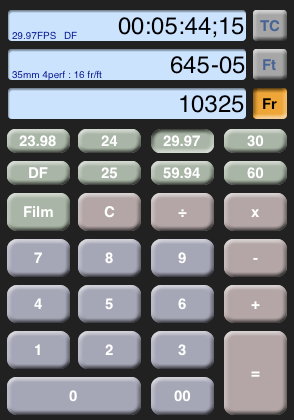
editcalcEditCalc is a new timecode and feet+frames calculator for the iPhone and iPod Touch. I’ve only had a quick look at it, but it seems quite polished, and it handles just about any frame rate or film gauge you can throw at it, including 16mm, 35/3-perf and 70/5-perf.

It does simultaneous conversions while you work — do a calculation in the time, footage or total frame fields and the others update live. It supports a wide range of video frame rates, along with drop and non-drop TC. You can also see a history of previous calculations, so you can check your work. The Avid calculator will do some of the same things, but it’s not as slick or well thought out.

A PPO in Disguise

February 22, 2009

There’s been a lot of debate about the new IATSE contract, especially regarding the requirement, in the third year, that members work 400 rather than 300 hours to get six months of coverage. What has gone almost unnoticed is the change in payment for “out of network” doctors. The plan used to pay 70% of the customary rate (more on that rate in a minute). In the new contract it’ll pay just 50%. That makes it a lot more painful to go out of network. Just a doctor visit and a few tests could set you back hundreds of dollars.

The health plan, which used to pay everything promptly and without argument, has morphed into an amalgam of a de-facto HMO (the Motion Picture and Television Fund clinics), and a PPO, Blue Shield of California.

This works fairly well for routine problems. But in special circumstances I’d like to know that I have the option to use any doctor, at a reasonable price. Many of the best doctors are now refusing to sign up with any insurer. The fact that we’ll only receive 50% of the standard rate for those docs seems at least as problematic to me as the new 400-hour requirement.

And regarding those customary rates? It turns out — big surprise — that they’re rigged. The large insurer, UnitedHealth, also owns Ingenix, the company that works out these numbers for the entire industry. This is an obvious conflict of interest and, sure enough, they have just settled with NY District Attorney Andrew Cuomo, who said the industry had engaged in “a scheme to defraud consumers” by systematically underpaying the nation’s medical bills. Details are in this NY Times article.

Sync Locks and Why You Need Them

February 16, 2009

I’ve noticed that a lot of people don’t turn sync locks on in the timeline. That seems like a shame to me. In the old days this feature was buggy and many people ended up avoiding it. But now I leave them on all the time. The reason is simple — sync locks allow you to make complex trims on multi-track sequences all day long and still be in sync when you’re done.

Specifically, it means that when you’re trimming, you can ignore any track that contains black at the blue cursor. No more need to create add-edits in black and put rollers on them. And no need to get rid of those add-edits later.

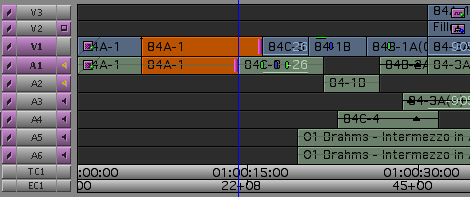
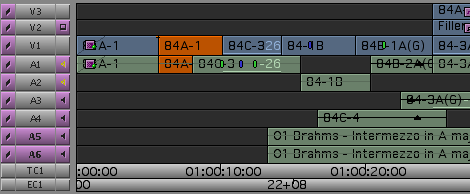
You can go from the first image below to the second in one step. Even though trim rollers are only on V1 and A1, everything stays in sync, and all downstream clips move forward.

sync locks - before trim.png

sync locks - after trim.png

In some cases, the blue cursor doesn’t necessarily need to be parked over black for sync locks to work. Nearby black will be trimmed, if necessary. But it’s not always clear what’s going to happen, so it’s probably better to use them only when the blue cursor is actually sitting on black.

Sync locks also allow you to extract a chunk of material in all tracks without having to turn them all on — all you need to do is enable a single track. When you hit the extract key you’ll pull material out of all tracks with sync locks.

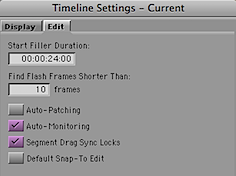
In general, sync locks don’t affect segment mode. So you should still be careful with sync when dragging clips around. A setting can help — but it’s quirky. It’s in timeline settings, under the edit tab: “Segment Drag Sync Locks.”

Timeline setting - segment drag sync locks.png

If you turn it on, sync locks will help keep you in sync in segment mode, but segment mode might not behave as you expect. For example, if you’re in yellow segment mode and you want to rearrange some picture clips, you’ll end up recutting any audio in that area — even though you’re not changing sync and you haven’t touched the sound. That’s just bad and ought to be fixed pronto. The tradeoff is that you will be able to move L-shaped picture and audio clips together, inserting black as needed to avoid unnecessarily chopping things up. That’s so tantalizing that I’ve left this setting on for months now trying to get used to it. But I’ve reluctantly decided to leave it off. Avid badly needs to take another look at this. It wouldn’t take much to make it work well.

None of this however, changes the fact that I live by sync locks. If you’re in segment mode most of the time you may prefer them off, but if you tend to be in trim mode a lot sync locks should be your friend. If you haven’t tried them lately, you might want to take another look.

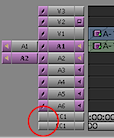
Keep in mind that sync locks are remembered separately for each sequence. So you’ll need to turn them on every time you make a new one. To turn all sync locks on at once, click the rectangle under the sync locks column in either EC1 or TC1. To turn them all off, click there again.

Turn on all sync locks at once.png

“Innovation in Hollywood”

February 16, 2009

Author Scott Kirsner will host a panel discussion on new technologies and how they’ve been adopted in cinema, from Thomas Edison to the present. It’ll take place this Thursday, Feb 18, at 5 pm at the Annenberg Auditorium at USC. Scott has written two valuable books on digital cinema and he’s now responsible for two blogs: CinemaTech and Innovation Economy.

Details are here: Innovation in Hollywood: Past, Present & Future

The Editors Guild’s New Available List

February 8, 2009

As most of you know, the Editors Guild supplies an “available list” to employers who request it, listing all unemployed members in a particular classification. But what you may not know is that the Guild now supplies resumes for everybody on the list. I recently had reason to use this feature, and I think the resumes are a game-changer.

The old available list only provided names and contact information. That meant that an employer had to already know your name to be interested in hiring you. At best, it created a reaction like this, “Oh yea, I know him/her. I’ll call and ask for a resume.” Editors would often call friends and read the list to them, looking for someone they knew. The resumes work differently. They allow an employer to learn about people they don’t know. As an employee, it has the potential to introduce you to a much larger group of potential employers.

Editors Guild members can create or update their credit lists at the Members Only section of the Guild website. Many people already have them. But others don’t, or haven’t updated them in years. In addition, there’s lots of room now for information above and beyond a simple credit title — editors, directors, producers, awards, comments, etc. Because many credit lists began as printed directory listings, that info is often missing.

I strongly suggest that you log on and have the site display your finished resume. Look for errors and omissions and make adjustments as needed. Assistants should be sure to include the names of the editors and directors they’ve worked for. This may take a bit of work (the site can be pretty slow), but if it gets you one job, or helps you make one new contact, it’ll be worth it.

One tip — if you’re entering your credits from scratch, be sure to input them in the correct order — and to be safe, check the display order as you go. My list was completely mixed up and fixing it was an exercise in slow-moving frustration, since you have to move each and every credit, one … position … at … a … time.

Your final step should be to list yourself as unemployed, as soon as you’re off work. (Or sooner — the site allows you to specify a date after which you’ll be unemployed.) Otherwise your name won’t appear on the list.