Archive for the ‘Avid vs. Final Cut’ category

Heads Up Displays

June 28, 2007

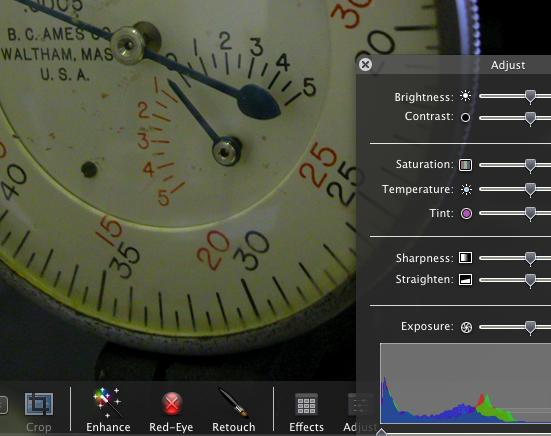
Heads Up Displays in iPhotoMany of the new Apple applications employ what the company calls “heads up displays.” These are control panels that are translucent and appear over the image you’re working on, fading in and out as needed. You can see them in iPhoto, Aperture, Motion and Quicktime. They look cool, but more important, they’re functional, because they let you do useful work on a full-sized image. They’re particularly helpful for small (ie. laptop) displays, where screen real estate is at a premium.

As I use my laptop more and more for cutting, I’m starting to see how valuable such displays could be in a mobile editing environment.

Because, in the laptop environment, the Media Composer definitely has some rough edges. When I’m working with the laptop itself, I want one window layout. But when I plug in to a bigger monitor and use the laptop screen as a bin monitor, I want another. The MC can handle this, but it takes a lot of fiddling around. And even when you have your workspaces all set up the way you want them, the system often does the wrong thing.

In general, the MC needs some tweaking around the issue of window activation. For example, when I double-click on a sequence I want the Composer window and the Timeline to activate and move forward. But now, only the Composer window does so. I also want the ability to quickly tab from bin to bin.

And that leads me back to the subject of heads up displays. How about this? Wouldn’t it be nice to work in full screen mode (video playing full screen) — but with a translucent timeline supered over it? The timeline (and maybe the editing controls from the bottom of the composer window — what Avid calls the ‘mini–composer’) would appear when you move the mouse, and they’d disappear when video plays for a moment. That sure would make for a slick, small-screen editing environment.

Heads up displays would also be great in a redesigned full screen title tool, much as they now allow for full screen editing in iPhoto.

What else could you do with this kind of interface?

Technorati Tags: , , ,

Fixing the Title Tool

June 24, 2007

Avid needs to start building a suite to compete with Apple and Adobe. It’s got the best video ap, and it’s got the best audio ap (except that it won’t work software-only). That’s a pretty good start. Avid certainly needs a DVD tool and a compression utility. But, for my money, the first order of business is a title animation tool to compete with Motion.

Titling is now part of the responsibility of most editors on all kinds of shows. These days, I help create the main title on every show I work on. And I’d do more if the tools were better. But the Avid tools are antiquated. You can’t create a modern, nuanced title with the Title Tool and it takes way, way too much work to do it with Marquee.

Avid can look at this as a problem or as an opportunity. The opportunity is to start with a clean slate and create something better than what the other guy is offering.

Here what I’d like to see:

  1. Don’t make a separate title application — build this functionality into the MC. I have no interest in creating a separate title project to go along with my MC project. I don’t want to manage both, archive both and move back and forth between them. I want the whole thing integrated into one environment.
  2. It should be as live as possible. The editor should design based on moving video.
  3. It should work with organic actions, like Motion does — or with keyframes. The editor should be able to move back and forth between these approaches as needed.
  4. It should support the use of a tablet or touch pad to create complex movements by showing the system what you want.
  5. It should be vector-based. No rendering. Simple scaling. Easy changes.
  6. It should offer title styles. Create your style, then create titles based on it. Want to make a change to all of them, say a different font or font size? Just change the style and all titles update automatically.
  7. It should export digital mattes at any resolution you want. That’s how you get your work out of the MC and into the finishing system of your choice. And it should do intelligent aspect ratio conversions, so you can work at letter-boxed standard def and still create useful mattes for HD or film.

Now wouldn’t that be cool? Wouldn’t you do a lot more slick title work if you had a tool like that?

Technorati Tags: , , , ,

Stopping on a Dime?

June 13, 2007

A friend of mine, a longtime Media Composer editor, is cutting his first feature with Final Cut Pro 5, and yesterday I spent an hour with him. He’s having a good time and has become a strong advocate of the program, but when we got into the nitty gritty, he admitted to having some problems. He hates trim mode, finds it buggy and unpredictable and, as a result, is inclined to use it less than he did on the Avid. He finds cutting one sequence into another awkward. He doesn’t like the fact that he has to create many different projects — having everything in one project slows the system down too much.

There were some bugs visible, even in a brief demo — we often saw progress bars when making trivial trims and, at one point, video flickered horribly until the sequence was reloaded into the canvas.

He does like some of the effects capabilities. And he’s working at 1080p (via a BlackMagic card) and loved that a lot. He also likes the fact that you can load many sequences into the timeline and instantly switch between them.

I played with the system briefly and was struck by how responsive timeline scrolling is. Drag your cursor off the screen to the left or right and the timeline instantly scrolls with you.

But I also noticed that, at least in trim mode, the machine doesn’t stop instantly. When you hit pause there’s a palpable, several frame delay before it stops.

Media Composer version 2.7 has a similar, but less severe, problem. When you hit pause it stops instantly, but you hear a couple of frames of audio beyond the stop point. You have to set up a careful test to catch this, but it’s definitely there.

Once upon a time such problems were considered totally unacceptable. You can’t cut precisely if the machine won’t stop precisely. But maybe things are different now. Have we gotten to a point where responsive play control is no longer important — or are the manufacturers just getting sloppy? A 1950s-era Moviola stopped a lot more precisely than Final Cut Pro did yesterday.

Technorati Tags: , ,

Home Movie Gotchas

June 5, 2007

Now that I’ve got a software Media Composer running at home, I’ve been trying to use it to edit some home videos. And therein lies a tale. The material in question was shot with a Panasonic PV-GS120, a nice little consumer three-chip DV camera, and I used the camera as a deck, as well. I’ll try to summarize what happened below. Relevant error messages and screen shots are included.

First problem: disk space.
There’s a serious bug (in the capture tool?) that can cause the MC’s temporary “creating” files to balloon and fill up your disk. One minute I had 20+ gigs available on the drive, the next minute it was completely full. I don’t know exactly what caused this to happen but it occurred several times.

Creating

This is a big problem in itself, but it’s compounded by the fact that the MC can’t cope with a full disk. When your disk fills up you’ll soon be looking at a perpetual spinning beach ball — but you won’t be able force quit. The first force quit doesn’t even make the Media Composer disappear. Repeated attempts eventually dismiss the interface, but something hangs around, because when you go to the Finder and try to delete the “creating” files you discover that they’re in use. The result? You can’t even shut down the computer. The only way out is to hold down the power button to force a restart. I had to do that four times this weekend, and believe me, it got old. This is with a 1.5 Ghz G4 Mac laptop. I can’t remember the last time anything crashed on it.

Force Quit

Second problem: sync.
I discovered that if I digitize without selecting the timecode light, when I play back a long clip, sync will drift. Hitting stop and start again during playback fixes the problem. If I digitize with timecode, things seem to be okay.

But even when I captured with DV timecode, media still came in slightly out of sync. In frustration, I finally grabbed a slate and shot some tests, examining the digitized media frame by frame against an audio waveform. Avid lets you introduce an audio delay during digitizing. If I set it to one frame, audio comes in slightly ahead of where it should be. If I set it to two frames, it comes in late.

Third problem: logging.
This being consumer DV, I naturally tried digitizing without logging the tape. When you hit the red capture button the MC does the right thing — it starts playing the tape and digitizing at the same time. But when video runs out, it acts like there’s been an error, tells you that your media may be no good, and asks if you want to keep it. Of course I do! Every tape runs out — this isn’t an error!

Capture Aborted 2

So I tried logging the tape and batch capturing, instead. But here the MC gets hung up on whether the tape has drop or non-drop code. If I just do a crash digitize it tells me the code is non-drop. But if I log a tape that way and try to digitize, it tells me the tape has drop-frame code.

Drop Vs Nondrop

The solution is to log the tape and then modify the clip to drop frame. But even then the MC has a terrible time finding the start point of a clip. I have to cue the tape by hand and get very close or it won’t cue up.

More Problems
When the MC sees the camera/deck it controls it just fine. The trouble is that it often doesn’t see it. Sometimes you can solve the problem by selecting “auto-configure” from the deck pop-up in the capture tool. But often you have to restart the MC. Not fun. Another glitch: the MC defaults to a maximum clip length of 30 minutes. Until I figured that out and reset it in capture preferences, I couldn’t digitize whole tapes.

There were other problems, too. Here are a couple of other error messages that I saw. I can’t remember the exact circumstances anymore.

Digdverror

Transfersamples

Bottom Line
The procedure I finally settled on was: turn the deck on and wait a bit before starting the MC (to make sure it sees the deck), set the maximum clip length to 90 minutes and the audio delay to one frame, and do a crash digitize with timecode. I ignored the error message that appeared at the end of the reel, and scrupulously checked the size of the “creating” file after every tape was captured. That worked fairly reliably. But it sure took a long time to come up with that formula.

For what it’s worth, lil ol’ iMovie does a whole lot better. It loads complete tapes every time without ever complaining and without any configuration hassles. But, of course, you get non-standard media and your editing controls are very crude.

Technorati Tags: , ,

Final Cut Reality Check

June 1, 2007

As people start using Final Cut 6 some of the hype is going to fall away and we’ll see what the program’s strengths and weaknesses really are. In a post on Editblog, Scott Simmons notes the extremely long analysis times that Apple’s SmoothCam requires (especially with HD). He also points out that times speed up considerably if you make a new master clip containing only the material cut into your show — otherwise the software analyzes the whole master clip, regardless of what you actually used. We sure didn’t see this in the demos Apple did.

I’m now very curious about how long Avid’s Stabilize effect would take on the same material. It’s not nearly as intuitive, but those multi-hour wait times on FCP look like a real disadvantage.

I’m also hearing from a friend that Compressor 3 is much slower than Compressor 2 on a quad-core G5. [Correction — it was a dual 2.0 G5.]

For its part, Avid introduced version 2.7 with a bad bug on Mac systems running Unity that can trash all your bins. Buyer beware — back up regularly. I’m sure hoping that one gets fixed real quick.

Technorati Tags: , , , ,

More Things Pro Tools Does Right

May 30, 2007

Harry Miller’s column in the latest ACE Magazine covers the many things he likes about the Pro Tools timeline. I couldn’t agree more, and I’ve mentioned many of these things in a previous post. Harry also talks about the ability to create a group of effects and save them as a single object, and the ability to reshape a fade by clicking and dragging.

Avid ought to incorporate this stuff into the MC. They certainly have the expertise to do it, if not from the Pro Tools or Media Composer engineering teams, then from the Fast/Avid Liquid group.

Liquid offers a live timeline, background rendering, simple project backups, the ability to work with a stereo pair as a single object, 5.1 capabilities and direct DVD authoring from within the program. Some of its appealing features are described in this post on AE Portal News.

When Apple buys a company it rapidly incorporates the purchased technology into its flagship products. When Avid buys a company it too often puts it on autopilot. That might be good for existing customers over the short term, but long term it’s wasteful and self-destructive.

Technorati Tags: , , ,