Archive for the ‘Avid Wish List & Bugs’ category

Dual Res All the Time

April 27, 2007

Adding to yesterday’s post about things Avid could do to improve it’s editing applications, let’s take a look at how we up-res a show.

It seems to me that the duplicate/decompose/redigitize workflow that we use now is very much “Version 1.” It’s flexible, sure, but all that flexibility adds up to a lot of complexity, too. And in the world of feature films, where we inevitably continue to make picture changes after a first conform, the decompose process gets even more complicated.

I want the system to take all the bookkeeping out of this and transparently keep track of two parallel sets of media, allowing me to use whichever resolution is appropriate. The key is that you work with one and only one version of your sequence. The system connects it, as needed, to the low-res media or the high-res media. You can make picture changes either way. If you’re looking at the high-res media and want to extend a shot, the system knows that the extension doesn’t exist at high res and uses low-res media as needed. When you’re ready to conform, it automatically asks for the needed tapes and loads whatever extensions are needed.

Now wouldn’t that be a whole lot easier than what we do now?

Technorati Tags: , , , ,

Can Avid Still Lead?

April 26, 2007

I’ve spent the last couple of days browsing through some of the post-NAB dialog on Avid-L2, the venerable Avid mail list and discussion group (now located in Yahoo Groups). Many of the people on the list have been active in the Avid community since the beginning, and their responses to this year’s NAB were pretty discouraging. Comments included:

  • “Avid hasn’t really upgraded the toolset in years.”
  • “While the basic edit functions are stable and reliable, the user experience remains lacking.”
  • “Avid is about Interplay and Unity and enterprise level solutions and not about editing systems.”
  • “Apple hasn’t told themselves that there’s no room to grow in the NLE market, and that’s why they steal customers from Avid every day.”
  • “If Avid is serious about staying in the NLE business for the long haul and taking a leadership position, it’s time for it to show editors something — anything — new and innovative.”
  • “I remember when the crowds at NAB around Avid’s booth were so large that security would have to try to clear the aisles. That’s sort of what the Apple booth was like.”
  • “It’s time for Avid to learn to innovate and lead again.”

Personally, I’m not quite so negative. Avid did introduce some new things — ScriptSync comes to mind, along with DNxHD 36. And the importance of a fast, portable Media Composer should not be underestimated. But I am also frustrated by how old and creaky some parts of the application feel.

Some people think that editing tools are now a commodity. I don’t agree. There’s plenty left to do. Here are just a few examples:

  • A Live Interface. I’m tired of being able to do absolutely nothing while video plays, or while exporting a Quicktime, or rendering an effect. A live interface will make everything else seem antiquated.
  • Background Saves. Heck, we had this in the Montage, and Pro Tools has it now.
  • Automatic Version Control. All I do all day is manage versions. The machine should help.
  • Better Mixing Capabilities. We need to be able to cut and paste keyframes and move them in groups. We need to be able to mix with sparse keyframes. We need waveforms that don’t extract a performance penalty. We need 5.1 capabilities and track nesting.
  • A New Titler. The Title Tool is almost 15 years old. It’s been showing it’s age for a decade.
  • Search Across Bins. How long have we been asking for this?
  • Improvements to Segment Mode. FCP is in segment mode all the time. I prefer Avid’s approach most of the time, but with a few improvements it would be possible to have the best of both worlds.

Give us just a few things like this and I wager we’d all get pretty excited again.

Technorati Tags: , , , ,

Color

April 22, 2007

Apple’s Color application certainly looks impressive, and it offers lots of power for low bucks. But I wonder how often I would actually use it in a typical “offline” situation. Moreover, it turns out that it’s not realtime at all, according to this very interesting post from Stu Maschwitz, one of the founders of the Orphanage and author of The DV Rebels Guide.

Maybe it’s a weakness of mine but I find it damn near impossible to color correct effectively if I can’t go back and play through a scene or a few cuts and look at what I did while video plays. I tend to go back and forth repeatedly — play, adjust, play, adjust and the faster that cycle is, the better the work. Apparently, you can’t do that in Color. You have to render the whole sequence and then play it in Final Cut. You also can’t run Color on a 15″ MacBook Pro, which is going to frustrate a lot of people. And I’m not clear about how it deals with picture changes.

Avid’s color corrector isn’t perfect — it’s worst feature, by far, is that you have to jump out of the color correction mode to play from one cut to another — but you have a lot of control and the corrections are all realtime.

Apple’s game plan is to give you all the tools you need to completely finish your film in the Final Cut environment. For folks who never plan to enter an online bay or DI suite that’s pretty exciting. But I don’t work that way. For me, it’s much more important that color correction be simple, effective and instantly available.

Nevertheless, Apple has once again shaken up our workflows and job descriptions. As Maschwitz points out, Apple is doing what it has done many times before — making high end tools available to everybody. We’re going to see a lot of bad color now, just as we saw bad graphic design at the beginning of the desktop publishing revolution. And we’re probably going to see more competition for colorist positions and, long term, an erosion of rates. Colorists, welcome to the revolution.

Technorati Tags: , , , ,

Soundtrack Pro Workflow

April 20, 2007

The more I look at the specs for Soundtrack Pro the more I like it. This application is really slick and does all kinds of things that I can’t do in my Avid. It offers non-destructive editing, a very nice looking tool for dealing with picture changes, simple speed adjustments, 5.1 panning and track nesting, easily applied and customizable audio dissolves, elaborate tools for repairing dialog, and nice analog-style scrubbing. It runs without extra hardware and integrates well with Final Cut.

There are a few obvious omissions: no ability to work in feet and frames, a limited track count (I was told that it maxes out at 32. Is this true?), and a clear dependence on the mouse for trimming and slipping (similar to Final Cut’s slip tool). Those certainly aren’t fatal, though, and putting all that power on the desktop for such a low price is wonderful.

The problem for me is that I don’t want this stuff in a separate application. Soundtrack seems like a worthy alternative for sound editors, but for a picture editor like me, the idea that I’m going to frequently switch back and forth from FCP to STP just isn’t efficient. What I really want are much better mixing and sound editing tools in the primary application.

I’ve mentioned some of this stuff before (Wish List #1 – Audio and Why Are Our Mixing Tools So Bad?) so I won’t go into all the gory detail here. But I badly need the ability to leave waveforms on all the time, to move automation around independent from the sound itself, and to easily make different kinds of crossfades. Final Cut offers several things that the Media Composer doesn’t, namely the ability to lay down sparse keyframes when mixing, and an onscreen mixer that isn’t limited to eight tracks. But neither program lets you move keyframes numerically, neither lets you move a group of keyframes at all, and neither lets you mix a group of tracks as if they were one thing — you can only make level adjustments within a clip.

Maybe I’m missing something, but it seems to me that I don’t want to be switching back and forth between two applications to do the kind of temp mixing that is now routine for picture editors. I don’t want to be conforming my own changes. I don’t want to wonder which application to use when working with a director. I don’t really need all the power of Soundtrack Pro or Pro Tools, but I do need some of it and I want it in the main application.

As a footnote, what’s with all this “Pro” stuff? Soundtrack Pro, Final Cut Pro, Pro Tools — it’s getting downright embarrassing. The word is so overused that it’s become meaningless. If I’m a professional and your program is for me, then putting “pro” in the name just makes me worry that you “protest too much,” as the bard would say. Yes, sir, I sure am professional! Heck it’s in my name! Every time I hear “pro” I think “amateur.”

Technorati Tags: , , , ,

NAB – 2nd Impressions

April 18, 2007

Nab Show FloorThe smoke has cleared a bit and I’m left just a wee bit underwhelmed by this year’s NAB. Full disclosure — I wasn’t able to go, so I’m commenting from the sidelines.

Apple and Avid both made some big announcements. Apple introduced Color, Final Cut Server, and a new, relatively high bitrate, compressed HD format. And it took the wraps off some significant improvements to Motion and Soundtrack Pro. Final Cut went to version 6 with an “open timeline” where you can mix and match formats and framerates.

Avid introduced an improved Unity product at a significantly lower price point, along with ScriptSync and DNxHD 36. It also offered a new and surprising commitment to open standards.

What strikes me about all this is how similar the two companies’ strategies are now. Both offer compressed HD formats, both have file sharing solutions, both offer a media asset manager, both have timelines that can mix and match different formats, both allow you to do useful work with a stock computer or a laptop, both provide a suite of applications, both profess to be based on open standards (though how that works out in practice remains to be seen). More than ever before, Avid and Apple are leapfrogging and copying each other.

The differences are in the details. Final Cut Studio provides much more breadth in terms of the applications offered, and the programs are tightly integrated. But Final Cut Server, which looks like a nice and inexpensive media asset manager, can’t do the most basic thing I need, which is to share bins. ProRes 422 and DNxHD now compete, but in different ways. Avid offers a 36 Mbps codec, which is about as light as you can get. But at higher bit rates Apple says you can still run an impressive 14 simultaneous streams of 720P/24 material on an 8-core Mac Pro (details).

Most disappointing to me, neither company made major changes to their core applications. Apparently they’ve both decided that their editing UIs are good enough. But that’s where I live all day long and there’s plenty in Media Composer that seems old and antiquated. Final Cut was built more recently and tends to feel a little more modern, but it has many weaknesses, too. It badly needs a better media manager, a better way to resync clips, and an improved trim module. Both companies seem to be influenced by facility people who aren’t close enough to the editing interface to recommend changes of this nature.

All that said, I’m excited by Color and I find the Final Cut ecosystem very appealing. On the Avid side, if Media Composer 2.7 offers good and stable performance on a laptop it might be the release that finally convinces a lot of Meridien users to switch. And many of my friends have been talking about ScriptSync, so I’m starting to think it might catch on.

Either way, it seems like the future of “offline” editing is high definition. I fully expect that I’ll be cutting with DNxHD 36 very soon. In fact, it seems like we’re going to have to come up with some new terms for this. Offline just doesn’t mean what it used to. At the top of the editing world we’re still going to see a distinction between editing from dailies and finishing. But the old idea that offline meant fuzzy and low-res just ain’t true anymore.

Technorati Tags: , , , ,

The Work vs. The Quicktime

April 9, 2007

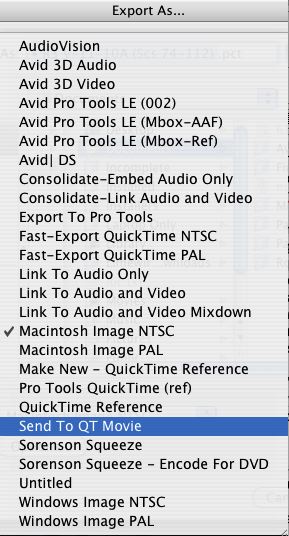
Quicktime PresetsI recently had to take care of a few small picture changes. The work itself took just a couple of hours and I was soon ready to present the results. But my producer and director couldn’t make it to the cutting room. To get their feedback I just had to make Quicktimes and upload them to an ftp site for viewing.

Easy, right? Wrong. I always worry about doing something when the task is preceeded by the word “just.” “Just bump that up to HD and blast it over to us, okay?” “Just recut all the music and make a new DVD, okay?” Just create cold fusion or a perpetual motion machine — it’ll just take a few minutes! In fact, making and uploading those files took exactly twice the time needed to make the changes themselves.

The export process is so convoluted, with so many different dialog boxes (four?) that anybody would be intimidated, but assistants are familiar with it and tend not to complain. Editors, on the other hand, are rarely confronted with this task and that probably reduces it’s priority level in Tewksbury. A lot of the code was apparently taken from Quicktime itself and some of the complexity comes from there. In their defense, the folks at Avid have made a valiant attempt at simplifying the task by offering us a bunch of canned presets. The problem is that the language used to describe them is often unclear (see above), and the process, whatever you do, seems to take forever.

If you’re making a Quicktime for a unique purpose, you should always try your settings on a short sequence first, see how long the conversion takes, how small the resulting file is, and whether you’ve inadvertently squeezed or cropped the image. If you don’t, be prepared to wait and to do it again when you don’t like the result.

Many people give up on all this and simply make DVDs with a standalone DVD burner. That works fine as long as you don’t have to use the Internet for viewing. Others make a basic Quicktime and then use Sorenson Squeeze, to shrink the file. Sometimes that can help, but it doesn’t make the task much simpler.

For the rest of us, particularly those who don’t do this every day, the complexity is pretty daunting. It sure would be nice if those Quicktime options were explained better. I’d love to see an estimate of how long your conversion will take and how big the resulting file might be — so you could make some intelligent choices before pressing the save button.

Technorati Tags: , , ,