Archive for the ‘Avid’ category

Tip Grab Bag Part 2

May 15, 2007

Here are a few more tips I picked up at the Keycode demo.


Scroll Wheel Joy

If you’re like me, you’ve become dependent on a mouse with a scroll wheel (my favorite is the Microsoft Intellimouse Optical). But until Adrenaline, this didn’t work in the Media Composer, and even in Adrenaline, scrolling speed was so slow as to be all but useless. Version 2.7 changes that. Scrolling is now quite effective, and once you start using it I suspect you’ll soon wonder how you did without it all these years. If you don’t like the default scrolling speed you can change it via Mouse Settings. I would have preferred somewhat finer control — normal was a bit slow and moderate was too fast — but regardless, your scroll wheel is now functional. You can assign other mouse buttons to Media Composer functions, as well.
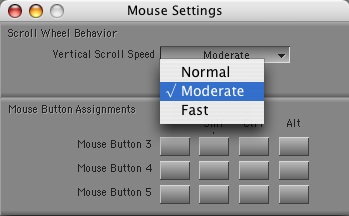
Mouse-Settings


Horizontal Scrolling

If you’re working on a late model Mac laptop, you can now scroll horizontally with the track pad. Drag two fingers left or right and you can scroll bins and even the timeline itself. The catch, unfortunately is that you’ll scroll backwards. This makes a certain kind of sense in the timeline (try it to see what I mean) but in windows it’s pretty unnerving. (If your Mac doesn’t permit two-finger scrolling from the trackpad you can add it with iScroll.)


Matchframe Without Selecting a Track

You can quickly matchframe on a specific track without first selecting it, using a contextual menu pick. Just park your cursor over the track light for the track you want to match to and right click (on a Mac without a two button mouse, use control-shift-click). A menu pops up. Select “Match Frame Track” and you’ll match that track only.
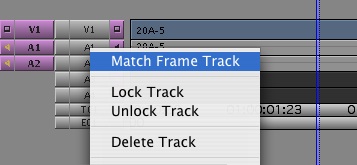
matchframe-track.jpg


Enter Text for Several Clips at Once

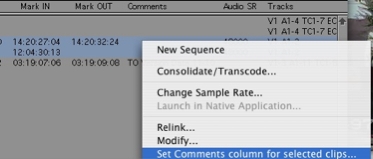
Set-Comments

Suppose you want to enter the same text in a certain column for a group of clips. You can now do that in a single step. Select the clips, then put your mouse over the column in question. The cursor turns into a double-headed arrow. Now right click and a contextual menu appears. Choose “Set Comments column for selected clips…” Another window opens and you enter your text. Voila, that text is entered in that column for all the selected clips.
Technorati Tags: , , ,

Tip Grab Bag Part 1

May 12, 2007

At Keycode’s ScriptSync demo last week Michael Krulik described several smaller improvements that have been recently introduced, and I noticed a couple of others. It seems that Avid has been steadily incorporating such changes, but hasn’t done a good job of telling anybody about it. Hopefully, we’ll see more seminars like this one in the future.

Along with the major improvements introduced in version 2.7, these represent some additional reasons to upgrade.


Segment Drag Sync Locks

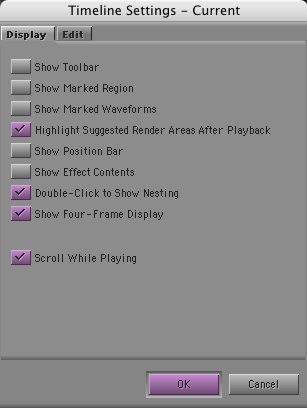
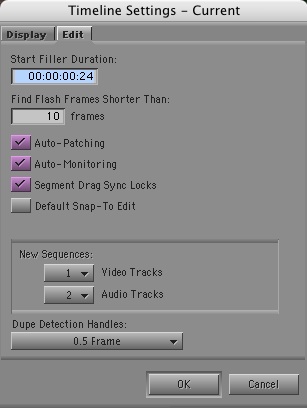
I always leave sync locks turned on when I’m cutting. This feature inserts or deletes black in trim mode to keep you in sync. But for as long as I can remember, it hasn’t worked correctly in segment mode. Rather than simply fix the problem, Avid has made the fix a preference — in the Timeline Settings. I tried it briefly and it seemed to work.

Timeline-Settings


Auto-Patching

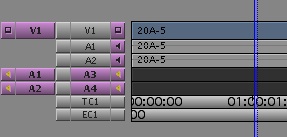
The same settings panel offers another choice, which many editors seem to be unfamiliar with: Auto-Patching. If you turn this on, your patching will automatically follow your track selection. As you select your tracks patching follows automatically. It’s quick and intuitive and might work for you.

Auto-Patching


The Return of the Scrolling Timeline

Meridien’s scrolling timeline disappeared in Adrenaline, but it’s back. Just select “Scroll While Playing” in Timeline settings and the timeline will move under a stationary cursor.

scroll-while-playing.jpg

In general, timeline performance is much improved in 2.7, and dragging through the timeline feels extremely responsive. This had been a big problem in some early versions of Adrenaline.

I’ll continue with more tips tomorrow.

Technorati Tags: , , ,

ScriptSync Demo

May 11, 2007

I just returned from a two-hour introduction to ScriptSync, put together by Keycode Media and presented by Avid’s Michael Krulik. The demo was quite well thought out, with laptops available to everybody present and a good projector so we could follow along. Krulik did an excellent job and, as a bonus, went over several other new or recently added features. I’ll go over some of that in an upcoming post.

I came away impressed with the scripting features, but not totally convinced. The technology is slick, simple and intuitive. You export your script from Final Draft and import the resulting text file into the Media Composer. You then select a portion of your script and drag clips to it, and the script gets “lined” with those clips. Then you simply turn on ScriptSync, and it automatically listens to the sound, reads the script and marks everything up.

The process is quite quick — over 20x real-time in a very informal test I did. Once the script is lined you can use it to select takes or readings and, if you’re game, cut from it. Once you’ve got a rough cut you can navigate to any point in the sequence and, with a keypress, jump to that portion of the script and compare takes. All in all, it’s quite functional, and I imagine that for certain shows it’ll be a lifesaver.

There were a few caveats. ScriptSync can’t deal with dialog that isn’t in the script. If an actor goes back and repeats a line or section ScriptSync won’t figure that out. You have to create a subclip for the repeat, or you’ve got to mark (or “mimic”) that section by hand. And it can’t deal with adlibs. The solution is to enter the adlib a word processor, cut and paste it to into your script and then do your mimic — you can’t actually edit the script itself. In addition, ScriptSync puts several marks in each hunk of dialog, one for every line of text. So, if a speech is five lines long, you get five marks and you have to delete them by hand. Finally, ScriptSync works best with a very well formatted script, where all the dialog is indented properly. If there are mistakes in the indentation there will be mistakes in the mimic.

These aren’t fatal problems, but they mean that script entry is still going to require some hand work. Nevertheless, the people in the class who had used Avid’s old manual script features thought the new version was miraculous and would save a lot of time.

Bottom line: if you like the idea of working directly from the script, it just got a lot easier to do. I’m eager to try it. Line-by-line editing feels pretty rigid to me, but having the script organized this way might get interesting for recutting, especially when you want to quickly compare alternate readings.

Technorati Tags: , , ,

Xpress Pro Exit Stage Left

May 7, 2007

Tell me again — what is Xpress Pro doing for Avid? Sure, when Media Composer meant Adrenaline, Xpress Pro gave Avid something that ran on the desktop. But now that Media Composer can run fine without extra hardware, Xpress just exists to support Media Composer’s high price. That might have looked ingenious to Avid management a year ago, but today it’s wasting resources and confusing editors.

Xpress is nobody’s first choice. The only reason you use it is because it’s cheaper. That breeds a subtle resentment. If you’re familiar with Media Composer, and you do a show with Xpress, you have to go through a week figuring out how to outsmart it and work around its limitations. The fact that you can do this makes you unconsciously lose respect for Avid. If you are a new user, your value proposition is this: either buy the full version of Final Cut, no limits, with all its applications, or get the stripped-down version of Media Composer — for $300 more! What kind of weird motivation makes you buy MC? “Well, it’s used by professionals. I better get it. Even though the pros use the pro version, I’ll be fine with the amateur version.” Nobody thinks that way. You get angry at Avid for its lack of respect for what you do — and you love Apple for liberating you.

But the worst part of this is that Xpress, by its very existence, is sucking resources from Media Composer and weakening Avid’s ability to compete. It requires its own engineers, support staff, testers, its own marketing, packaging, distribution, it’s own part of their website. Somebody has to figure out what features to take out of Media Composer to create Xpress and what features to put into Xpress to make it compete with Final Cut. It’s an impossible proposition.

Collectively, Avid has lots of great engineers — but they work on so many different products that their creativity is dissipated. How many editing applications does the company make? Xpress Pro, Media Composer, Symphony Nitris, DS, Pinnacle, Liquid and Newscutter. Many run on both Mac and PC.

Avid is making a valiant effort to support its margins by keeping the editing world segmented. Apple is breaking down those barriers by offering a Swiss Army Knife at a low price. Long term, Avid cannot win at this game. All the energy involved in differentiating its products is subtracted from the core issue: innovation and leadership. The first and easiest move is to get rid of Xpress — and lower the price of Media Composer.

Technorati Tags: , , , ,

Helpful Tutorials

May 3, 2007

Avid has posted some useful (and free) tutorials at this address.

There’s a very good overview of the powerful new motion tracking tools in Media Composer 2.7, and an introduction to SpectraMatte, the new, high-quality keyer.

There’s also a long (and slow!) overview of HD workflow in Adrenaline, as well as an introduction to the Marquee titling tool.

The tutorials seem to be the free portion of Alex, Avid’s fee-based online training service. But thankfully, you don’t have to go through the needlessly complex Alex interface to see them.

Technorati Tags:

Who is the Customer?

April 30, 2007

I don’t know about you but I’m starting to wonder if I’m Avid’s customer anymore. It’s not that I don’t use their products. I do. A lot. But the more I look at Avid’s corporate communications, and what they introduced at NAB, the more I wonder whether they see me that way. If this sounds awfully basic, it is.

Most of the action at Avid in recent years has been on big iron: Unity, Isis, Interplay. On the Media Composer side the only new feature shown this year was ScriptSync. Otherwise, what we got were plumbing improvements — the ability to run DNX 36, for example — and platform changes — porting the Media Composer to Mac Intel. Those things are important, all right, and they’ve helped keep the Media Composer competitive. But they don’t inspire editors. We saw no changes to our aging mixing or title tools, no improvements to the timeline, no changes to the editing feature set at all.

Avid’s tagline used to be “Tools for Storytellers.” Then, as Oliver Peters points out on Avid-L2, it went to “Make, Manage, Move Media.” That says it all.

Avid is playing to their base — to the people who write the big checks. But as I see it, Avid cannot succeed as a general purpose media company if it doesn’t have a best-of-breed editing application at the core of its business, an application that inspires editors and empowers them to do their most creative work.

Do we really think that big producers will force their editors to use Media Composers when the editors tell them they can be more creative and productive with Final Cut or Premiere? Do we really think, long term, that those big customers are going to continue to buy Avid networking and asset management systems when all their workstations are running the other guy’s programs? It just doesn’t make sense.

Avid has a tremendous amount of engineering talent under its collective roof, but it has had a lot of trouble bringing that talent together. DS has some great features (many of which ended up in FCP), Pro Tools has some great features, Media Composer has some great features. Avid just doesn’t seem able to bring all that functionality together in one product.

But they’re going to have to do something. For the moment, they still have the lead: trim mode, matchframe, track patching, syncing dailies, media management — all work far better in Media Composer. And the incremental improvements they’ve made lately have been helpful. But FCP has Sound Track, DVD Studio, Compressor and now, Color. It has a very nice segment mode and the ability to search across bins, and it costs less.

It’s time for Avid to show us what it can do. The company used to be in the business of inspiring editors. It needs to start doing that again.

Technorati Tags: , , ,