Archive for the ‘Avid’ category

Apple’s Announcement – First Impressions

April 15, 2007

nab-stage.jpgToday’s Apple event at NAB was heavily anticipated and turned out to be a real blockbuster. Updated versions of most of the major applications in FCP Studio were demoed and many represent breakthroughs either in capability or price or both. The company showed off a new media asset manager and collaboration tool called Final Cut Server, and it revealed a new color correction application, Color, included in FCP Studio.

Final Cut:

  • Multiple resolutions in same timeline
  • Multiple frame rates in same timeline
  • Support for a new compressed HD codec, called “ProRes 422,” via a $3,500 hardware encoder and breakout box from Aja called the “I/O HD”
  • Much better integration with Motion

Final Cut Server

  • Media management solution for $1,000 (10 users) or $2,000 (unlimited)

Motion

  • New 3D tools
  • New tracking tools
  • Paint tools

Soundtrack

  • Tracks changes in a sequence imported from FCP
  • Full support for surround (5.1 treated as a single clip, complete pan controls)
  • Spectral editing (look at a spectrum graph and remove pieces of it).

Compressor

  • More presets.
  • Much faster encoding using 8-core Mac Pro

Color

  • Sophisticated and easy-to-use color correction via technology that was presumably picked up when Apple acquired Final Touch.
  • Included in Final Cut Studio

What we didn’t see:

  • Final Cut Extreme — many rumors predicted a 4K hardware/software finishing solution for $10,000. The demo talked about 4K support on a laptop, but I see nothing about this at Apple’s FCP site.
  • Changes or additions to the basic editing model (translate — better trim controls). I’m really bummed about this one.

Of course, it’s early days on all of this. We’ll have to see how it shakes out in the real world of editing rooms, which no NAB demo will ever reveal. And the announcement covered so much ground that all kinds of details were missing. But Apple is taking direct aim at Avid in several ways.

Final Cut Server is positioned against Avid Interplay at a fraction of the price. I/O HD takes on Adrenaline HD, again for much less money. ProRes 422 competes with DNxHD. Motion integration into Final Cut aces all of Avid’s antiquated title generation tools.

Soundtrack offers 5.1 mixing, something you have to buy a Pro Tools to get on the Avid side of things, and change tracking between FCP and Soundtrack is something Avid should have offered long ago. The new Color application gives Apple the lead in low-cost desktop color correction.

It’s been almost two years since Final Cut Pro 5 was released and a year since 5.1 added Intel support. In that time Avid should have been innovating aggressively. We’ve seen some valuable improvements, certainly, but the changes have been relatively conservative, presenting Cupertino with what amounts to a near stationary target in some areas — and Apple has responded very aggressively.

Engadget has good early coverage with a lot of pictures. Apple’s site gives additional details.

Technorati Tags: , , , ,

Waiting for NAB

April 11, 2007

At this point, I expect that all eyes are on NAB — the calm before the storm, as it were. Apple’s announcement this coming Sunday has been the subject of a lot of speculation, namely that we’ll see a 4K version of Final Cut and a revamped Logic. The company has made it clear that it plans to focus on host-based processing and with the quiet introduction of the 8-core Mac Pro last week it has an opportunity to really push the envelope. It doesn’t take a crystal ball to guess that they’ll use those machines to do things that haven’t been possible before. That should provide excitement enough, but we haven’t seen a significant feature upgrade to Final Cut for some time and the company may have some other improvements up it’s sleeve, too.

As you all probably know by now, I tend to be more interested in bread and butter usability features than finishing or visual effects. Not to say that those things aren’t important. But my focus is on shaping story and performance and I tend to get excited about things that help me do that. An extreme example: one friend, a prominent editor, prefers Adrenaline over Meridien for exactly three reasons: real time audio dissolves, 16 playable audio tracks and faster bin saves. The ability to play layer upon layer of visual effects in real time, Adrenaline’s headline advantage, doesn’t figure in his calculation. If Avid offered invisible, background saves, or a live timeline that could be scrolled or scaled while the machine played, I’d wager it would create a lot of Hollywood converts. I doesn’t seem that things like that get high priority in Tewksbury and that’s slowing adoption here.

Avid doesn’t keep secrets the way Apple does and it looks like they haven’t held much back for NAB. That doesn’t diminish the importance of version 2.7. If it’s as bug free as we’ve been led to expect it will finally allow us to get some serious work done on portable systems and that has the potential to fundamentally change our work environments. Avid wasn’t the first to this party — Apple was — but if they’ve got it right it will change the way we in features and episodic TV work. DNxHD 36 is also important and will help a lot of us start looking at HD images — no small thing, either.

All in all, it feels like a watershed NAB for both companies, but in different ways, and that can only be good for editors. The changing technical landscape continues to alter our lives. But at the end of the day, storytelling has to remain paramount. I love the technology — but if I’m not using it to move people it doesn’t mean a whole lot to me.

Technorati Tags: , , , ,

The Work vs. The Quicktime

April 9, 2007

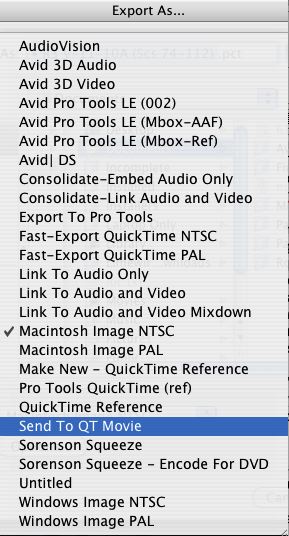
Quicktime PresetsI recently had to take care of a few small picture changes. The work itself took just a couple of hours and I was soon ready to present the results. But my producer and director couldn’t make it to the cutting room. To get their feedback I just had to make Quicktimes and upload them to an ftp site for viewing.

Easy, right? Wrong. I always worry about doing something when the task is preceeded by the word “just.” “Just bump that up to HD and blast it over to us, okay?” “Just recut all the music and make a new DVD, okay?” Just create cold fusion or a perpetual motion machine — it’ll just take a few minutes! In fact, making and uploading those files took exactly twice the time needed to make the changes themselves.

The export process is so convoluted, with so many different dialog boxes (four?) that anybody would be intimidated, but assistants are familiar with it and tend not to complain. Editors, on the other hand, are rarely confronted with this task and that probably reduces it’s priority level in Tewksbury. A lot of the code was apparently taken from Quicktime itself and some of the complexity comes from there. In their defense, the folks at Avid have made a valiant attempt at simplifying the task by offering us a bunch of canned presets. The problem is that the language used to describe them is often unclear (see above), and the process, whatever you do, seems to take forever.

If you’re making a Quicktime for a unique purpose, you should always try your settings on a short sequence first, see how long the conversion takes, how small the resulting file is, and whether you’ve inadvertently squeezed or cropped the image. If you don’t, be prepared to wait and to do it again when you don’t like the result.

Many people give up on all this and simply make DVDs with a standalone DVD burner. That works fine as long as you don’t have to use the Internet for viewing. Others make a basic Quicktime and then use Sorenson Squeeze, to shrink the file. Sometimes that can help, but it doesn’t make the task much simpler.

For the rest of us, particularly those who don’t do this every day, the complexity is pretty daunting. It sure would be nice if those Quicktime options were explained better. I’d love to see an estimate of how long your conversion will take and how big the resulting file might be — so you could make some intelligent choices before pressing the save button.

Technorati Tags: , , ,

Eight-Core Mac Pro Finally Arrives

April 4, 2007

After months of speculation, Apple finally released an 8-core Mac Pro today. It employs two quad-core Xeon’s clocked at 3 Gigahertz. The price is high — $1500 more than the standard system with two dual-core chips — about $4K.

The big question is how much real-world speed increase you get with this baby.

Mac Pro Site

Technorati Tags: ,

Avid on Intel-Mac Arrives

March 30, 2007

Well, it’s finally happened. Avid released Media Composer 2.7 and Xpress 5.7 today, complete with Mac/Intel compatibility. Other features include phonetic script integration, which Avid is calling “ScriptSync,” and compatibility with the DNxHD 36 codec. New features in these releases were shown at Avid’s Insider Seminar, which I described in several recent posts.

The press release quotes Matt Feury with the following: “We’ve run these systems through a more rigorous testing process than ever before, and we’re confident that our customers will be pleased with the stability and performance they’ll receive after installing the new software.” Let’s hope so. I’ve heard that Avid on Mac/Intel is the fastest Avid you’ve ever seen. I’m eager to get my hands on one of these things.

The complete press release, including upgrade pricing, is here.

Technorati Tags: , , ,

Clip Comments/Bin Comments

March 30, 2007

I don’t know about you, but I’m always wishing that I could see clip comments in frame view bins. I make a lot of sequences (and sub-sequences of different versions and alternates) and even though you can create clip names of any length, sometimes it’s helpful to make longer notes. Yes, I know I can see comments in text view, but I arrange sequences in a visual grid where position means something and I don’t want to switch views to see comments. I’d like to see a second line of text under a clip, or have the comment pop open if I pause my cursor over a clip.

By the same token, I’d love to have a comment column for bins. It’s galling enough that I can’t make a bin name that’s longer than 27 characters, even though the OS no longer has a problem with this, but I’d like more. A description of what the bin contains and why I might want to open it, visible in the project window, would be very helpful. A typical project for me lasts six to twelve months and produces hundreds of bins. In the Avid I can’t search across bins, so getting some help figuring out what a bin contains would be welcome.

These two features seem pretty simple to me and I venture that they’d appeal to a lot of people. For my money, they’d be a lot more desirable than some other features that would take a lot more effort to create.

Technorati Tags: , , ,