Some of you may be wondering whether I’m planning an update to “Avid Agility” for Media Composer 5.5. The answer is yes. It’ll be a relatively minor update, with changes confined to the new features (mainly Find, PhraseFind, the Transition Tool and Legacy/Classic Trim Mode). There will also be adjustments in the illustrations to reflect the new arrangement of the Smart Tool. Those of you who are editing with Version 5 will probably want to stick with the current book because the screen images match the software you’re using. Those of you who expect to use Version 5.5 will want the new version. It should be available at Amazon in about three weeks and will be listed as the “Second Edition.” The first edition will continue to be available through the publisher, CreateSpace.
Archive for the ‘Avid’ category
Avid Agility and Media Composer 5.5
March 23, 2011The Interaction Model
March 20, 2011Apple’s sneak peak of Final Cut 8 has encouraged people to start thinking about their wish lists: 64-bit, more native formats, background rendering, export to YouTube and many other ideas have been floated. That’s all great, but what I want is a new interaction model. Most of what we do as editors looks like this: play a clip or sequence, press stop, open a dialog box, make a change, hit okay, move the position indicator backwards, and play again. Over and over again, all day long. The idea that you could change a sequence that easily was miraculous in the early years, and the need for all that stopping didn’t seem onerous. But now it seems downright anachronistic. I want an application that keeps playing. We have the processor power to do this now, but our applications are full of low-level code that waits for you to hit stop before it’ll do anything.
In Pro Tools you can be playing your timeline in one area and go somewhere later in your session and make a change without stopping. When you get there, you’ll hear the change. Motion lets you loop your composition and change it while it plays. Final Cut lets you move around in the timeline while video keeps playing. Screenflow lets you save while video plays. And Sony Vegas lets you do just about anything without stopping.
What else would we get if we could have that never-stop technology?
- Render while you work.
- Never stop to save.
- Import and export while you do other things.
- Change bin data while watching dailies.
- Play more than one clip at the same time, experiment with different placements of of music against picture, compare clips side-by-side.
- Mix while you play without having to stop and hit record.
- Live mute and solo.
- Live editing.
To make music you need a musical instrument. Workflow enhancements are important. New features are important. But how the machine allows us to shape the material affects everything. The simplest potter’s wheel is more interactive, more tactile, more responsive than our best editing machines. It’s that kind of live interactivity that will change the way we work.
Reminder —
I’ll be speaking at the Editors Lounge this Friday in Burbank, as part of their pre-NAB panel discussion.
Panelists: Debra Kaufman, Lucas Wilson, Mark Raudonis, Michael Bravin, Terry Curren and me.
Location: Key Code Media, 270 S. Flower St, Burbank, CA 91502
Time: Food at 6:15, Panel at 7.
Media Composer 5.5 Goes Live
March 8, 2011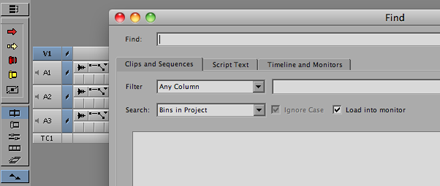
Media Composer 5.5 began shipping today. Announced three weeks ago, the new release builds upon version 5 in many important ways:
- A new, universal Find window has been added, allowing you to search throughout the entire project for clip information and display the results in a single window. (And as a side benefit, Find Bin, which uses the same engine, should work more consistently.)
- For an extra fee, you can add PhraseFind, giving you the ability to search for dialog throughout your project. The system listens to your tracks, indexes them and then searches for any text you enter. Slick. (For details, see this video.)
- MC now supports the AJA I/O Express box for low cost monitoring, as well as the Avid Artist (Euphonix) control surfaces for mixing and transport. See Avid’s Hardware Options page for details, this video on the controllers, or this pdf covering I/O choices.
- The Smart Tool now includes a Transition Tool, allowing you to adjust transition effects by dragging them.
- The Keyframe tool has been moved out of the Smart Tool palette so that it can be controlled independently (and left on permanently).
- It’s easier to turn off the rest of the Smart Tool and keep it off.
- “Legacy Trim Mode” is now a standard part of the application. If you leave the Smart Tool off, and enter Trim by lassoing or with the Trim Mode button, it will feel like it did in Version 4. (See this post for more.)
- More media types are accessible via AMA (but you now have to do a separate install for almost everything except Quicktime).
- You can now do source colorspace modifications on Quicktime AMA files, letting you adjust field dominance and RBG/709 status with a preview window.
- You can set the stereo/mono status of a file’s audio tracks when importing.
I’ve been beta testing this version, and so far, have been very happy with it. I would not hesitate to use it on a show. The changes to the Smart Tool are reason enough to upgrade, and the Find window and PhraseFind are fundamental improvements that might change the way you work. Fair warning — I’ve been using it on a small project with a software-only laptop and don’t have any experience with it in the trenches yet. Avid beta testing is more thorough than in the past, and this one went longer than most, but as with all Avid releases, there will probably be surprises when the software gets into the wild.
A software-only upgrade from 5.0 to 5.5 will run you $149. If you’ve got a support contract, it’s free. Students who bought version 5, should be able to get it for free, as well. PhraseFind costs $495. Pricing is here. For more information about 5.5 check out Avid’s Media Composer page.
Another Great Review of Avid Agility
March 7, 2011The Editors Guild magazine has just published a great review of my book, Avid Agility, in their March/April issue. To quote it briefly: “Avid Agility is very much a definitive book about the Media Composer environment. [It] may well be the ultimate book on customizing Avid’s unique capabilities for individual creative editing.”
My special thanks to Ray Zone and the Editors Guild Magazine for their terrific writeup. You can get the book at Amazon. If you’re looking to get beyond the basic Media Composer documentation, this is the best and easiest way to do it. Details are here.
FCP Speculation
March 5, 2011Phil Hodgetts and Terry Curren devote their latest podcast (website — itunes) to speculation about the upcoming Final Cut Pro 8, and what might have transpired at the super-secret demo that Apple held for 100 luminaries on Feb 17. The main takeaway: no viewer/source monitor (as in iTunes), no tape I/O, background rendering, all 64-bit, running on a new modern codebase that is no longer tied to Quicktime — and all purely speculative, of course. But it makes for interesting listening. The release is promised this Spring.
Pre-NAB Editors Lounge
March 1, 2011Later this month I’ll be participating in the what I hope will be an insightful and provocative Pre-NAB Editors Lounge Panel Discussion, hosted by Terry Curren and his company AlphaDogs in partnership with Key Code Media. The Editors Lounge is a great place to meet other editors, get questions answered, and generally stay current. And the food ain’t bad, either. This event will also feature a demo of Sony’s new OLED production monitor (list price, just $26,000).
Panelists: Debra Kaufman, Lucas Wilson, Mark Raudonis, Michael Bravin, Terry Curren and me.
Date and Time: Friday, 3/25 at 6:15 pm
Location: Key Code Media, 270 S. Flower St, Burbank, CA 91502



 Splice Now
Recent Comments