Archive for the ‘Laptop Editing’ category

Switching Between MC and iTunes

October 15, 2007

Why does it take so long to switch between MC and other programs? I’m cutting temp music and using iTunes as the music browser. This is because it’s next to impossible to quickly position and audition music against picture in the MC. That, in itself, is a fundamental problem, but with iTunes, I have an adequate workaround. The problem is that I have to repeatedly switch back and forth from MC to iTunes and unfortunately, every time I do, MC goes through some kind of update. The result is a roughly four-second wait while the system seems frozen. Repeated all day long, that turns out to be maddening, especially when you’re trying to hit play in iTunes and then go to MC and hit play there so that music and picture will be in rough sync. Really hard to do it with that long wait.

You can see the same problem when bins are opened — or closed. There’s a several second wait after the bin appears or disappears, while all clipframes in all other open bins are laboriously reacquired from disk — and the system is frozen. Why? This wasn’t true in Meridien or ABVB.

I just tested this at home and discovered to my surprise that it doesn’t happen on a software-only system with local storage. I can switch between iTunes and MC in a quick keystroke — no waiting. And I can open a bin or close it without seeing any other clipframes update.

What gives? Is this a function of Unity? Or of sharing a project? And if so, is it really necessary, or is it an artifact, a programming mistake that added some kind of “refresh all” command where it isn’t necessary?

Technorati Tags: , , ,

Academic Pricing

September 30, 2007

In what appears to be a pretty dramatic shift in policy, Avid is now selling Media Composer to students and teachers for — just $300. You don’t seem to need an academic P.O. anymore — just valid ID. I saw a couple of web sites that have it, including this one: Academic Superstore.

Technorati Tags:

DNXHD-36 Without Adrenaline

July 26, 2007

I got a demo yesterday of a software-only Media Composer playing DNXHD-36 media. We hooked up an 8-core Mac Pro to a big Pioneer plasma TV that served as our second monitor. In a word, it was fantastic. Seeing material with that kind of clarity at that size in an offline editing room, and being able to play it and work with it quickly, jogging back and forth and dragging through a clip, was downright breathtaking. And it was not just an aesthetic experience, although it was that, for sure. You’re getting more information — for example, you can clearly see facial expressions in wide shots.

Major caveat — all I did was look at a couple of clips a few minutes long. I didn’t try to play huge complex sequences, I didn’t run a big project, I didn’t even have much audio. All I did was use JKL to move around in the video, made a few cuts, tried making a Quicktime and a cut list. In that limited environment, the system was quite responsive.

Special thanks go to Jeremy Dela Rosa at Global Entertainment Partners (GEP) for putting the demo together for me.

The big revelation was that we could do this with a software-only Avid. You don’t need Adrenaline to do HD, and you don’t need huge amounts of storage. DNX-36 uses about 16 GB per hour at 24 fps — just a bit more than DV, and about triple what you’d need for good ol’ 14:1.

So can you really use a software-only system instead of Adrenaline? That depends on what you are trying to do. The first problem is monitoring. We ran the system with two monitors, one of which was the HD TV (the TV has to have a DVI input). That might be a viable way to work — if you had a 30″ monitor for cutting, you could put everything there, bins, composer and timeline. But if you want three monitors, you’re moving to the bleeding edge. You’d install a second graphics card in your Mac, and run your bin monitor from that. We didn’t have that second card, so we weren’t able to try it. Avid doesn’t officially sanction it, but it ought to work.

The second problem is input and output. The software system has only one way of doing this — Firewire. And that severely limits your choices: DV or DVCPRO HD. If you’re working at DNX36 that doesn’t help much.

So a realistic environment for a small show might mean an Adrenaline-based system for the assistant and a software-only system for the editor.

We tried a few other things:

Making an SD Quicktime — something you might have to do for turnover to sound. On the 8-core Mac, creating a 640×480 QT at Motion JPEG-A was very quick — a bit faster than real time.

Playing SD material in the HD project. The only way to do this is to create a separate SD project, load your video there and then drag the bin into the HD project. In the time we had, all we could do was create some color bars at DV resolution. I was not only able to play that in the HD project, I could intercut it with HD. Unfortunately, the MC insisted on treating the SD clip as though it were 16×9, so it looked anamorphically stretched. But adding a reformat effect solved that problem, and the effect played without rendering.

I also tried making a cut list. And, not surprisingly, I ran into some new bugs. FilmScribe is not nearly as stable as it used to be. Lists out of MC used to handily beat those from FCP. I don’t know if that’s true anymore.

I heard about some other problems, too:

In Adrenaline you can output to SD with a pillar-box in real time. But you can’t do it with deck control. In other words, you can’t use digital cut, you can only crash record. That makes creating an SD tape pretty dicey and not particularly useful.

Worse, I was told about a bug in Adrenaline, that puts a delay into video on the client monitor. The result is that you can be in sync on the client, or on the record monitor, but not on both. The delay is four to six frames — not trivial. I didn’t see this myself, but I sure hope Avid engineering is doing whatever they can to fix it — pronto. The good news from my demo is that the problem only occurs with Adrenaline. Software only was in perfect sync.

All in all, an eye-opening couple of hours, and a lot of food for thought.

Technorati Tags: , , ,

HD Lite

July 14, 2007

“Offline HD,” or whatever we’re going to call the process of editing with compressed HD materials, looks like it might be the biggest thing to hit Hollywood in many years. I doubt that there are many editors (or directors) who wouldn’t prefer to look at HD images, even if the tradeoff is less realtime performance and slower renders.

Right now, you can get into offline HD less expensively with Final Cut than with Media Composer. But there are two ways to do it and the economics are quite different.

Method 1: Hardware
This is the standard approach. It allows you to digitize from HD tape, output to tape in SD or HD and run a full time client monitor (ie. a big HD TV). Unfortunately, it costs a lot more to do this with Media Composer.

  Apple   Avid
  Final Cut Studio $1,300   Media Comp. Adrenaline
w/ DNxcel HD board
$20,000
  HD Card or AJA I/O $3,000    
  Mac Pro $3,000     $3,000
  Two LCD Monitors $2,000     $2,000
  HD TV $2,000     $2,000
  Amp & Speakers $1,000     $1,000
  Total $12,300     $28,000

Method 2: Software only
Here the playing field is a little more level. You won’t have a way to plug in a deck, except via Firewire (DVCPRO) so you have to assume that film dailies will be digitized in telecine. You can run your material full screen but you lose a monitor to do it. (You may be able to hook up a third monitor via a second video card.) And you can’t output to tape, again except via Firewire. Downrezing your work to SD for DVD output has to be done via Quicktime, which is slow.

  Apple   Avid
  Final Cut Studio $1,300   Media Composer software $5,000
  Mac Pro $3,000     $3,000
  Two LCD Monitors 2,000     $2,000
  HD TV $2,000     $2,000
  Amp & Speakers $1,000     $1,000
  Total $9,300     $13,000

And you can also combine these two approaches. On a small feature film or TV show you can give the assistant editor the hardware system so he or she can do the I/O and let the editor work software-only.

What do you all think? Am I missing anything? Does this represent an important competitive advantage for either side?

Technorati Tags: , , , ,

More Laptop Issues

June 29, 2007

Numeric Trim Displays

More and more, I see myself working from various locations on a show — anchored in an editing room, of course, but bringing stuff home or to the set to work on or to show people.

Avid could do some useful work in this area, making it easier for us to edit on the go. I mentioned some of these things yesterday. Here are a couple of additional things I’d like to see:

1. “Pack and Go” — I’d like to be able to select a bin or bins and tell the system to copy all relevant media, and the bins themselves, to another drive or to a laptop. Media should be put in the right place, bins go into the project folder on the laptop. One-click simplicity.

2. The Media Composer expects you to have a dedicated numeric keypad. But laptops don’t have them, and that creates some problems. You can change a dissolve length in the timeline using the regular number keys (at the top of the keyboard). But if you want to trim numerically — or even just move around in the timeline numerically — you’ve got to hit the number lock key, use the embedded keypad (and go blind finding the keys) and then finally turn number lock off, because it locks out all the other keys. Final Cut does not have this problem. You can trim and move around with the normal number keys. And Final Cut adds another bit of finesse — when you customize your keyboard, the template is smart enough to show you the keyboard you’re really using.

Technorati Tags: , , ,

Heads Up Displays

June 28, 2007

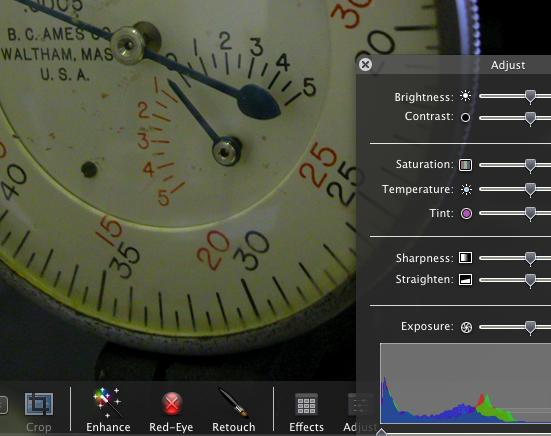
Heads Up Displays in iPhotoMany of the new Apple applications employ what the company calls “heads up displays.” These are control panels that are translucent and appear over the image you’re working on, fading in and out as needed. You can see them in iPhoto, Aperture, Motion and Quicktime. They look cool, but more important, they’re functional, because they let you do useful work on a full-sized image. They’re particularly helpful for small (ie. laptop) displays, where screen real estate is at a premium.

As I use my laptop more and more for cutting, I’m starting to see how valuable such displays could be in a mobile editing environment.

Because, in the laptop environment, the Media Composer definitely has some rough edges. When I’m working with the laptop itself, I want one window layout. But when I plug in to a bigger monitor and use the laptop screen as a bin monitor, I want another. The MC can handle this, but it takes a lot of fiddling around. And even when you have your workspaces all set up the way you want them, the system often does the wrong thing.

In general, the MC needs some tweaking around the issue of window activation. For example, when I double-click on a sequence I want the Composer window and the Timeline to activate and move forward. But now, only the Composer window does so. I also want the ability to quickly tab from bin to bin.

And that leads me back to the subject of heads up displays. How about this? Wouldn’t it be nice to work in full screen mode (video playing full screen) — but with a translucent timeline supered over it? The timeline (and maybe the editing controls from the bottom of the composer window — what Avid calls the ‘mini–composer’) would appear when you move the mouse, and they’d disappear when video plays for a moment. That sure would make for a slick, small-screen editing environment.

Heads up displays would also be great in a redesigned full screen title tool, much as they now allow for full screen editing in iPhoto.

What else could you do with this kind of interface?

Technorati Tags: , , ,