Archive for the ‘User Interface’ category

How Would You Use Multitouch?

August 25, 2008

The NY Times ran an article yesterday about how multi-touch is about to become more commonplace (Turning Point for Touch Screens). Dell is putting it on a small laptop, it’ll be on all kinds of cellphones soon, and the next version of Windows is supposed to handle it natively. Since the iPhone has pushed this technology into the mainstream, it seems likely that Apple will bring it to OS X, as well.

The question for us in post production is how and whether we’d use it. Is it the world’s coolest thing, or a novelty that will wear off after an hour or two?

At NAB a few years ago, I experimented with Photoshop on a 20″ touchscreen from Wacom, and it was super-intuitive and fun to play with. And that was an old screen that could only handle one contact point at a time, with no understanding of gestures. Modern multi-touch would be much better.

My favorite fantasy would be use this kind of thing in trim mode. Select transitions with your fingers. Trim by dragging with your hands. And scrubbing? Just move your finger over the audio to listen to it.

But a multi-touch screen would likely lie flat or be oriented like a drafting table. Would you want to be looking down all the time? And would you want to move your arms over a 24 or 30″ space all day when you could be moving a mouse just a couple of inches?

I suspect that in the end we’re going to come up with some kind of hybrid model, where you’d use the multi-touch interface augmented by a mouse or pen. And your screen might be moveable so you could work with it vertically or horizontally.

Somebody ought to be setting up a lab right now to figure out how best to use this technology in the editing room. If it works, it could be a game changer, making the whole process of editing more organic and intuitive. The Times article ends with the following quote: “A lot of people don’t realize they want it until they use it.” Sometimes letting the customer tell you what they want is a good idea. But sometimes it guarantees that you’ll be late to the party.

What do you iPhone users think? Would you want a giant iPhone interface for editing?

Technorati Tags: , , , , ,

Is the Suite Sweet?

June 16, 2008

One big question for the next phase of digital post production is whether developers ought to focus on building a suite, or whether an all-in-one application makes more sense. And the more I think about this subject, the less I understand it. Yes, there’s an obvious distinction between a big all-in-one program and a group of smaller, separate aps that do the same thing. But if you look at it more closely the edges blur.

Microsoft popularized the suite with Office, but even there it has rolled together functions that others deal with separately. Entourage integrates all the functionality of Apple’s separate Mail, Calendar and Address Book programs, and Word includes more and more desktop publishing functionality that used to be handled exclusively by Quark or Pagemaker. If you expand the definition enough, every application on your computer could be seen as part of a suite that is hosted by the operating system.

When it comes to digital media, Avid began life trying to roll as many functions as possible into a single app. Editing, visual effects and sound were all included. Final Cut started with that model, too. But now Apple offers Final Cut Suite, and Adobe offers CS3, with Audio, DVD and VFX tools. Avid now includes AvidFX, Sorenson Squeeze, SonicFire Pro and Avid DVD, though the last two only work on Windows. (For more about the Avid suite see Frank Capria’s recent post on the Source/Record blog.)

So is a suite better than a powerful all-in-one environment? The more I think about it the more this looks like the wrong question. The real issue is integration — how the different modules, whatever you call them, work together to produce a consistent, responsive environment that best supports the editor’s creativity.

Case in point: I just finished a show with Media Composer and did the titles with Apple Motion (details in this post). I enjoyed using Motion and loved all the things it let me do. But I had to do deal with two sets of media and two separate timelines, I had to do way too much importing and exporting, and I had to manage two different projects.

That’s a key issue — if the elements of your suite are working on the same data then they should all be accessible from the same timeline. Importing and exporting should be instantaneous and invisible.

Another key issue is look-and-feel. AvidFX looks like a much-improved way to do titles, and it works on MC data nicely. But it doesn’t look like the MC.

This points to one big advantage of a suite — not for editors but for software developers. It’s easier to create because you can buy the separate apps, put them in one box, and advertise a long list of capabilities. The key question for editors comes down not to what’s in the box, but how well the parts fit together.

However you package the tools, what I want in an editing environment is the same. I want a powerful editing application with great trimming tools (ie. MC) and great segment tools (ie. FCP), I want integrated titling and vfx in the main timeline with minimal rendering. I want professional 5.1 mixing and sound editing — again, in the same timeline. And I want the ability to make a basic DVD without creating a separate project to do so. I don’t want to have to conform sound elements to my own picture changes. And I don’t want to have to export and import to create titles or effects or simple DVDs.

Each of the three companies has succeeded with parts of this, but nobody does it all — yet.

Technorati Tags: , , , ,

Segment Mode in a Complex Timeline, Part 2

March 19, 2008

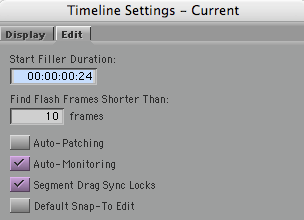
In the previous post on this subject (available here), I left out one big issue, namely how segment drag works with sync locks. There are two choices for this, selected via a checkbox in the timeline settings window:

Sync Locks Setting

“Segment Drag Sync Locks” inserts black during a segment mode drag and that ought to solve some problems. But it does it in such a strange way that I can’t imagine how anyone would use it. (And you can still throw your timeline out of sync with sync locks on, which shouldn’t be possible.)

Here’s what happens if you drag picture only with that check box selected:

Picture 4-Pix Only Seg Locks On

Sync is no better than when this option is off, and track still gets broken up.

If I drag picture and sound together I get this:

Picture 5-Pix And Track Segment Locks On

Once again, black is added but in a totally unhelpful way and sound is broken up.

None of these methods do what I need, allowing me to move groups of overlapped clips around in the timeline without breaking any of them into parts. There’s no easy way to do that now and there should be.

Technorati Tags: , , ,

Segment Mode in a Complex Timeline

March 16, 2008

The Media Composer has always done a better job when first-cutting than with re-editing. There are good historical reasons for this: most longform editors can’t or won’t do beta testing over the nine-month-or-more timeframe of a typical feature film, and Avid beta on a single product never lasts that long anyway. The result is that I find rearranging and inserting material into a multi-track and heavily overlapped timeline pretty cumbersome.

When recutting, my best friends are asymmetrical trim and sync locks. Segment mode is essential, too, but it’s frustrating — with a complext timeline it tends to require too many steps. To demonstrate this I’ll use a highly simplified example with just two clips, as follows.

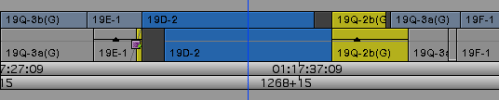
Picture 1 - Orig

The goal is to interchange the blue and yellow clips. Interchanging picture-only is simple. Just grab a picture clip with yellow segment mode, hold down the command key for snap-to-heads, and drag. This is the result:

Picture 3-Drag Pix And Track

But I want to move picture along with sync sound, and both clips are overlapped at both ends. Here’s what happens if I drag picture and sound. Picture does the right thing, but sound gets broken up, with a hunk of the yellow clip’s audio floating free.

Picture 2-Drag Pix Only

To fix up this timeline, I have to rejoin the two yellow audio clips and I have to make room to do that. Not straightforward at all.

Instead, I wanted picture and sound to move together and intact. Like this:

Picture 8-What I Wanted

It takes way too many steps to get the timeline into this condition, where clips haven’t been broken up and can be re-edited easily.

As a partial solution I’d accept the ability to insert black into an overlapped timeline, like this:

Picture 9-Insert Black Into Overlapped Tl

In Media Composer, there’s no easy way to do that, either. FCP allows you select all clips to the right of the cursor. You can then drag them over and open up space. But that’s an incomplete solution to the problem posed here — you still have to move the clips, and that takes several more steps. What I really want is the ability to directly move only the clips I’m interested in — without cutting anything up. Neither MC or FCP make that easy.

(For more on this subject, see this post: Segment Mode in a Complex Timeline, Part 2.)

Technorati Tags: , , , ,

Fixing Segment Mode

March 8, 2008

Avid added segment mode to the Media Composer long before Final Cut was conceived, and even then, it was apparent then that editing in the timeline was an essential feature in any non-linear editing application. Working from the DS playbook, Final Cut made segment mode its primary editing mode and arguably made the application more intuitive to newbies who grew up with the desktop publishing metaphor — rearranging moving video by dragging little rectangles around on the screen.

I’ve never been a believer in the primacy of that metaphor. I think that the best editorial decisions are made by manipulating the video itself. That’s where the Media Composer excels, and for me, anything else is a shortcut that makes it harder to produce fluid editorial decisions. But there are still plenty of situations where dragging things in the timeline is the best way to quickly arrange a bunch of clips, and in this, Final Cut seems to have the edge.

The question for Avid is how to enhance its segment mode to better compete with FCP’s — without destroying the MC’s slickness and precision.

For me, it comes down to a handful of relatively simple fixes:

1. Don’t make clicking in a time track turn off segment mode. Unlike in the MC, in Xpress Pro stays on until you explicitly turn it off. When I first tried it, I thought this was a disadvantage. So I ended up mapping the red and yellow segment mode buttons to the keyboard. And boy did I like having them there. Now I find that having segment mode switch off every time I drag the cursor pretty frustrating. Allowing segment mode to stay on as long as you want it to would be the best and most flexible compromise with FCP’s “on all the time” approach.

2. Add a feature that lets me select “everything to the right.” This is a big win for FCP because it makes it easy to open up space in the middle of a complex, overlapped timeline. It would be trivially simple to add to the MC — it doesn’t even need its own button. You’d just select a clip while holding down a modifier key, and everything to the right would be highlighted. Do the same thing to each track and then drag to the right to open up space, as needed. I’d kill to have this seemingly small change.

3. In red segment mode, make it possible to select two non-adjacent clips in the same track and move them together without selecting all the clips in between.

4. Make it possible to select and move two audio clips (ie. a stereo pair) up or down one track at a time.

5. Offer a simple way to clone a clip and place it in another track. Great for trying musical alternates, or copying sound effects.

There are a few other minor issues, but for the most part, that’s it. Avid has just about everything else — cut and paste works fine, the four-headed display when dragging a segment is better than FCP’s. Dragging while snapping to the beginning — or the ending — of nearby clips works better, too.

But maybe I’m missing something. So I’ll put this to those of you who are proficient in both programs: What else is missing from Avid’s segment mode?

Technorati Tags: , , , ,

Leopard First Impressions

October 29, 2007

It seems to me that software design can spring from two opposing philosophies. One says, “We know what the machine can do. But we don’t really know much about what you want to do with it. We’ll spend our time making sure you have all the options you want.” The other says, “We know exactly what you want to do. We’re going to make the machine do that. We’ll spend our time figuring how to make it do the right thing intuitively, quickly and easily.”

Which brings me to Leopard. I haven’t tried it, and I won’t be able to until the MC works under it. That’s a shame, because after four major upgrades, Apple has demonstrated that the OS can still be markedly improved, to a new level of interface simplicity and intuitiveness. Leopard makes it easier to find stuff, easier to back up, easier to share files, easier to stay organized. And as nice as Tiger looked, Leopard looks better.

To see what I mean, check out Apple’s Leopard guided tour video. It’s a half hour long, but when you’ve watched it, I think you’ll agree that Apple has found plenty of room for innovation in the supposedly staid world of operating system design. What I find so exciting is that many of the improvements make routine tasks, things we’re completely used to, all of a sudden seem old — because the designers found a simpler, more aesthetic, more visual and more intuitive way to do them.

They accomplished this by first deeply understanding what their customers are trying to do, and then by innovating — creating new and more intuitive ways to do those things.

All this begs the question about what Avid’s been doing low these many years. Way too many of the problems I have with the Media Composer have been around for a decade — not just bugs, but features that didn’t work right from the beginning. Yes, we’ve seen many innovations, but most have involved visual effects and color correction. When it comes to basic usability, we’re still working with Media Composer circa 1997. Luckily for Avid, Final Cut’s basic feature set hasn’t evolved much in the last couple of years (innovations have come in the suite instead) and before that, they were playing catch-up. But if Apple starts innovating the Final Cut interface as much as it has OSX, the MC is going to look awfully tired very quickly.

Technorati Tags: , ,