What Was Said and What Wasn’t

Posted April 13, 2011 by Steve
Categories: Avid, Avid vs. Final Cut, Final Cut

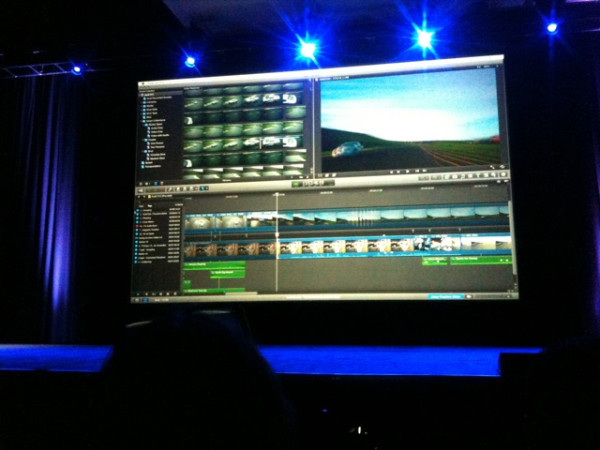
Well, the wait is over — Apple showed off what the company is calling Final Cut Pro X, at the Supermeet in Vegas last night. Some of the speculation turned out to be fairly accurate: full use of all CPU cores and the GPU, enough performance that they can claim you’ll never have to transcode, resolution independence up to 4K with mixed resolutions in the timeline, background rendering — and a decidedly iMovie-style interface.

There were many features designed to help you automatically organize, clean up and subclip material: shot recognition, face recognition, color correction, audio clean up, stabilization, all on import. Range-based keywording and something they are calling “Smart Collections” — all medium shots, for example, can be auto-identified, listed automatically and played together as if they’re in a sequence. You’ll be able to start editing a shot before it has been fully copied from a memory card to a local drive.

Other features include skimming with pitch-corrected audio, automatic syncing of multiple cameras as in PluralEyes, sample-accurate syncing, shot nesting (multiple versions held in a single timeline clip), multiple audio fade curves along with waveforms that move with clips and respond dynamically to level adjustments (audio keyframes seem to be a thing of the past), a color-managed workflow with automatic color matching between shots and secondary correction.

The timeline has been rethought in many ways. It doesn’t have fixed tracks — they’re dynamically created and removed as needed. There’s no viewer window — everything is played in what used to be the canvas — but there’s a nice audition feature, allowing you to merge alternate takes into a single object and then quickly switch between them within the sequence. There’s an an iMovie-style “precision” trimmer, but instead of Avid-style multi-track trimming you get the ability to define sync relationships within the timeline. Clips remain locked together even if they weren’t shot together, which makes it easier to move stuff around without throwing music or sound effects out of sync with picture.

The editing model is even more drag-and-drop than current FCP, and to make it work, clips move out of the way to accommodate a drag, something Apple calls a “magnetic” timeline. Drag and drop encourages track proliferation — you just keep stacking stuff up. To deal with that, there’s a new nesting feature, called Compound Clips.

The capper — it’ll be sold as a download from the Mac App Store — for just $299, available in June.

Many questions remain unanswered. What has become of the rest of the suite: Motion, Soundtrack Pro, Color, DVDSP and Compressor? Visual effects tools, titling and mixing weren’t discussed. How will Final Cut fit into professional, collaborative working environments? Will it export to Pro Tools? Can you input or output to tape? Will it even generate an EDL? In classic Apple style, the demo allowed for no questions.

In general, the new FCP is another step in the democratization of editing. aimed squarely at people who need to quickly rough out a story from miles of unstructured, file-based material. Those making documentaries, commercials, webvideos and reality tv are going to find a lot to like. For structured material, it makes less sense. Whether automatically moving clips around in a timeline and automatic track creation will work for scripted features and television remains to be seen.

We’ll certainly see a lot of discussion about it today. Let the fun begin. Additional details are available at ProVideo Coalition. There’s a detailed live blog at Photography Bay with some hidden camera video here.
Pre-NAB Editors Lounge Video

Posted April 8, 2011 by Steve
Categories: Avid, Avid vs. Final Cut, Final Cut, Media and Society, Workflow

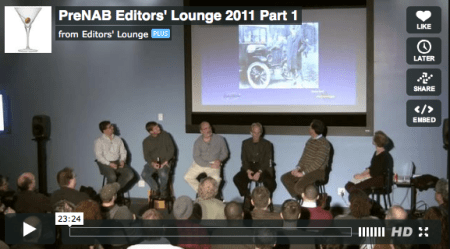
Video from the Editors Lounge Pre-NAB Panel Discussion was posted yesterday. I was part of it, and we covered a lot of interesting stuff, including the new FCP, the future of the editing UI, 3D, the lack of HDCAM-SR tape stock due to the tsunami, and many other things.

The other participants were Terry Curren, Mark Raudonis, Lucas Wilson and Michael Bravin, and the panel was moderated by Debra Kaufman. It was co-sponsored by Alphadogs and Keycode Media.

The video is in four 15-20 min. segments. So the two hour panel has been expertly trimmed to about 80 minutes.

Check it out at Vimeo.

Part 1 – Final Cut Speculation and Predictions
Part 2 – Evolution of the Editing UI/Editing Outsourcing
Part 3 – The End of Tape/Thunderbolt/Camera Evolution
Part 4 – 3D/Questions and Answers

Long Work Days and Your Heart

Posted April 8, 2011 by Steve
Categories: Quality of Life

In another sobering reminder that long work days influence your health, a paper published Monday in the Annals of Internal Medicine reports that people who worked 11 or more hours a day were 66% more likely to have a heart attack or die of one than those who worked 8 hours. Or course, the paper only demonstrates an association — they’d have to do a different kind of study to prove causality. But 66% is a pretty unsettling number.

NY Times Article / Abstract of Original Article

Final Cut Pro 8 Tuesday?

Posted April 7, 2011 by Steve
Categories: Avid, Avid vs. Final Cut, Final Cut

It appears that Apple will take the wraps off FCP8 (aka FCPX) at NAB Tuesday night at the Supermeet, a user group event that once focused on Final Cut but lately has branched out. This year is was supposed to feature presentations from several companies, including Avid and Aja, but on Tuesday the program abruptly changed, with Apple bumping all other presenters. The supermeet web site now refers to a “surprise sneak peek at something very special,” which is presumably FCP.

Terry Curren broke the story on the Avid-L listserv and Steve Hullfish has commented there and on the ProVideo Coalition blog. As you can imagine, there’s been plenty of talk in the blogosphere, and the reaction has not been all positive. Some people, including Scott Simmons, are pretty unhappy about the way Apple is throwing its weight around.

Without a presence on the show floor and even before the show opens, Cupertino has demonstrated that it has the power to suck all the air out of the room — without telling us a thing. Mark Raudonis made a presentation at the Editors Lounge a couple of weeks ago and got everybody talking without saying much more than “I saw it and it’s awesome.” When he was asked whether he plans to switch his company over, he politely demurred. That’s Apple’s MO — use mystery and surprise to focus attention. It’s in stark contrast to Avid, a company that now excels at reaching out to, and working with, its customers.

Based on Jobs’ design philosophy, the new version will probably focus on performance and user experience, and eliminate old metaphors whenever possible. I suspect that it will be resolution independent at least up to 4K, probably higher; it will use all the cores and graphics power on modern Macs, and attempt to make transcodes a thing of the past; and it’ll be fully multi-threaded, meaning that you’ll be able to save, render and do all kinds of other work while video plays. It may also ignore tape I/O and eliminate the source/record metaphor. Many features we’ve come to expect may be missing in action.

Will we in the professional world use it? Maybe not immediately. Avid will continue to shine in fully professional environments. But Apple has already got our attention. On Tuesday the reality distortion field will disappear, the multiverse will collapse into ordinary reality, and we’ll know a lot more.

Avid Agility and Media Composer 5.5

Posted March 23, 2011 by Steve
Categories: Avid, Avid Agility

Some of you may be wondering whether I’m planning an update to “Avid Agility” for Media Composer 5.5. The answer is yes. It’ll be a relatively minor update, with changes confined to the new features (mainly Find, PhraseFind, the Transition Tool and Legacy/Classic Trim Mode). There will also be adjustments in the illustrations to reflect the new arrangement of the Smart Tool. Those of you who are editing with Version 5 will probably want to stick with the current book because the screen images match the software you’re using. Those of you who expect to use Version 5.5 will want the new version. It should be available at Amazon in about three weeks and will be listed as the “Second Edition.” The first edition will continue to be available through the publisher, CreateSpace.

The Interaction Model

Posted March 20, 2011 by Steve
Categories: Avid, Avid vs. Final Cut, Avid Wish List & Bugs

Apple’s sneak peak of Final Cut 8 has encouraged people to start thinking about their wish lists: 64-bit, more native formats, background rendering, export to YouTube and many other ideas have been floated. That’s all great, but what I want is a new interaction model. Most of what we do as editors looks like this: play a clip or sequence, press stop, open a dialog box, make a change, hit okay, move the position indicator backwards, and play again. Over and over again, all day long. The idea that you could change a sequence that easily was miraculous in the early years, and the need for all that stopping didn’t seem onerous. But now it seems downright anachronistic. I want an application that keeps playing. We have the processor power to do this now, but our applications are full of low-level code that waits for you to hit stop before it’ll do anything.

In Pro Tools you can be playing your timeline in one area and go somewhere later in your session and make a change without stopping. When you get there, you’ll hear the change. Motion lets you loop your composition and change it while it plays. Final Cut lets you move around in the timeline while video keeps playing. Screenflow lets you save while video plays. And Sony Vegas lets you do just about anything without stopping.

What else would we get if we could have that never-stop technology?

  • Render while you work.
  • Never stop to save.
  • Import and export while you do other things.
  • Change bin data while watching dailies.
  • Play more than one clip at the same time, experiment with different placements of of music against picture, compare clips side-by-side.
  • Mix while you play without having to stop and hit record.
  • Live mute and solo.
  • Live editing.

To make music you need a musical instrument. Workflow enhancements are important. New features are important. But how the machine allows us to shape the material affects everything. The simplest potter’s wheel is more interactive, more tactile, more responsive than our best editing machines. It’s that kind of live interactivity that will change the way we work.

Reminder

I’ll be speaking at the Editors Lounge this Friday in Burbank, as part of their pre-NAB panel discussion.

Panelists: Debra Kaufman, Lucas Wilson, Mark Raudonis, Michael Bravin, Terry Curren and me.
Location:
Key Code Media, 270 S. Flower St, Burbank, CA 91502
Time: Food at 6:15, Panel at 7.

DetailsBe Sure to RSVP

