Health Plan Kicks In Sooner Than You Might Think

Posted December 29, 2009 by Steve
Categories: Editors Guild, Quality of Life

One of the most frustrating things about the health care bill working its way through Congress is that if it passes it won’t kick in for years (2013 for the House bill and 2014 for the Senate bill). It turns out that that’s true of the individual marketplace it sets up and for the subsidies to help people purchase plans there. But many other key provisions, some of particular concern to readers of this blog, will go into effect much sooner. One would extend Cobra eligibility for roughly four years. That ought to provide considerable extra peace of mind for people covered through the IATSE. Other provisions that come on quickly eliminate lifetime and yearly limits on coverage, partly close the Medicare drug “doughnut hole,” prohibit insurers from rescinding coverage when you get sick, limit insurance company profits, and force insurers to adopt uniform plan descriptions.

The details are in this NY Times blog post by David Herszenhorn: Health Bill Benefits for the Impatient. Check out the list that starts about halfway down the page. Some of it might surprise you.
Final Cut User Group Videos

Posted December 12, 2009 by Steve
Categories: Apple, Avid, Avid Technical Tips, Avid vs. Final Cut, Final Cut

Video from the LA Final Cut Pro User Group meeting I spoke at is now available for download via the Open Television Network. The meeting covered new features in MC 4.0 and featured presentations from me, Walter Murch and Shane Ross. Details are in this post. The video has been divided into three parts, one for each of the presenters. It’s not free, but the prices are minimal and the quality is excellent. Go to the LAFCPUG page on the Open Television Network and enter your credit card information. Click the link to subscribe to the feed via iTunes. Buttons for all recent episodes will appear in the iTunes podcast page. Take a look at the free previews or download each segment in full. It sounds like a hassle, but it worked well for me and only took a minute or two. You’ll get a signup discount of $5, so watching all three parts will cost you a whopping $2.47.

Media Composer Makes Nice with Snow Leopard

Posted November 23, 2009 by Steve
Categories: Avid

Avid released Media Composer version 4.0.4 this afternoon. The big news is that the new release is certified to work with Snow Leopard (OS X 10.6.2). The bad news is that Avid recommends a clean install of Snow Leopard, not an upgrade.

Here’s the relevant section from the ReadMe (page 4):

This release has been qualified with Mac OS® X Snow Leopard® v10.6.2.

You cannot perform an upgrade from the Leopard to the Snow Leopard OS. You must perform a clean install of Snow Leopard in order for the editor installer to install properly. See your Apple documentation for information on performing a clean install.

The upgrade is also reputed to fix a critical bug with Nitris and Mojo DX systems, where Fast Scrub would cause much-too-frequent waveform redraws. See this post for details. MC 4.0.4 will also work with Leopard, version 10.5.8.

Avid at the FCP User Group

Posted November 19, 2009 by Steve
Categories: Avid, Avid vs. Final Cut

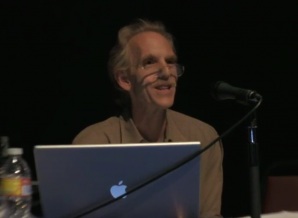
I spoke at a very interesting meeting of the LA Final Cut Pro User Group last night, along with Walter Murch and Shane Ross. Walter talked about moving back to MC after years with FCP and described in fascinating detail the relative merits of each application. Shane went over Avid Media Access, which makes it possible to work with file-based media without conversion, and offered an impressive demo of Avid’s Mix and Match capability, putting all kinds of material into a single timeline and playing it without a hiccup. I gave a brief introduction to Transition Preservation, Advanced Keyframes and Trim Mode, and I tried to convey my sense that Avid is a renewed company that is innovating aggressively. In other words, there was plenty of substance to chew on.

For me, the main takeaway was that the world is becoming a lot more balanced. A couple of years ago the Final Cut community was unanimous in its disdain for all things Avid. Last night was far more open. There was a powerful sense that both applications are worthy of consideration, that they have different strengths and weaknesses, and that newbies would be well advised to know both.

This can only be good for us as editors. Our internecine rivalries can be fun, but we should always remember that regardless of the tools we use, our shared goal is to create beautiful and compelling cinema, to shape space and time, to move audiences. We may prefer one tool or another, but the big win is that we have a choice. These applications aren’t finished — there’s plenty more to do. And as the manufacturers leapfrog each other, we editors can only benefit. I hope to see more events like last night, where content is king and bias is minimized. I learned a great deal, and I hope those of you who were present did, too. Please share your comments. I’m eager to know what you thought.

My special thanks go to Mike Horton, the heart and soul of LAFCPUG, for hosting this meeting. The group is a terrific resource and a critical part of the Los Angeles editing community. Video will be uploaded soon at this page on the Open Television Network and I’ll link to it when it’s available.

Final Cut User Group on MC v4 – Wednesday

Posted November 15, 2009 by Steve
Categories: Avid

This month the Media Composer will take center stage at the Los Angeles Final Cut Pro User Group (lafcpug). I’ll be making a presentation, along with Shane Ross and Walter Murch. I plan to cover some of the new editorial features in Version 4, namely Transition Preservation, and I’ll also do a quick overview of the Advanced Keyframe model and why I love trim mode. Shane will go over Avid Media Access (AMA) and the new Mix and Match frame rate capability, and Walter will describe his experiences returning to the Media Composer after so many years on Final Cut. It promises to be a very interesting evening and will probably be sold out by the end of the weekend.

The meeting takes place at the Gallery Theater in Barnsdale Park — 4800 Hollywood Blvd (between Vermont & Normandie). It’ll start at about 6:45 pm. Details and travel directions are here.

Admission is just $8. I’ve been given three free tickets to distribute. They’ll go to the first three people who add comments to this post. I’ll be able to see the name and email address you registered under, and you’ll present that at the door to pick up your tix. See you there!

Collapse the Composer Window

Posted November 13, 2009 by Steve
Categories: Audio, Avid, Avid Technical Tips, User Interface

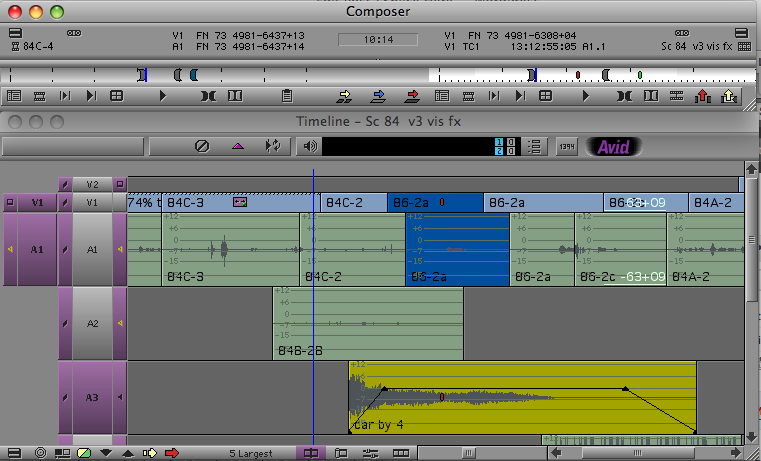
I explained in the last post how you can hide the Source Monitor, but you can also collapse the  Composer window, hiding video entirely and showing only buttons, menus and tracking information. This can expand your screen real estate mightily, making room for a much-enlarged timeline with plenty of room to manipulate audio keyframes and see waveforms. If you’ve got a client monitor, you’ll view video there.

mini-composer-2

This view was once called the “mini-composer.” To invoke it on a Mac, simply hit the the green “+” button at the top left of the Composer window. Or right-click on a video image and select “Hide Video.” To go back to your regular Composer view, hit the plus button again or deslect Hide Video.

You can do anything in the mini-composer that you could do in the regular composer. Trim mode is available, for example, and works as you’d expect. You can even drag from a bin to the source or record monitor. Just drop your clip onto the mini-composer window.

Of course, you wouldn’t work this way all the time, but for audio work, it can be very useful. I make it part of my Audio Toolset. (For more about Toolsets see this video post.)