Hide the Source Monitor

Posted November 8, 2009 by Steve
Categories: Avid, Avid Technical Tips

You probably know that the Composer Window can be resized, but did you know you can completely hide the source monitor? This can be very helpful if you’re short on screen real estate and want to work on a visual effect where you need to make things big — an Animatte, for example.

hide_source_mon

To hide the source monitor, Option-click (or Alt-click) the Source/Record Mode button at the bottom of the timeline. Then enlarge the Record monitor by right-clicking it and selecting Full Size Video. Or you can simply resize the Composer window by dragging its bottom right corner — if you drag it into a roughly square shape the source monitor will disappear.

To restore the source monitor, option-click the Source/Record button again, or drag the monitor into a wide rectangle.

You’ll probably want to memorize your custom window setup in a Workspace or Toolset. See this video tip for details.

DVR Love at the Networks

Posted November 2, 2009 by Steve
Categories: Media and Society

In another blow to conventional wisdom, the networks are now embracing the DVR. Yes, you read that right. The long-feared recorder, the device that was going to kill television as we know it, is now being seen as something of a savior. Why? Because we are finally measuring its effect. Instead of counting the number of people watching the show, Nielsen now measures something called “commercial plus three” — the number of people watching the commercials — within three days of airing. Well, it turns out that roughly half of the people watching recorded shows are not skipping the commercials. TV watching is a passive activity. We all knew that, but the folks at the networks just didn’t believe it and resisted the rating change.

What the new ratings show is that the DVR is increasing TV ratings — which now means the number of people watching the commercials — by 10 to 20%. In fierce network competition that’s a big number.

TV was supposed to kill cinema, the VCR was supposed to kill TV, and the DVR was supposed to kill network TV. Unintended consequences are always stronger than we think. Which is another way of saying that our ability to predict almost anything is pretty darn limited.

The details are here: DVR, Once TV’s Mortal Foe, Helps Ratings

No More Jumping Rollers

Posted November 1, 2009 by Steve
Categories: Avid, Avid Technical Tips

Media Composer makes it easy to trim asymmetrically (simultaneously trimming some elements to the right and some to the left), but the technique contains a subtle bug. If you make an asymmetrical trim that eliminates a clip by trimming it away, the roller attached to that clip doesn’t know where to go — and it jumps to a nearby clip. In a complicated trim, this is inevitably jarring, and if you don’t catch it, it can lead to mistakes that you only discover later.

In the illustration below, if you were to trim to the right, and go far enough to eliminate the clip in v1, the v1 roller would jump to another transition.

asymmetrical_trim

The problem has been in the system for a long time — since asymmetrical trimming was introduced in the early 90s. Well, believe it or not, it’s finally fixed. In Media Composer 4.0 rollers never move. This may sound like a small thing, but if you spend a lot of time in trim mode, it might just be reason enough to upgrade. As the I Ching says “Perseverance Furthers.”

The Pros and Cons of Fast Scrub

Posted October 26, 2009 by Steve
Categories: Avid, Avid Technical Tips, Avid vs. Final Cut, Avid Wish List & Bugs

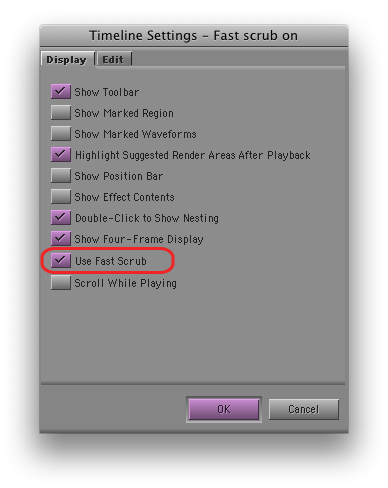
If you’re using Avid’s new DX hardware (Nitris or Mojo), then you’ve probably been using “Fast Scrub,” perhaps without knowing it. This is a slick new feature that makes the timeline more responsive, by dramatically improving the number of frames displayed as you drag. Fast Scrub offers some of the smoothest timeline performance in the business — so smooth that you can often check your work just by dragging through it. It also improves audio responsiveness, especially if you keep the caps lock key down. (I don’t, but I know many of you do.) If you’re using DX hardware you’ll find it in Timeline settings. It’s turned on by default.

But if you like to leave waveforms on — and I can’t work any other way now — then Fast Scrub will make you crazy. Why? Because it causes waveforms to redraw much too frequently, even when you are just manipulating video. If you simply move a video clip in segment mode — with no change to any audio — all your waveforms, for your entire timeline, will slowly redraw, during which time you can’t do anything but wait. Many other seemingly innocuous things will also trigger a redraw. Undo will usually do it, for example. I’ve even seen redraws after simply changing a clip name in a bin.

With a fast CPU, waveform display in the Media Composer has become very usable (and waveforms in MC have always been much more detailed than in FCP). But with Fast Scrub you have to turn waveforms off, or keep a straight jacket handy.

Okay, so why not just disable Fast Scrub, itself? Timeline dragging is plenty responsive with software-only systems or even with Adrenaline, so turning it off  shouldn’t be a big deal. Unfortunately, with the DX hardware and Fast Scrub off, timeline dragging goes back to the way it was before version 3 — very slow. So you’re damned either way.

Caught between a rock and a hard place, I’ve had Fast Scrub off for a week or so now, and I’m getting used to it. But I sure wish the timeline could be as responsive as it is on my laptop at home.

Turn Off the AC

Posted October 25, 2009 by Steve
Categories: Media and Society

thermostatWe in post-production use a lot of energy. It’s not always obvious — no blast furnaces are in evidence, after all — but when you add up all the devices we have running, often 24/7, you’re likely to come up with a big sum. The computer, the many monitors, the decks, the server: that’s a lot of little motors spinning and backlights lighting. And then, of course, there’s the heating and air conditioning. In our building, every room has its own thermostat, offering us the luxury of setting temperatures individually. And the thermostat comes with another little perk: an on/off switch.

As I was leaving the cutting room recently, I mentioned to a friend that I always turn the system off over the weekend. The response? “I don’t like to come in to a stuffy room in the morning.” I guess that’s a common concern. But as we look forward to the upcoming congressional debate on a big cap and trade system, we might consider some measures closer to home. One trivially easy thing we could all do is avoid heating, cooling (or lighting) empty rooms. If you’ve got a switch on your AC system, why not use it?

New Avid Tip Podcast

Posted October 24, 2009 by Steve
Categories: Avid Technical Tips

AvidscreencastChristian Foerster has started a new Avid screencast of video tips that you can subscribe to via iTunes. There’s only one episode so far, but it’s very nicely done.

Check it out.  His website is avidscreencast.com. The itunes page is here.