Dignity and Online Advertising

Posted August 6, 2009 by Steve
Categories: Media and Society

The new head of Consumer Protection at the Federal Trade Commission is apparently interested in protecting consumers. This novel idea is borne out in an interesting NY Times article explaining his fundamental concerns about a key web business model, namely that we give up our privacy and allow ourselves to be tracked in exchange for “free” content. His name is David Vladeck, and he spent 26 years at a public-interest law firm, so he might actually have some bona fides regarding the protection of consumers.

The whole thing seems so odd to me. We are essentially being paid to watch ads — on TV or on the net. But we’re being paid at a rate that we have no control over, and it’s being done surreptitiously, with each advertiser secretly trying to get as much dirt about us as possible so as to figure out how they can get us to buy stuff — hopefully without us realizing that we’re being manipulated. Long term, it just doesn’t make sense in a democracy.

I vote for a simpler system — just pay me to watch ads and let me choose the ads I want to watch. Even better, auction off the ads — some advertisers would pay more for my time and some pay less. I, the consumer, can trade what I watch/earn for content. I can watch the ads whenever I want — no need to interrupt me or distract me. And if I don’t want to watch ads, well, I just pay for the internet or TV with real money.

Ads I choose to watch ought to be a whole lot more valuable to advertisers because I am actually interested in the product. Advertisers can learn about what I’m interested easily — no subliminal activities required. There’s no privacy issue — no internet tracking would be allowed, and none would be needed. Everybody is happy. I suspect that consumers would actually buy more.

But maybe I’m naive. Maybe they have to force feed us all this stuff or the world will come to an end (ie, the internet will cease to exist).

And yes, Vladeck did use the word “dignity” to talk about his goals for online advertising. What a concept.

Final Cut 7

Posted July 23, 2009 by Steve
Categories: Avid vs. Final Cut, Final Cut

Well, it’s finally happened. Apple has released a new version of Final Cut Studio. As has become typical for Apple, the web pages explaining the new features are slick, well thought out and come with concise and well produced explanatory videos.

New features are described on this page. My personal favorites in FCP: slick integration with iChat theater for remote collaboration, background export, realtime audio filters, and multi-touch gesture support via a trackpad (including the ability to scrub the timeline). Other features, like the timecode window, speed change controls, more resolutions in ProRes, global transitions, and the ability to show SD title safe in HD material, seem like attempts to keep up with Media Composer.

The other aps in the suite offer lots of additional improvements, including the ability to burn regular and Blue-Ray DVDs from within Compressor, support for Euphonics control surfaces in Soundtrack, and many 3D and titling enhancements in Motion.

All-in-all it looks like an important upgrade, but perhaps a bit more evolutionary than revolutionary. The price has come down, too. It’s now $999.

Tech Tips Organized for Your Enjoyment

Posted July 1, 2009 by Steve
Categories: Avid, Avid Technical Tips

Responding to popular demand (thanks, Harry), I’ve put up a page with a complete list of the tech tips I’ve posted, organized by subject. You can always click on the category menu in the right-hand column and select “Avid Technical Tips,” but the tips list should make things easier to find.

It’s here: Avid Tech Tips

The list will always be available under “Pages” in the right-hand column. And I’ll keep it up to date as additional tips are posted.

The Supremes and the DVR

Posted June 30, 2009 by Steve
Categories: Media and Society

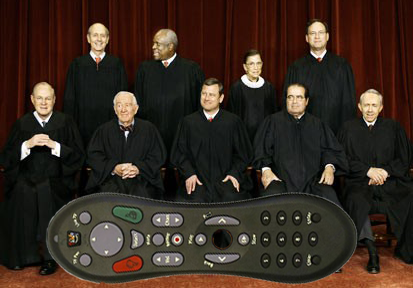
supreme_remoteWell, it’s finally happened–a US Supreme Court decision that affects the world of non-linear editing. Perhaps I exaggerate. But on Monday the court let stand a lower court ruling that allows cable TV operators to market network DVRs. The idea is that you’d simply identify the show you want recorded and the recording would take place on the cable company’s servers. No longer would you need a local hard drive to record or play back material–your existing cable box would do it all. This will inevitably make DVR technology cheaper and more widely deployed. Those of you who have “on-demand” service for selected programs know how convenient it is. This creates the possibility of on-demand service for everything and puts another nail in the coffin of scheduled television. Watch whatever you want, whenever you want, for less money with less hassle and no special equipment. Needless to say, the networks opposed the decision.

NY Times Article

Ars Technica Article

We Like Being Interrupted

Posted June 29, 2009 by Steve
Categories: Media and Society

I thought I had a pretty good idea of how commercials work, but an article in the NY Times surprised me. It seems that commercials can actually improve the way a show plays. People who watched an episode of “Taxi” with commercials liked it better than those who watched without interruption. If you like something, and it’s interrupted, you tend to like it more. That is, except when the show is demanding of your attention. So commercials make an escapist show that doesn’t require much attention play better. Who’d a thunk it?

Editing DVD Material in an Avid

Posted June 23, 2009 by Steve
Categories: Avid, Avid Technical Tips, Workflow

I recently had to re-edit some source material that lived only on a DVD. And I had to do it at home on a software-only Media Composer system. Many friends told me not to attempt this–too many settings, too many ways to screw yourself up. Better to use a good DVD player, using component or SDI outputs, and digitize via hardware: Adrenaline, Mojo or Nitris. But I didn’t have the hardware, so I persisted.

There are indeed, many, many ways to convert DVD material to Avid media, and by now, it seems like I’ve tried them all. I’ll describe the workflow I came up with below. It seems to work well and once you figure it out, it’s not all that hard to do. Quality is quite good.

The process begins with software to get the video off the DVD. On a Mac, you can use Handbrake, Cinematize, and MPEG Streamclip, among other applications. MPEG Streamclip has two advantages: it’s free, and it’ll digitize directly into Quicktime formats, including the Avid QT formats. Handbrake will only transcode into different MPEG flavors or AVI, so to get into a Media Composer you have to transcode twice. Video captured that way looked okay, and if you’ve got Handbrake I wouldn’t be afraid to use it, but I wanted to skip the extra step. I ended up with MPEG Streamclip.

Settings are critical. You want to digitize into a 480-line format. Video on DVD is 480 lines high. But standard def is usually 486 lines and those extra six lines can create problems, putting horizontal bars into your video when you output. The most common 480-line non-mpeg format is DV. But it turns out that there are several flavors of DV. If you use the standard Quicktime DV codec in an Avid, you can end up with elevated blacks. Better to use the Avid DV codec. The Avid version has another  advantage. You can work at DV50, which offers twice the bandwidth and more color resolution (422) — roughly equivalent to Digibeta.

Insert your DVD and open MPEG Streamclip. Select File > Open DVD and point the application to your DVD. Pick the track you’re looking for. If necessary, open each track and play it to figure out which is which. Streamclip asks if you want to fix timecode breaks. I skipped that step.

Choose the audio track you want. If you have a two-track (dolby stereo) version on the disk you’re probably better off with that. MC doesn’t understand 5.1 and you’ll have to load the individual tracks separately. Then select File > Export to Quicktime. Here’s where the fun begins.

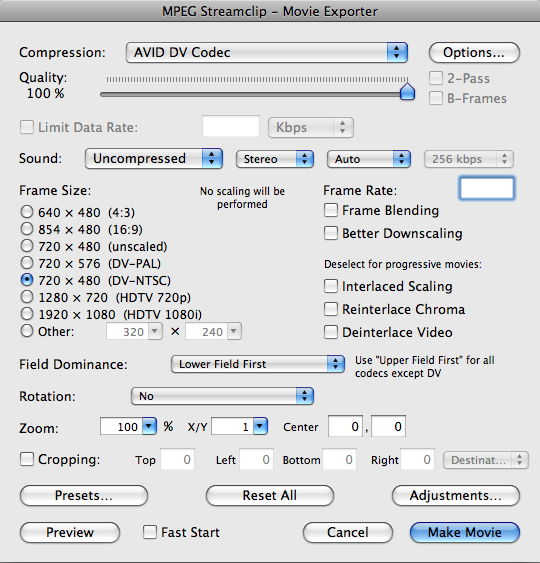
I set the basic import options as follows (if you have trouble seeing the screenshots, click them and they’ll enlarge in a new window). The main idea is to use the Avid DV codec at 100% quality, lower field dominance. If you’ve got 24p material on your disk you’ll want to de-telecine it, and you may need another application. I didn’t experiment with that.

MPEG Streamclip Options

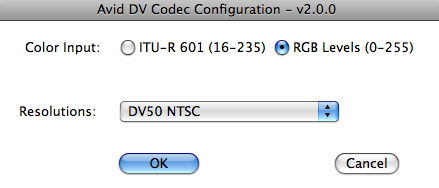
Click the Options button to reveal the Avid DV Codec options. Be sure to select DV50 and RGB levels.
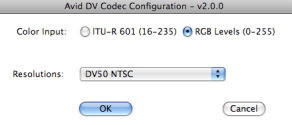
Avid DV Codec Options

Then click Make Movie to begin digitizing. On a dual-core Macbook Pro this took roughly real time. When you’re done you’ll have a Quicktime-wrapped Avid DV file.

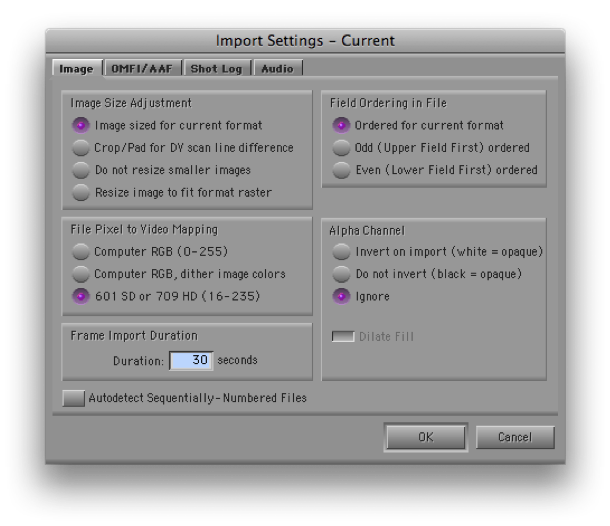
You now have to import this into the MC. The idea is to simply remove the Quicktime wrapper without altering the underlying video. To do that, you have to get the MC to do a “fast import.” Open your Import settings and set them up like this:

Import Settings

The critical settings are “Image sized for current format,” and “601 SD.” That’s right — you want RGB, but if you select “Computer RGB” the video will be re-encoded. The button is apparently misnamed — “601” really means “don’t muck with it.” Audio will come in first. When video starts loading make sure the progress bar says “fast import.”

When you’re done you should have a very clean-looking piece of Avid media. Mine was also very responsive, using a laptop with nothing but a Firewire 400 drive. To see the video in its full glory be sure to select the green/green quality setting at the bottom of your timeline.

Edit away, as needed.

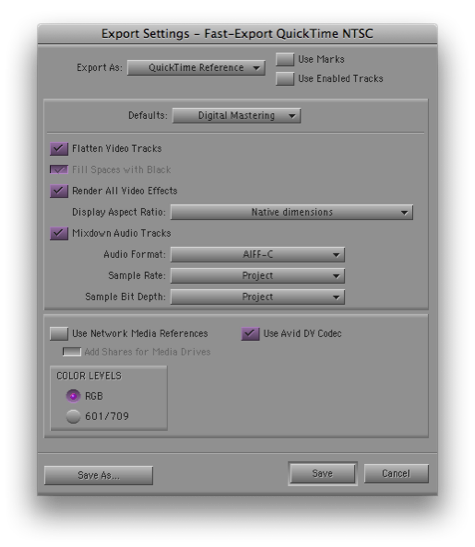
When you’re ready to output, your best and fastest option is a Quicktime Reference file. This references your Avid video media and avoids re-encoding it. You’ll want to use the Avid DV codec and set RGB levels, which is where you’ve been all along. (Of course, the reference file won’t work on another machine unless you bring your Mediafiles folder with you.)
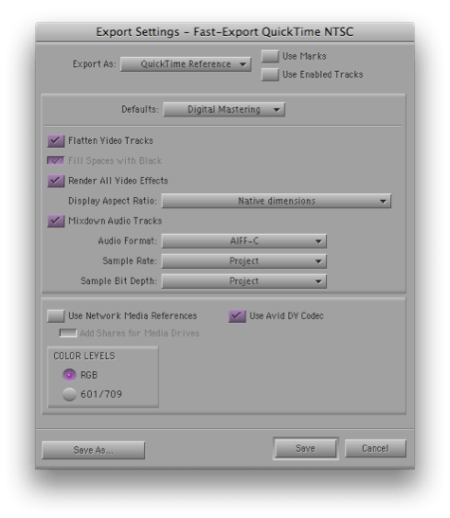
Export Settings

And that’s it. Seems easy now, doesn’t it? But I must have done 25 tests over a period of a week to get all this worked out, and there are issues I didn’t fully deal with (de-telecining and using the 5.1 audio, among others). There really ought to be a better, simpler way. But without extra hardware, this approach, or something like it, looks like the best you can do right now.

Many thanks to Rainer Standke, Michael Phillips, Jeff Ruscio, Michel Rynderman and everybody on Avid-l for their help with this.