Installing Media Composer 3

Posted July 31, 2008 by Steve
Categories: Avid Technical Tips

The deed is done. I have Media Composer version 3.0 running on my Mac laptop. The upgrade wasn’t trivial, partly because I moved from Tiger to Leopard at the same time, and I’ll attempt to explain for the uninitiated.

First, there are now two current versions of MC. Version 3.0 is for Leopard. Version 3.01 is for Tiger. Why would you want to run Tiger? Because there is a known bug in the Leopard Firewire code that makes using Adrenaline and Mojo boxes unreliable, especially for digitizing. Avid says this has to be fixed by Apple, and no fix has appeared. If you want to use your existing Adrenaline or Mojo with MC version 3, you need to stick with Tiger and use 3.01. If you’re using the newer Avid breakout boxes, namely the Mojo DX or Nitris DX, you’ll be fine in Leopard.

Here’s what I did:

  1. Uninstall Media Composer (in my case, v 2.8) and all other Avid applications. You do this using the Avid uninstaller aps. They’re here: Macintosh HD/Applications/Avid Uninstallers. There’s a separate uninstaller for every application you’ve got. I had to run the uninstaller seven times.
  2. Check out your system and back up. I started by running Disk Utility and checking my internal drive. Then I did a complete system check (including a surface scan of the drive) with TechTool Pro. And finally, I ran Cocktail to rotate the system caches and repair permissions. Then and only then did I clone the internal drive using SuperDuper. You’ll need a drive that’s at least as big as your system disk to do this. Confirm that your copy is good by booting from it.
  3. After doing all this system maintenance, I upgraded to Leopard using the standard Apple procedure (shove in the DVD and do what it says). There’s a school of opinion that says you should do an erase and install, which wipes your drive and starts over, and then use Migration Assistant to bring back all your files and applications from the SuperDuper clone. I’m told this works well, but I decided to go the easy way first. I could always do the erase later.
  4. Download and install all Apple upgrades via System Preferences/Software Update. I’m told that this is critical because if you were updating Tiger regularly some of your applications will actually get rolled back during the upgrade to Leopard. The updater will solve that.
  5. Test the Leopard installation. I used it for three days before I decided it was okay. A couple of programs had to be updated, but nearly everything worked fine, including a lot of old applications that I was worried about. I do regular speed tests using a benchmarking utility called Xbench and I was initially dismayed to see that disk speeds had gone down after the upgrade. But it appears that this was the result of Spotlight indexing the drive. As time went on, disk speeds improved.
  6. Install Media Composer 3. First, insert the Media Composer DVD, and do a regular install. Then, following directions on a yellow card that came with the upgrade, go to avid.com/upgrade, register your upgrade and request a dongle updater. This will be emailed to you or you can download it. Locate your DongleManager software (it’s not where the card tells you, it’s here: Macintosh HD/Applications/Utilities/Avid Utilities/DongleManager/DongleManager) and hit the update tab. Then open the file and update.
  7. After that, you should check that your MC runs. If it does, go ahead and do additional installations. I was eager to see Avid FX, so I installed that. I’ll also be installing EDL Manager and FilmScribe.

That’s about it. The whole process took several days, much of which involved the move to Leopard. But the Avid part of the upgrade could have been a lot easier. The company has spent many years dealing with a priesthood of certified tech people, and it needs to get better at talking directly to editors.

First, Avid badly needs a create a “Welcome to Version 3” document that clearly and simply walks you through the whole process. Instead, you get three separate sheets that are confusing and rate a zero for graphic design. (You can also go to this page for more info.) And the installer needs to get a whole lot smarter. There are way too many steps and too many opportunities to make a mistake. The installer should be responsible for the uninstalls — or at least there ought to be a single, unified uninstaller. The various elements of the suite, especially those made by Avid, ought to be installed together. The dongle should be updated automatically. And the MC, like every other modern application, ought to go out to the net and determine whether it is up to date.

In any event, I have now moved my machine into the present. I’ll talk about my impressions of version 3 after I’ve had a chance to play with it for awhile.

Technorati Tags:

Getting Rid of the Old Gear

Posted July 30, 2008 by Steve
Categories: Media and Society

I imagine we’ve all faced this problem — what to do with an old computer.

Last week I sold a 450 Mhz G4 tower along with a good 19″ Trinitron. Together, they cost about $3,300 in 2000 when they were new. The CPU still ran OSX just fine and the monitor was way better than your typical LCD. My goal was to find somebody who would actually use it, and if that wasn’t possible, then to dispose of it responsibly.

It took 10 days on Craig’s list. At $200 I didn’t get a single call. $75 seemed to be the magic number.

While my computer wasn’t selling, I was looking for places where I could give it away. I didn’t find much. The World Computer Exchange is supposed to get computers to young people in the developing world. They have a chapter in LA, but they only take Mac laptops and only in Massachusetts.

After that, I would have used an LA County E-Waste drop off center. If you you live in LA and haven’t used one of these places you should consider it. They’ll take your monitor, your CPU, and just about anything else that shouldn’t go in the trash, including paint, oil and solvents (list of locations). I’ve used the one on Vista Del Mar near LAX and enjoyed the whole process, including the drive along the beach. There are two pounds of lead in a 17″ monitor. And all kinds of other crap in that CPU of yours. By using the e-waste center you’re doing what you can to keep your garbage out of somebody else’s water.

Another choice, of course, would have been Goodwill or the Boys and Girls Club. I’ve given them a lot of stuff over the years.

In the end, though, the whole thing seemed awfully strange to me. We’re blythly purchasing and using these gadgets — and they are abandoned every year by the millions. Where do they end up?

Technorati Tags:

4K for Avid, Apple and Adobe

Posted July 28, 2008 by Steve
Categories: Avid vs. Final Cut, Avid Wish List & Bugs, Quality of Life, Workflow

Following up on the last post, if we’re really looking at a future where resolution goes away as an issue for picture editing, as it has for sound, what does that mean for the designers of the software we use?

This is why so many people are now talking about “workflow.” What do we do with all this digital stuff? How does it move through the post production process?

But, frankly, I’m getting pretty tired of that word. Because it all too often means more work for the editing room. We end up shouldering more of the dailies burden and more responsibility for finishing, we work harder and longer and somehow, somebody else pockets the difference.

And I dislike the word for another reason. Because it’s become an excuse for editing equipment manufacturers to ignore the needs of editors. They start thinking that they’ll win the game if only they can cut Red material directly, or P2 or XDCam. And yes, of course, that’s important. But focusing on it tends to help you forget that there’s a creative person doing the work and that his or her imagination has to be nurtured.

So my wish for the manufacturers is that they forget about workflow and think about work. Start focusing on how human beings do all this and let that notion balance your interest in materials and process.

There is one workflow issue that does matter to me, however, and that’s how the equipment can better support collaboration among the small teams that end up making a film. We have a tower of Babel right now — incompatible file formats, resolutions, sample rates; applications that live in their own little worlds, unable to share much of anything with each other; and especially, no good way for a work-in-progress to evolve while all participants keep working on it. How much extra work do we all go through to keep sound, visual effects, music and color correction up to date with picture?

Yes, Apple has a lead over Avid in putting a complete post production studio in a box. They’ve empowered individuals to work as one-man-bands. But nobody has really figured out how to do workgroup collaboration yet. The winner of the NLE wars has to do both. And has to inspire editors to do their best work at the same time.

It’s a tall order. But it seems to me that because digital file formats have changed everything, the playing field is now much more level than many of us acknowledge.

Technorati Tags: , , , ,

4K on the Desktop?

Posted July 25, 2008 by Steve
Categories: Workflow

Back in the early ’90s, when HD wasn’t even a glimmer in our eyes, I predicted that online and offline would merge. But that didn’t really happen. What changed instead was that the bar was raised. Just as it became possible to work with uncompressed standard def on the desktop, HD came along and made the SD issues irrelevant.

Today, we’re seeing compressed HD as the new offline format of choice for television and feature work. But we haven’t lost the old offline/online paradigm. Uncompressed HD is still a bridge too far for a lot of people. But someday that won’t be true. For that matter, rumor had it that Apple was going to offer a 4K desktop solution at last year’s NAB. It didn’t materialize, but can it really be that far off?

Which leads to a question: what are we going to do with all that power? Do we want to do full-bore finishing in the formerly offline editing room? Or is there an intrinsic difference between editing-from-dailies and finishing, a difference that no amount of equipment will change?

Yesterday I visited a friend who was doing a complete sound job on an industrial. He was cutting dialog, sound effects, creating a score and mixing the whole thing, straight through to delivery, in his extra bedroom. Sound always seems to get to these things first, partly because the bandwidth issues are easier. Will we picture editors soon be doing the same kind of thing, even as resolutions increase?

This is a key question for editors, equipment manufacturers, and facilities alike. What does the shape of the post production landscape look like when we can do final, finish-quality work, at any resolution, on the desktop? How do we prepare for that time?

Then again, maybe the issue is overblown. We tend to get sucked in by the allure of all the glitzy new gear and too often ignore the human dimension. Does anybody really envision a time when we’ll be mastering “The Dark Knight” in the same room where it got edited? I doubt it. Way too much risk for a limited economic benefit. But the trailer? The featurette? The DVD. Probably. And lower budget features. Sure. Anywhere that the risk/benefit equation skews toward cheap.

Even at the top of the pyramid, if we don’t have responsibility for mastering, we’ll be doing more titles, more visual effects, more sound work — and more of that is going to make it onto the screen unchanged.

Which means more responsibility for editors and assistants. And the inevitable need to keep improving our skills.

Technorati Tags: , , , ,

New Storytelling / New Distribution

Posted July 22, 2008 by Steve
Categories: Media and Society

The Conversation” is a new conference focused on new media storytelling and distribution. It takes place October 17 and 18 at the Pacific Film Archive in Berkeley, CA, and already has many interesting speakers lined up. Author Scott Kirsner, who writes the CinemaTech blog is one of the founders. Check it out at theconversationspot.com.

Technorati Tags:

Moveable Type

Posted July 16, 2008 by Steve
Categories: Media and Society

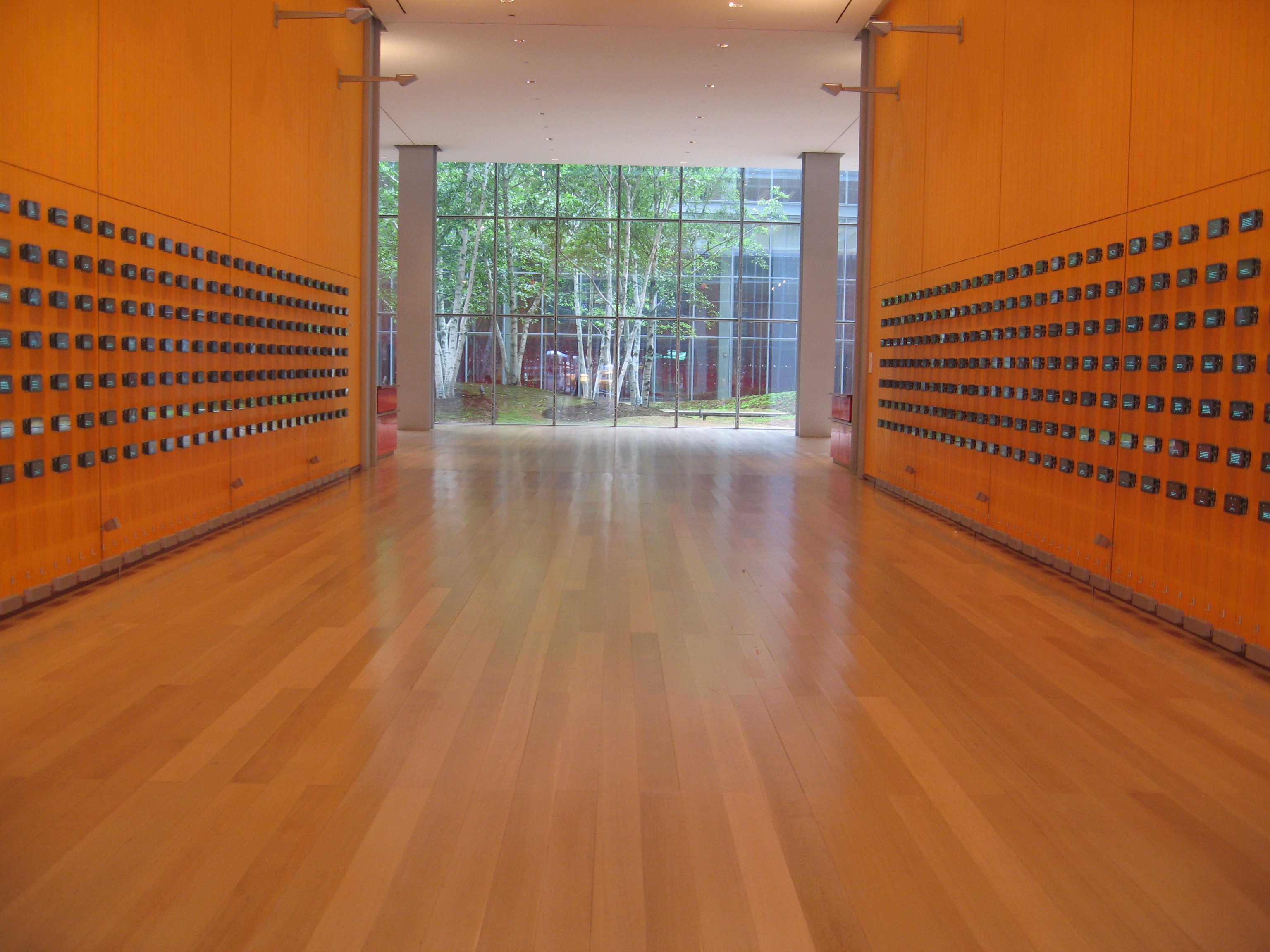
Moveable Type Exhibition

I was in New York recently and saw a wonderful piece of video art, displayed in the lobby of the new New York Times building. It’s called Moveable Type and, in the words of the designers, it’s “an active portrait of the New York Times that is fueled by the contents of the daily paper and the visitors to NYTimes.com.” It uses natural language processing algorithms to “extract fragments — words, phrases, quotes, numbers and places — from The Times’s growing, living, real-time news database and to recombine these fragments into a series of ever changing kinetic compositions.”

Physically, it consists of a couple of hundred small screens (deliberately old fashioned, vacuum-fluorescent displays) suspended on a wire grid, each mounted on a little computer, complete with a speaker, and all networked into the Times’ database, stretching back to the middle of the 19th century. There are about 15 moving “scenes” that it works through, each expressing a different theme, and pinging material around the room with sound that travels as well. Sometimes it sounds like a subway, other times like typewriters or linotype machines. The content itself never repeats because it’s wired into the living, breathing news of the world.

I was blown away by it and could have stayed for hours. Take a look at the video below (1:45). It gives you a taste, but keep in mind that it was made with a still camera and text is mostly unreadable, so it’s hard to appreciate what’s going on.

The Times posted this article about the installation along with this video interview with the artists, Ben Rubin and Mark Hansen.

The New York Times building is at 620 8th Avenue, between 40th & 41st Streets, across from the Port Authority Bus Terminal. I believe the lobby is open 24/7.

Technorati Tags: