Avid’s Fourth Quarter Numbers

Posted February 5, 2007 by Steve
Categories: Avid

Avid released lackluster quarterly numbers on Thursday, and the stock price fell about 5% on Friday and seems headed for another drop today. Revenue is down from last year and the company showed a net loss for the period. Even if you subtract a $53 million charge for “the impairment of goodwill associated with the acquisition of Pinnacle Systems,” (whatever that means!), you’re still looking at a company that just barely broke even.

For the year, revenues were up relative to 2005, but the company still showed a net loss.

CEO David Krall called the results “mixed” and pointed to a “shortfall in our video business in the fourth quarter.”

One has to wonder how much the slow adoption rate for Adrenaline here in Hollywood influenced these results. Adrenaline is nearly four years old, but you still don’t see very many systems in editing rooms here. Personally, I would use Adrenaline every time over Meridien. But it’s been hard for me to find others who strongly recommend it.

Adrenaline, like Meridien before it, simply doesn’t offer enough for feature and television editors. The product is less expensive than Meridien, does a lot more in terms of visual effects, and this year runs without extra hardware. But there isn’t much in it that makes editors like me say “I gotta have this.” And it was much too buggy for far too long.

Editors in the “longform” world represent a significant portion of Media Composer sales, and upgrades here could certainly contribute to Avid’s bottom line. But that won’t happen until the company makes a concerted effort to understand what we need and create features that make us sit up and take notice.

Next Bin

Posted February 2, 2007 by Steve
Categories: Avid, Avid Wish List & Bugs

Another easy-to-do feature that would make it a lot easier to work on a laptop: a keyboard shortcut that would cycle you through all open bins. On a small screen your windows are inevitably overlapped, and the result is that bins tend to get covered up. It would be great to be able to hit a key and go to the next open bin. It would save a lot of mouse clicks and menu picks.

Many other applications offer this. In Word it’s Command-F6. In Photoshop it’s Control-Tab. And the Finder lets you switch applications with Command-Tab. The MC needs it, too.

Running the MC at Home

Posted February 2, 2007 by Steve
Categories: Avid, Avid vs. Final Cut, Avid Wish List & Bugs

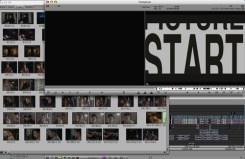
Overlapping WindowsI’ll be buying a new machine to replace my aging G4 shortly. My goal is to make this my primary computer at home — and I’d also like to be able to do some editing with it. Avid doesn’t make this easy, in at least two ways.

First, the company is always late to the party with operating system compatibility. With an Avid installed on your machine you are well advised to upgrade the OS with great care, lest you make your Avid flaky or nonfunctional. Avid blames this on Apple and I’m sure there’s something to that, but it still feels less and less acceptable these days. I just don’t have other applications that are this fussy. Somehow, virtually every other software manufacturer is able to deal with changes in the OS more quickly than Avid. Even Digi does a better job.

The second problem lies in the way Avid handles non-standard monitor configurations. The Media Composer was designed to work with two monitors, each with a 4:3 aspect ratio. You put your bins on one and the composer (the source/record monitor) and the timeline on the other.

Two 4×3 monitors was state of the art in 1991, but not today. We’ve got much bigger screens available and it ought to be possible to work comfortably with just one of them. Both Avid and Apple allow you to put your windows wherever you like them, so — problem solved, right? Wrong.

The trouble lies in window activation. Apple’s laptops and big monitors all have aspect ratios of about 16×10. But two 4×3 monitors next to each other have, in total, an aspect ratio of 16×6. In other words there’s a lot more width. If you try to jam bins, composer and timeline into 16×10 what you get is overcrowding. Either you make your bins very tall and narrow, or you overlap your windows. Overlapping shouldn’t be any big deal — except when you try double clicking on a clip. Your shot opens in the appropriate monitor, and the composer window comes forward. But the timeline stays where it is, behind the bin, creating the mess you see in the image above. So every single time you put a clip in a monitor, you’ve got to click again on the timeline in order to actually do anything with that clip. This may seem like a small thing, but anybody who has tried to cut on a laptop, and look at their bins in frame view, knows how annoying this can be.

Final Cut works differently, but isn’t much better. In FCP the viewer and the canvas are separate windows. That can be helpful in certain situations. But in this case, it just confuses things. If you double click on a source clip the viewer comes forward — but not the canvas and not the timeline. If you double click on a sequence, you get the canvas and the timeline, but not the viewer. In each case you have to click again to to do something useful.

People who work with their bins in text view are probably okay with this setup — tall and narrow bins are fine when you’re just looking at text. But I don’t work that way and neither do a lot of people I know. It shouldn’t be much of a challenge for the engineers to change this kind of behavior. The question is, as always, “What does the customer want?” This one is easy — just make window activation a preference. That would make it a whole lot simpler to work on diverse displays and it would make it a lot easier for me to buy a new monitor, too.


Quicktime Pro

Posted January 31, 2007 by Steve
Categories: Avid Technical Tips, Avid vs. Final Cut

Avid has done a pretty good job of making OMF the professional standard for sound turnover, but for picture, Quicktime is king. I’m finishing up a show now that used no tape in our turnover process — none for the DI, none for sound effects and music, none for mixing. The only videotapes we generated were for overseas looping where the facility insisted on it. This kind of workflow has held sway on shorter projects for some time now, but for major features, a fully-digital, quicktime-based workflow is relatively new. The advantages are many: better accuracy, better quality, lower cost and the ability to send material around via the net. On a good projector, Quicktime can look better than tape.

I suspect that this represents a competitive advantage for Final Cut over Avid, since FCP is Quicktime-native. But with the use of the Avid Quicktime plug-in, the Media Composer can function pretty well in a Quicktime world.

One essential tool for Avid folk is Quicktime Pro. It’s an upgrade to the Quicktime Player that opens up important additional functionality, namely the ability to do limited editing and make conversions from one format to another.

As an example, I recently needed to create a DVD with a new temp-mix audio track. Since we already had a locked QT picture for each reel the easiest way to do this was to use QT Pro and combine the existing picture with the new sound. The procedure is this: open the picture in Quicktime Pro and use the Properties window (command-j) to delete any sound tracks it contains; then open the audio files and use the “Add to Movie” command (command-option-v) to lay them under the existing picture. In our case, we had two mono tracks, so, again using the properties window, we identified them as left and right. We then saved the whole thing as a new Quicktime. That was much easier and faster than importing, editing and exporting with the Media Composer, and it was safer, too.

In short, Quicktime Pro belongs in every digital editor’s toolkit. At $30, it’s a bargain.

What You See is What You Know

Posted January 24, 2007 by Steve
Categories: Media and Society

Did anybody pay attention to the camera placements for the State of the Union speech last night? I was watching ABC, but I think all the networks were taking the same feed. They had only two wide shots, one from the back of the room on a jib arm and one shooting across the room toward the Republican side. Other angles were either on the President or were mobile.

As usual, the senators and congressmen are seated according to party: Republicans are on the right, Democrats on the left.

The wide camera on the jib arm was from the back and left side of the room and showed the Republican side from the front and the Democratic side from the back. The stationary wide shot covered exactly half the room — the Republican half.

Needless to say, Republicans applaud everything the President says, and Democrats often refrain from applauding. But because of the way the cameras were placed, you never saw that. Every time they went wide you thought the whole room was clapping because the stationary wide shot only showed the Republican side. The jib arm showed the Democrats, but only from the back. You couldn’t see what the Democrats were doing. You saw the Republicans clearly.

The only way you could tell that the Democrats weren’t enthusiastic about Bush’s speech was by deduction. You had to look at their backs and figure out that they weren’t clapping. You never saw it plainly.

The effect was to reinforce the idea that the whole room was united around the wonderful policies of our dear leader. Dissent didn’t exist because you couldn’t see it.

The All Digital Workflow

Posted January 23, 2007 by Steve
Categories: Workflow

Every show I’ve worked on in the last couple of years has embodied a new workflow twist. Before the digital revolution we made movies and television one way: on film with Moviolas or KEMs. We shot film, we delivered film and everybody stayed in synch, and in synch with each other, by referencing the film.

Today we’re rapidly moving to a world where film doesn’t exist. We’ll shoot on something digital, be it HD, 2K or 4K, record images on solid-state media and hard drives, pass it around on hard drives, and deliver it to the theater without the help of chemistry or celluloid.

Many of the big challenges we’re facing all turn on how this new paradigm gets implemented — how we get and view dailies (and what are dailies, anyway), how we picture editors turn over to sound, how we get sound files back, how we deliver to distributors and theaters.

This is not only a headache for us, it’s slowing the evolution of our tools because every manufacturer has to devote significant resources to these workflow issues, trying to stay focused on what amounts to a moving target.

Right now, an all-digital workflow looks like a lot of headaches because we’re losing the single defining standard that held us all together for so long. With luck, we’ll get to another standard, or set of standards. For me, it can’t happen soon enough.
