In Praise of Unified Search

Posted June 6, 2011 by Steve
Categories: Avid, Avid Technical Tips

I’ve been using MC 5.5.2 for about 2 and a half weeks now and my first impressions are very good. Working with two Unity seats and a reasonable amount of media, it’s been stable, fast and responsive.

A lot has been made of this version’s new phonetic search capability. Certainly the most gee whiz new feature, the system “listens” to your audio, building its index in the background, and then lets you find dialog with surprising accuracy.

But for a scripted show, it’s the new unified Find feature that wins for me. I was recently looking to to fill a scene that was just too quiet. Nothing in my sound effects library felt like part of the scene and I quickly wanted to listen to all of the room tone that had been recorded. We’ve got dozens of bins and only a few pieces of RT. The prospect of opening all those bins seemed like a lot of effort that might be wasted, but then I realized I could look through them all at once. Fifteen seconds later I had found what I was looking for.
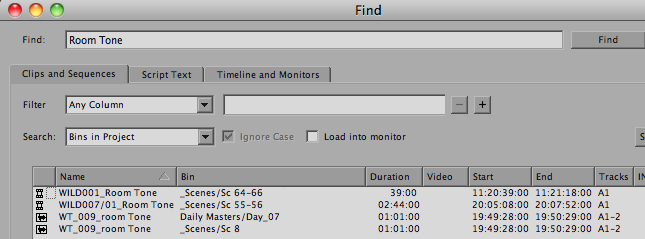
Being able to search for any data in any bin isn’t new in the history of non-linear editing, and it isn’t flashy. But in terms of bread and butter functionality, it’s going to change the way we Media Composer users work every day.

Customer Support – Not!

Posted May 29, 2011 by Steve
Categories: Adobe Premiere, Apple, Avid vs. Final Cut, Consumer Editing, Final Cut

I recently spent some quality time on the phone with Microsoft customer support in the far east. I’ve used Microsoft mice for years, but I needed to temporarily uninstall their mouse driver. I ended up speaking to five people including a supervisor and the supervisor’s supervisor. None had any Macintosh experience. There is apparently no such thing as Microsoft Mouse/Keyboard support for Mac. After two callbacks, the supervisor’s supervisor finally informed me that the uninstaller exists in the my Utilities folder. It doesn’t have the same name as the mouse driver, but there it is. Time wasted — two hours.

I’ve had similar experiences with Adobe tech support for its publishing program, In Design, where it often seems that all problems can be solved by reinstalling the application or trashing your preferences. If that doesn’t work, then the bug you found is actually a feature.

We’ve all had these experiences. And painful as they are, they are one thing when they relate to your phone bill, and another when they’re about a piece of software you depend on to make a living.

Two weeks ago Avid took over the AlphaDogs Editors Lounge event with a series of simultaneous, small-group meetings where customers could get up close and personal with key Avid personnel. CEO Gary Greenfield was on hand, along with the principle Media Composer product managers and engineers. Anybody present could pose questions to the key decision makers at Avid and get honest answers.

Contrast that to Randy Ubillos’ impressive Final Cut X demo at the NAB Supermeet. He showed off lots of intriguing technology, and the crowd cheered. But no questions were permitted.

Avid and Apple are playing to their strengths. Apple is once again democratizing the market, making it possible for more and more people to edit, and hoping for customers numbered in the millions. Avid is building on its deep roots in the professional community and keeping those relationships as close and current as possible.

I’m glad both companies exist. They’re doing different things and both are important. But when it comes to customer support, I’ll take the up close and personal kind, any day.

Avid Agility for Kindle

Posted May 21, 2011 by Steve
Categories: Avid, Avid Agility

Today, I’m very excited to announce the release of Avid Agility for Kindle. As many of you know, I’ve been busy working on this version for months now, hoping to create an ebook that fully incorporates the printed book’s illustrations and looks as good on screen as it does on paper. I’m proud to say that the version I’m releasing today is every bit as effective as the traditional one, especially on larger color screens, and it has some important advantages: it’s easier to carry around, you can quickly search for anything you’re interested in, all cross references are active and clickable — and it’s less expensive.

Remember that you can read Kindle books on all kinds of devices, not just the Kindle itself, where the black and white screen is a limitation. Avid Agility looks particularly good on the iPad, where the big color screen works wonders for the illustrations, and it’s also available on the iPhone and on Android phones and tablets. The free Kindle apps for Mac and PC mean that you can have the book where you need it most — on your editing system, while you work.

The new Kindle version is also available in many European countries, where you can get it without having to pay shipping charges.

The book has gotten terrific reviews: from some of the most important editors in Hollywood to relative neophytes. You can be reading it in seconds by ordering from Amazon’s Kindle Store. Find out more about it here. I hope you like it as much as I do.

Avid Post-NAB Event – May 13

Posted April 26, 2011 by Steve
Categories: Avid

Avid will be holding an important post-NAB event a week from Friday at the Editors Lounge in Burbank.

On hand will be CEO Gary Greenfield and many of the key product managers and designers, including Dave Colantuoni, Director of Product Management, Frank Capria, Consulting Designer for Product Management and Steve McNeill, Director of Architecture and Design. Steve will preview Avid’s solution for 3D editing (very powerful) and Dave will discuss plans for the future.

They’ll also be showing off Media Composer 5.5, which features the company’s new PhraseFind technology, allowing you to search for dialog (or anything else) throughout your project. And you’ll have a chance to play with Avid’s new physical controllers.

DETAILSLOCATION AND MAP

The Editors Lounge opens at 6:30 pm. Food will be provided. Presentations will begin at 7.

BE SURE TO RSVP. Space is going to fill up quickly.

Avid Agility and Media Composer 5.5

Posted April 19, 2011 by Steve
Categories: Avid, Avid Agility

Today, I’m excited to announce the release of the second edition of my book, Avid Agility, now updated to cover the exciting new features in Media Composer 5.5. Like the first edition, it represents most of what I know about Media Composer; it’s profusely illustrated, well organized, and beautifully printed in color. You’ll find details and sample pdfs here.

The reviews have been terrific:

  • Jonathan Moser, Post Magazine:
    “Like having a seasoned pro sitting next to you, revealing his trade secrets. Avid Agility will make you a better editor, guaranteed!”
  • Ray Zone, Editors Guild Magazine:
    “May well be the ultimate book on customizing Avid’s unique capabilities for individual creative editing.”
  • Edgar Burcksen, CinemaEditor Magazine:
    “Will guide you to the next exciting level in the art of editing.
  • Norman Hollyn (USC):
    “An amazing work — for both new and old Media Composer users.”
  • Frank Capria (Avid):
    “An easy read, logically laid out, and useful to novice and experienced editor alike. I highly recommend this book.”
  • Steve Hullfish:
    “A very readable, incredibly illustrated book. Consistently delivers magical little tricks that make you say, ‘I wish I’d known that yesterday!’”
  • Lawrence Jordan:
    “The quickest path to becoming a Media Composer Jedi Master. Clear, comprehensively-illustrated and easy-to-understand.”

Avid Agility, Second Edition is available from the publisher, CreateSpace and from Amazon. As a way of saying thanks to my loyal readers here, I’m temporarily offering a 20% discount at CreateSpace. Be sure to enter this discount code: 27DDGFWY. Economy shipping is inexpensive and will get you the book in a week or so.

I hope you like the new edition, and I’m eager to hear your feedback. Add your comments to this post or write me directly at steve@splicenow.com

ORDER FROM CREATESPACE //  ORDER FROM AMAZON

FCPX 2nd Day

Posted April 14, 2011 by Steve
Categories: Avid, Avid vs. Final Cut, Final Cut

For a better look at the FCP-X introduction, check out these videos: part 1, and especially part 2. What’s striking to me on second viewing is how much of the demo focused on editing. There were none of the de rigueur things we’ve gotten so used to — no mention of the number of realtime layers, for example, and little discussion of which media formats can be used. Instead, they talked about how editors work.

A few examples: The timeline doesn’t have tracks — it just has empty space. Sync picture and sound clips can be moved around as single objects. You can have multiple, independently editable timelines in the same sequence. Instead of audio keyframes, you drag the ends of fades. When you trim, all the clips in the timeline move. Speed ramps are done by grabbing part of the clip itself and stretching it.

It remains to be seen whether I would want to cut a complex sequence without asymmetrical trimming. Or whether I’d want to look at a timeline where sync audio clips and dialog edits weren’t visible. Or whether I’d want to lock music and sound effects to picture clips all the time in order to keep sync when trimming. Or whether I could do without the ability to lock two sequences together and compare them side by side. Nor is it clear how you’d turn over to sound, or share a project between editors, or handle big projects.

But whatever you think of this demo — and today’s reaction was pretty mixed in some circles — it focused on how we work. That’s where the innovation was, and that’s what got the crowd charged up.

