Archive for the ‘Avid vs. Final Cut’ category

4K for Avid, Apple and Adobe

July 28, 2008

Following up on the last post, if we’re really looking at a future where resolution goes away as an issue for picture editing, as it has for sound, what does that mean for the designers of the software we use?

This is why so many people are now talking about “workflow.” What do we do with all this digital stuff? How does it move through the post production process?

But, frankly, I’m getting pretty tired of that word. Because it all too often means more work for the editing room. We end up shouldering more of the dailies burden and more responsibility for finishing, we work harder and longer and somehow, somebody else pockets the difference.

And I dislike the word for another reason. Because it’s become an excuse for editing equipment manufacturers to ignore the needs of editors. They start thinking that they’ll win the game if only they can cut Red material directly, or P2 or XDCam. And yes, of course, that’s important. But focusing on it tends to help you forget that there’s a creative person doing the work and that his or her imagination has to be nurtured.

So my wish for the manufacturers is that they forget about workflow and think about work. Start focusing on how human beings do all this and let that notion balance your interest in materials and process.

There is one workflow issue that does matter to me, however, and that’s how the equipment can better support collaboration among the small teams that end up making a film. We have a tower of Babel right now — incompatible file formats, resolutions, sample rates; applications that live in their own little worlds, unable to share much of anything with each other; and especially, no good way for a work-in-progress to evolve while all participants keep working on it. How much extra work do we all go through to keep sound, visual effects, music and color correction up to date with picture?

Yes, Apple has a lead over Avid in putting a complete post production studio in a box. They’ve empowered individuals to work as one-man-bands. But nobody has really figured out how to do workgroup collaboration yet. The winner of the NLE wars has to do both. And has to inspire editors to do their best work at the same time.

It’s a tall order. But it seems to me that because digital file formats have changed everything, the playing field is now much more level than many of us acknowledge.

Technorati Tags: , , , ,

Heard in Passing

July 16, 2008

I continue to hear good reports about Media Composer 3.0. Yesterday, I talked to somebody at a rental house who is supporting a show running five new Macintosh-based MC systems using the new hardware and cutting DNX36. So far, very solid. And I’ve heard from several friends who are running MC-software that they like what they are seeing. Some will say that reports like this are long overdue, and I wouldn’t disagree. But it seems that Avid’s long effort to kill bugs and improve reliability and efficiency is paying off.

Meanwhile, I’ve talked to members of the editing faculty at two Los Angeles film schools who all indicated that students tend to come in much more comfortable with Final Cut, but after being exposed to both MC and FCP at school, they almost always end up preferring MC as an editing tool.

Both comments are little more than rumors. Take them for what they’re worth. But in my experience there’s a trend here. Media Composer is improving, and people are noticing.

Technorati Tags: , , , ,

Is the Suite Sweet?

June 16, 2008

One big question for the next phase of digital post production is whether developers ought to focus on building a suite, or whether an all-in-one application makes more sense. And the more I think about this subject, the less I understand it. Yes, there’s an obvious distinction between a big all-in-one program and a group of smaller, separate aps that do the same thing. But if you look at it more closely the edges blur.

Microsoft popularized the suite with Office, but even there it has rolled together functions that others deal with separately. Entourage integrates all the functionality of Apple’s separate Mail, Calendar and Address Book programs, and Word includes more and more desktop publishing functionality that used to be handled exclusively by Quark or Pagemaker. If you expand the definition enough, every application on your computer could be seen as part of a suite that is hosted by the operating system.

When it comes to digital media, Avid began life trying to roll as many functions as possible into a single app. Editing, visual effects and sound were all included. Final Cut started with that model, too. But now Apple offers Final Cut Suite, and Adobe offers CS3, with Audio, DVD and VFX tools. Avid now includes AvidFX, Sorenson Squeeze, SonicFire Pro and Avid DVD, though the last two only work on Windows. (For more about the Avid suite see Frank Capria’s recent post on the Source/Record blog.)

So is a suite better than a powerful all-in-one environment? The more I think about it the more this looks like the wrong question. The real issue is integration — how the different modules, whatever you call them, work together to produce a consistent, responsive environment that best supports the editor’s creativity.

Case in point: I just finished a show with Media Composer and did the titles with Apple Motion (details in this post). I enjoyed using Motion and loved all the things it let me do. But I had to do deal with two sets of media and two separate timelines, I had to do way too much importing and exporting, and I had to manage two different projects.

That’s a key issue — if the elements of your suite are working on the same data then they should all be accessible from the same timeline. Importing and exporting should be instantaneous and invisible.

Another key issue is look-and-feel. AvidFX looks like a much-improved way to do titles, and it works on MC data nicely. But it doesn’t look like the MC.

This points to one big advantage of a suite — not for editors but for software developers. It’s easier to create because you can buy the separate apps, put them in one box, and advertise a long list of capabilities. The key question for editors comes down not to what’s in the box, but how well the parts fit together.

However you package the tools, what I want in an editing environment is the same. I want a powerful editing application with great trimming tools (ie. MC) and great segment tools (ie. FCP), I want integrated titling and vfx in the main timeline with minimal rendering. I want professional 5.1 mixing and sound editing — again, in the same timeline. And I want the ability to make a basic DVD without creating a separate project to do so. I don’t want to have to conform sound elements to my own picture changes. And I don’t want to have to export and import to create titles or effects or simple DVDs.

Each of the three companies has succeeded with parts of this, but nobody does it all — yet.

Technorati Tags: , , , ,

Making Titles with Motion

March 30, 2008

This week, I finally gave up on using the Avid title tool. Nothing’s changed, of course. It still does what it always did, all the way back to the early ’90s. But back then, a main title meant a series of cards fading in and out. Today, title animation is so common that I felt compelled to try and find another way. And yes, I’ve made a good faith attempt with Avid Marquee, making all my titles with it on at least one show, but it’s way too techie and so badly integrated with the MC that sometimes it’s laughable (for more, check out these posts “Fixing the Title Tool” and “More on the Title Tool.”)

I know that some of you use After Effects, and I realize that it’s very powerful, but for me, it seems to require an awful lot of meticulous attention to keyframes.

Enter Apple’s Motion. Motion offers “behaviors” — canned combinations of keyframed parameters that can be stretched and shrunk to make your animations do all kinds of things that would take hours with other applications. And Apple helpfully allows you to preview these behaviors, and to mix and match them if you don’t see what you want. It is also completely real-time. You never render anything, and that makes it feel very responsive. You can also let it play your animation as a loop and change parameters while it’s running, which makes it seem even more spontaneous.

So I just completed a first draft of a main title with Motion. Though the learning curve was much steeper than I had initially expected, I was able to do things that I couldn’t even contemplate with the MC. Specific impressions follow.

Pros:

  • All real-time. No rendering. Lots of canned effects.
  • Easy to do impressive things quickly, but fine-tuning takes longer.
  • Integrates with the MC fairly well, as long as you’re willing to export and import and you know a few tricks.
  • Good on-line manual. There’s plenty of conceptual explanation, so you can get a high-level look at what you’re trying to accomplish and then dive into the details. Contrast this with MC’s online help, which gets to the nitty gritty, but often skips the big picture.

Cons:

  • Maximum resolution is HD, so it’s not appropriate in a film/DI environment. I’m working on a show that will deliver HD, so it’s not a problem, but I want to use this on film shows, too.
  • Not particularly stable. Crashed regularly and with no warning, making me value Adrenaline’s comparatively bullet-proof performance.
  • Not good with two monitors — I didn’t see a way to split the timeline from the viewer, for example.
  • Despite Apple’s heroic attempt to shield you from keyframes, you’re eventually going to need the program’s keyframe editor. And because it graphs keyframe values in 2D space, it needs lots of screen real estate and isn’t particularly intuitive for AE or MC users.

Tips:

  • If you’re working in a traditional offline/online environment, be sure to set up your project at the screen resolution that you’ll deliver at. Talk to the people who will online your project and work out the specifics before you start.
  • You’ll have to experiment with export choices a bit. I exported at the Motion project resolution, using the default settings, and imported the resulting Quicktime into the MC with “invert alpha” at 1:1 resolution. That created cleaner keys. It helped that my standard-def Avid project is 16×9 squeezed. Thus the aspect ratio in the Avid and in Motion matched. (See this post for more.)
  • I chose to “export selection,” which meant that each title came over as a separate item. If you want to move your entire Motion project into the MC, you can just drag the little icon at the top of the Motion project window directly into an Avid bin.
  • I was able to install MC software and Motion on my laptop and didn’t see any conflicts. But our rental company insisted on creating a dual-boot setup for our Adrenaline systems. That isolates the MC for safety, but it’s awkward.

Bottom line — Avid needs a new title tool. Though I like Motion, I didn’t much enjoy going back and forth between the two programs, and rendering all the mattes in the MC is a pain. Making a small change means going back to Motion and then doing the export/import thing again. The integration is better in the Final Cut environment, but you still have to leave FCP to do your titles. Avid has an opportunity to build a better title tool, and to put it where it belongs — in the editing application.

Technorati Tags: , , , ,

Segment Mode in a Complex Timeline, Part 2

March 19, 2008

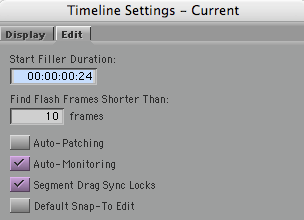
In the previous post on this subject (available here), I left out one big issue, namely how segment drag works with sync locks. There are two choices for this, selected via a checkbox in the timeline settings window:

Sync Locks Setting

“Segment Drag Sync Locks” inserts black during a segment mode drag and that ought to solve some problems. But it does it in such a strange way that I can’t imagine how anyone would use it. (And you can still throw your timeline out of sync with sync locks on, which shouldn’t be possible.)

Here’s what happens if you drag picture only with that check box selected:

Picture 4-Pix Only Seg Locks On

Sync is no better than when this option is off, and track still gets broken up.

If I drag picture and sound together I get this:

Picture 5-Pix And Track Segment Locks On

Once again, black is added but in a totally unhelpful way and sound is broken up.

None of these methods do what I need, allowing me to move groups of overlapped clips around in the timeline without breaking any of them into parts. There’s no easy way to do that now and there should be.

Technorati Tags: , , ,

Segment Mode in a Complex Timeline

March 16, 2008

The Media Composer has always done a better job when first-cutting than with re-editing. There are good historical reasons for this: most longform editors can’t or won’t do beta testing over the nine-month-or-more timeframe of a typical feature film, and Avid beta on a single product never lasts that long anyway. The result is that I find rearranging and inserting material into a multi-track and heavily overlapped timeline pretty cumbersome.

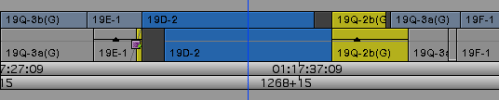
When recutting, my best friends are asymmetrical trim and sync locks. Segment mode is essential, too, but it’s frustrating — with a complext timeline it tends to require too many steps. To demonstrate this I’ll use a highly simplified example with just two clips, as follows.

Picture 1 - Orig

The goal is to interchange the blue and yellow clips. Interchanging picture-only is simple. Just grab a picture clip with yellow segment mode, hold down the command key for snap-to-heads, and drag. This is the result:

Picture 3-Drag Pix And Track

But I want to move picture along with sync sound, and both clips are overlapped at both ends. Here’s what happens if I drag picture and sound. Picture does the right thing, but sound gets broken up, with a hunk of the yellow clip’s audio floating free.

Picture 2-Drag Pix Only

To fix up this timeline, I have to rejoin the two yellow audio clips and I have to make room to do that. Not straightforward at all.

Instead, I wanted picture and sound to move together and intact. Like this:

Picture 8-What I Wanted

It takes way too many steps to get the timeline into this condition, where clips haven’t been broken up and can be re-edited easily.

As a partial solution I’d accept the ability to insert black into an overlapped timeline, like this:

Picture 9-Insert Black Into Overlapped Tl

In Media Composer, there’s no easy way to do that, either. FCP allows you select all clips to the right of the cursor. You can then drag them over and open up space. But that’s an incomplete solution to the problem posed here — you still have to move the clips, and that takes several more steps. What I really want is the ability to directly move only the clips I’m interested in — without cutting anything up. Neither MC or FCP make that easy.

(For more on this subject, see this post: Segment Mode in a Complex Timeline, Part 2.)

Technorati Tags: , , , ,