Archive for the ‘Avid’ category

Avid DX Sneak Preview

April 10, 2008

Avid offered a sneak preview of their new hardware offerings at Universal Tuesday night. To my everlasting frustration, I was unable to go, but the details are emerging. CEO Gary Greenfield and new head of the video division Kirk Arnold were there, along with Matt Feury and Michael Phillips and a host of engineers and others. The message seemed to be: “We understand you (better than the other guys). And we want your input (unlike the old Avid).” And from what I heard, the audience thought they made both points effectively.

The big announcement was new hardware across the product line. Adrenaline is gone, to be replaced by something called “Mojo DX,” a high-def, rack-mounted box that does away with the old and slow Firewire connection and replaces it with an extension to the much-faster PCI-e bus. Symphony DX will likewise get powerful new hardware. Media Composer will move to version 3 and offer some new features, including a real-time timecode burn in effect, and improved multi-stream effects capabilities. It’ll be able to intelligently address multiple CPU cores and also use the DSP power of your graphics processor and should be a lot more responsive as a result. And it will run under Leopard and Vista.

Michael Phillips demonstrated Avid’s new XML export functionality, with an architecture that allows other manufacturers to write small conversion programs (“droplets”), so that they’ll be able to import sequence and bin information (but apparently not effects descriptions).

Pricing has come down dramatically, and there will be several upgrade alternatives for current owners.

More specifics will emerge at Avid’s events at the Hard Rock in Vegas this Sunday and Monday. For more about Wednesday’s event, see these articles: Digital Production Buzz and HD Head.

Technorati Tags: , , ,

Making Titles with Motion

March 30, 2008

This week, I finally gave up on using the Avid title tool. Nothing’s changed, of course. It still does what it always did, all the way back to the early ’90s. But back then, a main title meant a series of cards fading in and out. Today, title animation is so common that I felt compelled to try and find another way. And yes, I’ve made a good faith attempt with Avid Marquee, making all my titles with it on at least one show, but it’s way too techie and so badly integrated with the MC that sometimes it’s laughable (for more, check out these posts “Fixing the Title Tool” and “More on the Title Tool.”)

I know that some of you use After Effects, and I realize that it’s very powerful, but for me, it seems to require an awful lot of meticulous attention to keyframes.

Enter Apple’s Motion. Motion offers “behaviors” — canned combinations of keyframed parameters that can be stretched and shrunk to make your animations do all kinds of things that would take hours with other applications. And Apple helpfully allows you to preview these behaviors, and to mix and match them if you don’t see what you want. It is also completely real-time. You never render anything, and that makes it feel very responsive. You can also let it play your animation as a loop and change parameters while it’s running, which makes it seem even more spontaneous.

So I just completed a first draft of a main title with Motion. Though the learning curve was much steeper than I had initially expected, I was able to do things that I couldn’t even contemplate with the MC. Specific impressions follow.

Pros:

  • All real-time. No rendering. Lots of canned effects.
  • Easy to do impressive things quickly, but fine-tuning takes longer.
  • Integrates with the MC fairly well, as long as you’re willing to export and import and you know a few tricks.
  • Good on-line manual. There’s plenty of conceptual explanation, so you can get a high-level look at what you’re trying to accomplish and then dive into the details. Contrast this with MC’s online help, which gets to the nitty gritty, but often skips the big picture.

Cons:

  • Maximum resolution is HD, so it’s not appropriate in a film/DI environment. I’m working on a show that will deliver HD, so it’s not a problem, but I want to use this on film shows, too.
  • Not particularly stable. Crashed regularly and with no warning, making me value Adrenaline’s comparatively bullet-proof performance.
  • Not good with two monitors — I didn’t see a way to split the timeline from the viewer, for example.
  • Despite Apple’s heroic attempt to shield you from keyframes, you’re eventually going to need the program’s keyframe editor. And because it graphs keyframe values in 2D space, it needs lots of screen real estate and isn’t particularly intuitive for AE or MC users.

Tips:

  • If you’re working in a traditional offline/online environment, be sure to set up your project at the screen resolution that you’ll deliver at. Talk to the people who will online your project and work out the specifics before you start.
  • You’ll have to experiment with export choices a bit. I exported at the Motion project resolution, using the default settings, and imported the resulting Quicktime into the MC with “invert alpha” at 1:1 resolution. That created cleaner keys. It helped that my standard-def Avid project is 16×9 squeezed. Thus the aspect ratio in the Avid and in Motion matched. (See this post for more.)
  • I chose to “export selection,” which meant that each title came over as a separate item. If you want to move your entire Motion project into the MC, you can just drag the little icon at the top of the Motion project window directly into an Avid bin.
  • I was able to install MC software and Motion on my laptop and didn’t see any conflicts. But our rental company insisted on creating a dual-boot setup for our Adrenaline systems. That isolates the MC for safety, but it’s awkward.

Bottom line — Avid needs a new title tool. Though I like Motion, I didn’t much enjoy going back and forth between the two programs, and rendering all the mattes in the MC is a pain. Making a small change means going back to Motion and then doing the export/import thing again. The integration is better in the Final Cut environment, but you still have to leave FCP to do your titles. Avid has an opportunity to build a better title tool, and to put it where it belongs — in the editing application.

Technorati Tags: , , , ,

Segment Mode in a Complex Timeline, Part 2

March 19, 2008

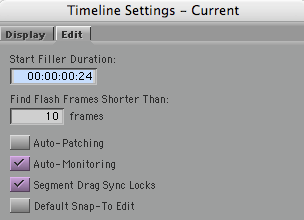
In the previous post on this subject (available here), I left out one big issue, namely how segment drag works with sync locks. There are two choices for this, selected via a checkbox in the timeline settings window:

Sync Locks Setting

“Segment Drag Sync Locks” inserts black during a segment mode drag and that ought to solve some problems. But it does it in such a strange way that I can’t imagine how anyone would use it. (And you can still throw your timeline out of sync with sync locks on, which shouldn’t be possible.)

Here’s what happens if you drag picture only with that check box selected:

Picture 4-Pix Only Seg Locks On

Sync is no better than when this option is off, and track still gets broken up.

If I drag picture and sound together I get this:

Picture 5-Pix And Track Segment Locks On

Once again, black is added but in a totally unhelpful way and sound is broken up.

None of these methods do what I need, allowing me to move groups of overlapped clips around in the timeline without breaking any of them into parts. There’s no easy way to do that now and there should be.

Technorati Tags: , , ,

Avid Lowers Prices and Drops Xpress

March 17, 2008

Avid lowered prices for the software-only Media Composer today, dropped Xpress Pro from the product line and launched a new “community” web site with video tutorials and other resources.

The new price for Media Composer software is $2495. Any college student with an ID can get it for $295 (the old policy restricted student discounts to a few big institutions). Existing Xpress Pro customers can upgrade to MC for $495.

The press release is here. The new community site is here.

Technorati Tags: , , ,

Segment Mode in a Complex Timeline

March 16, 2008

The Media Composer has always done a better job when first-cutting than with re-editing. There are good historical reasons for this: most longform editors can’t or won’t do beta testing over the nine-month-or-more timeframe of a typical feature film, and Avid beta on a single product never lasts that long anyway. The result is that I find rearranging and inserting material into a multi-track and heavily overlapped timeline pretty cumbersome.

When recutting, my best friends are asymmetrical trim and sync locks. Segment mode is essential, too, but it’s frustrating — with a complext timeline it tends to require too many steps. To demonstrate this I’ll use a highly simplified example with just two clips, as follows.

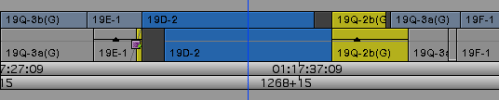
Picture 1 - Orig

The goal is to interchange the blue and yellow clips. Interchanging picture-only is simple. Just grab a picture clip with yellow segment mode, hold down the command key for snap-to-heads, and drag. This is the result:

Picture 3-Drag Pix And Track

But I want to move picture along with sync sound, and both clips are overlapped at both ends. Here’s what happens if I drag picture and sound. Picture does the right thing, but sound gets broken up, with a hunk of the yellow clip’s audio floating free.

Picture 2-Drag Pix Only

To fix up this timeline, I have to rejoin the two yellow audio clips and I have to make room to do that. Not straightforward at all.

Instead, I wanted picture and sound to move together and intact. Like this:

Picture 8-What I Wanted

It takes way too many steps to get the timeline into this condition, where clips haven’t been broken up and can be re-edited easily.

As a partial solution I’d accept the ability to insert black into an overlapped timeline, like this:

Picture 9-Insert Black Into Overlapped Tl

In Media Composer, there’s no easy way to do that, either. FCP allows you select all clips to the right of the cursor. You can then drag them over and open up space. But that’s an incomplete solution to the problem posed here — you still have to move the clips, and that takes several more steps. What I really want is the ability to directly move only the clips I’m interested in — without cutting anything up. Neither MC or FCP make that easy.

(For more on this subject, see this post: Segment Mode in a Complex Timeline, Part 2.)

Technorati Tags: , , , ,

“Legacy” Bugs

March 11, 2008

One of the most maddening things about the Media Composer is that certain bugs never seem to get fixed. Regularly complained about, they’ve been in the software for so long they’re like old friends — or maybe enemies that never die. Avid could do a lot of good by dealing with some of these problems, and the bang-for-buck (editor satisfaction vs. engineering man hours) would probably be very high.

Here’s my list of favorites:

Slow Response When Opening or Creating a Bin
I’ve already mentioned this, but it bears repeating. Every time you open a bin or make a new bin the software runs a little routine that re-acquires every clip frame — from disk — in every open bin — even ones that are completely blocked behind other windows. This takes T I M E. And when you just want to quickly open a bin and check for something, this can drive you nuts. The software appears to be running the same routine that’s invoked every time you come back in from the Finder. It makes sense in that case because the MC needs to make sure no media has changed. But just to open a bin? Not necessary.

Source Timeline Glitches
When a clip is newly loaded into the source monitor and you hit “source timeline,” the timeline doesn’t center around the cursor. So you don’t know where you are. And the zoom factor always seems wrong. And then there’s the bug where you see the timeline for a completely different sequence until you cause a timeline redraw.

Rollers Jump to Next Cut
If you trim one element of an overlap cut to nothing, the roller will often disconcertingly jump to a nearby cut, screwing up your rhythm and forcing you to reset the trim.

Can’t Drag a Stereo Pair to the Next Track
Dragging stereo pairs vertically is perversely restricted. You can only move up or down two tracks at a time. I understand the logic for this circa 1993, but in 2008 does anybody need this?

Fades Don’t Work Properly Unless Cut Against Black
Fades are really dissolves to black. Cut a fade out of one clip against a fade in of another and try to trim the resulting transition. You can’t. Put a fade out on picture and sound at the end of your sequence using the “tail fade” button and you won’t be able to lengthen the end shot. (For more about fades see this post.)

Locators in Black
Never add a locator in black. If you do, you’ll corrupt that segment. (One symptom is that every time you move a segment adjacent to that black, you’ll create new, unnecessary, add-edits within it.)

Can’t Add Black at the End of a Sequence
How long do we have to work around this? It’s been there for 20 years.

Client Monitor Freezes in Trim Mode
If you’ve got rollers on both sides of a cut, and you’ve got dual image play turned on in trim settings (a great feature that FCP doesn’t have), your director is going to see a frozen frame while you look at a nicely moving image. This is an Adrenaline-only thing, but it’s been with us way too long.

That’s my short list. I’m sure you’ve got your own. Please add them in the comments.

Technorati Tags: , , ,