 Those of you who are thinking about purchasing my book “Avid Agility” may have noticed that Amazon stopped discounting it last week. Their discount formula is a closely guarded secret, but I’m happy to say that humans can prevail, and after I talked with tech support, they’ve reinstated it. In fact, they’re now offering the book at their lowest price ever — just $30.99, making this a terrific time to pick up a copy. With its detailed illustrations and simple explanations, “Avid Agility” is a great way to learn about using Media Composer in the real world. Check out reviews and order it from Amazon. Or take a look at the sample pdfs here.
Archive for the ‘Avid’ category
Amazon Reinstates Discounts on Avid Agility
February 13, 2012Final Cut X vs. Media Composer 6 Podcast
December 27, 2011 If you’re looking for a sane and reasoned comparison of Media Composer 6 and Final Cut X — from the real world of the editing room trenches — look no further than the latest edition of Kanen Flowers’ “That Post Show” podcast. I was a participant, along with Scott Simmons, Paul del Vecchio and Kanen. The show is available from the iTunes store, or you can download it on the show notes page. This episode is facetiously titled “Edit Pro Supergood.” Fair warning: it’s long, and Skype failed us a few times, but it’s consistently substantive and, from my biased perspective, makes for interesting listening.
Avid Releases MC6
November 16, 2011 Avid began distributing Media Composer 6 today. The new version has been upgraded to offer 64-bit support, and includes many new features, including a complete reinvention of the application’s approach to 3D-Stereo editing, the ability to mix in 5.1 and 7.1, “Open I/O” which allows you to use a variety of third party hardware options, tabbed bins, and a “reskinning” of the user interface. If you purchased version 5.5 in the last month or so, the upgrade is free, otherwise, it’s $300. Pricing for new licenses remains the same as with previous versions, and Avid has instituted a permanent “cross-grade” from FCP7 for $1500.
This version represents a bigger break from the past than previous upgrades. The new UI looks a lot like Premiere, and depending on your taste, you’re either going to love it or hate it. As with Version 5 and 5.5, it offers a brightness slider, but the lighter settings, which I suspect will be a lot easier to look at over the course of a long day, are flatter and less dimensional than in the past, making icons and buttons harder to see. Some icons have been changed, too, notably Mark In and Mark Out, and some terminology has been altered (Locators are now called Markers).
64-bit is important, but for the moment, it only permits the application to address more RAM. There’s no background rendering or saving or timeline manipulation, or any of the other exciting things that you may associate with the concept — that’s all been left for the future. The application seems stable, but keep in mind that everything has been recompiled, and your mileage may vary. (The Title Tool is one of the few exceptions — as a result, it now runs as a separate application.) 64-bit also means that older computers won’t work. If your Mac is more than about 3 years old you’re probably out of luck. (Go to System Profiler, click on “Software” and look for “64-bit Kernel and Extensions: Yes.” [Update: this may not be strictly necessary. See my Dec 1 comment.]) On the Mac, this version is officially supported only on OS X Lion, but it should run on Snow Leopard if you’re not using shared storage. You’ll also have to upgrade all of your AVX plug-ins.
Avid’s goal was reinvent 3D-Stereo editing and they seem to have done it in spades, with tools that are unmatched in any other offline editing application. There’s also support for a new 444 DNX format, which opens the door to high-quality conforms, though raster size is still limited to HD. 5.1 and 7.1 mixing are welcome, but their utility is limited because the playable track count is still stuck at 16. You’ll max things out with just three 5.1 stems (18 tracks).
Avid seems to be aiming this release at least partly at those who’ve been left high and dry by Apple, and support for many common third-party I/O cards will be welcomed by anybody making the switch. There’s also support for Avid’s “Artist Color,” three-ball controller. Symphony is now available in a software-only configuration for those using 3rd party hardware.
AMA has been expanded to include support for AVCHD and Red Epic, along with improvements to Quicktime and Pro Res, and AMA clips no longer display with yellow highlighting. There’s also an online purchasing option, something the company has dubbed “Avid Marketplace,” which allows you to purchase stock footage and plug-ins from within the application, and, yes, download your purchases in the background.
For more about MC6, see Avid’s Features List or this Creative Cow Article. You’ll find complete details in the What’s New pdf. Specific purchase and upgrade links can be found on this forum post from Avid’s Marianna Montague.
In other news, and for those of you who may have missed it, Avid laid off about 200 people a couple of weeks ago, or roughly 10% of its workforce. (Its quarterly report indicated roughly flat income compared to the same period last year, and a small loss of about $8 million.) One of those to go was Michael Phillips, an old friend, who had been at Avid since the beginning. He was a tireless advocate for the needs of longform editors, working with us personally and at countless seminars, and influencing the work of the entire community. Glenn Lea, the principle engineer responsible for FilmScribe, has also departed. I wish them success in whatever they do.
And on a personal note, many thanks to those of you who have been wondering why I haven’t been posting lately. I’ve been traveling. But I’m back now and I intend to get up to speed over the next few days. Stay tuned.
Editors Lounge Friday
October 27, 2011Alphadogs’ monthly Editors Lounge is always an entertaining and informative event for editors of all stripes. The discussion tomorrow night will skip the usual tech talk and instead focus on how editors edit — the choices we make and why. With high-profile panelists from features, television, reality, and music videos, I suspect the discussion will reveal how similar we are, regardless of the material we cut.
The panel includes Mark Goldblatt, Andrew Seklir, Derek McCants and Bee Ottinger, and will be moderated by Debra Kaufman.
Details are here. Be sure to RSVP. Note that the event is being held at a new location. Doors open at 6:15, the panel starts at 7.
Upgrading Without Tears — Moving from MC4 to 5
September 27, 2011I received an email from an editor recently, a long-time Avid user, which started more or less like this: “I’m using MC5 on a TV series. But I really don’t like it. And the other editors on the show all have the same impression.” He went on to explain how much he dislikes the FCP model and prefers Avid’s trim tools, especially asymmetrical trim. But MC5 removes much of the fluidity that he loved in older versions of Media Composer.
My reaction is that while MC5 felt different, Version 5.5 brings back much of the feel of Version 4. The trick to making it work is, naturally, in your settings. If you adjust things properly, you will find that 5.5 functions pretty much as you expect, and offers several important new features, including real-time audio effects, stereo tracks, and the ability to search the entire project for clipnames or descriptions (or anything else, for that matter). If you pay an extra fee, you can search for audio dialog, as well (PhraseFind).
Here’s what you need to do.
1) Timeline Settings
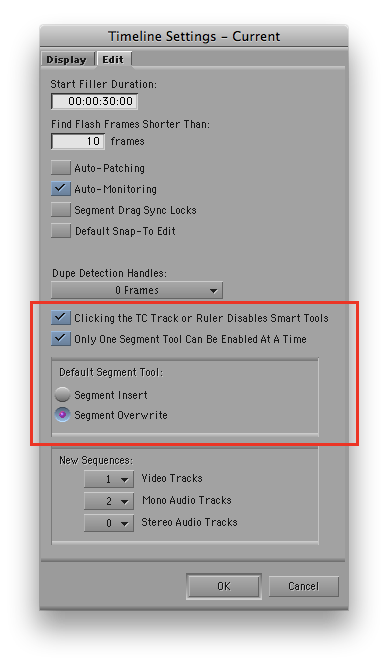
Be sure to select “Clicking the TC Track or Ruler Disables Smart Tools.” That brings back traditional behavior — click the timecode track and segment mode turns off. Over time you may find that you prefer this to be turned off, but if you want familiarity, leave it on. Selecting “Only One Segment Tool Can Be Enabled at a Time” also makes MC5.5 work like Version 4 — when you choose Red or Yellow Segment mode, the other turns off. And finally, your default segment tool should be “Overwrite.” I could go on at length about this, but if you want fewer surprises, use Overwrite. Note that all these settings are not this way by default — that’s a big part of why long-time Media Composer users get so frustrated with v5 and 5.5.
2) Smart Tool
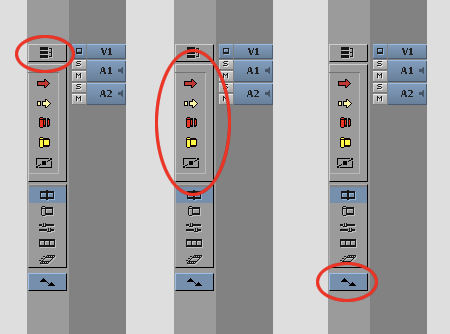
Start by turning off the Linked Selection button. For long-time users, this single feature is probably responsible for more frustration than anything else. Turn all the Smart Tools off. In Version 5.5, they’ll stay off. Turn on the keyframe tool — when you move your cursor over a keyframe you’ll be able to adjust it.
3) Keyboard
Be sure to put both segment mode buttons on your keyboard. When you need to move a clip, just hit the mode you want. I also like to put the waveform toggle on the keyboard (“Wa” in the illustration).

4) Trim Mode
Nothing special to be done here. But important changes in Version 5.5 bring back the responsiveness and precision that you were used to in Version 4 when selecting rollers. And it fixes the bug that took you out of Trim Mode if you accidentally clicked too far away from a roller.
5) Composer Settings
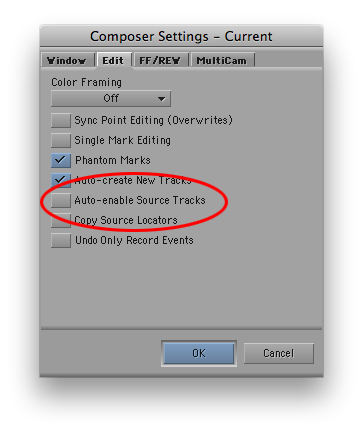
Be sure to de-select “Auto-enable Source Tracks.” This brings back the MC4 feature that remembered source track selection. Again, it is selected, rather than deselected, by default (see this post).
6) Keyboard Shortcuts
Yes, some of the keyboard modifiers and shortcuts have changed. It’ll undoubtedly be frustrating initially, but it’s not the end of the world. These are the ones you’ll need most often.
- To drag a segment vertically while allowing no movement side-to-side, use Command-Shift-Drag.
- To enter Slip and Slide from Trim Mode, get into Trim Mode any way you like, then double-click an existing roller to slip, double-click again to slide.
- To lasso transitions and clips anywhere in the timeline, hold down the Option key (rather than the command key) and drag.
7) Other Shortcuts
- To set the start timecode for a sequence, simply make a change in the Start column for that clip in a bin. Or right-click on the sequence in a bin and select “Sequence Report…” (You can also use this option to create a list of all effects in the sequence.)
- To measure a group of clips or sequences, select them, then right-click on one of them and choose “Get Bin Info.” The Console window will open, with a total length listed.
8) What’s Next?
Once you’ve got all these things set up, MC should feel pretty familiar to you. After that, you’ll want to explore some of the new features. Start with the Track Control Panel, where you can add real-time audio effects. Keep in mind that you can’t change an effect internally — it stays constant throughout your sequence — but it can still be very useful for many things, such as adding a ring-out in music. You can also turn waveforms on or off on a track-by-track basis. In addition, MC5 lets you create and use stereo tracks and clips, so you can treat a stereo pair as a single object in the timeline. You’ll also want to check out the new Find features (Command-F). They let you to search throughout your project. And you’ll need an introduction to Advanced Keyframes, which are now used for most effects. They’re much more powerful, but they take some getting used to. You can find all of that and more in my book, Avid Agility.
That Post Show
September 21, 2011 Host Kanen Flowers released another installment of his podcast “That Post Show” yesterday, and once again I was a participant. The episode, entitled “Cinematic Communal Experience” is a thoughtful look at the art and science of editing and, in particular, how web-based entertainment is changing cinema. We did our best to stay away from the FCP-X debacle, but there’s a taste of it in the post-show montage. Check it out on Kanen’s web site, or download it from iTunes



 Splice Now
Recent Comments