Archive for the ‘Avid’ category

FCP-X and the Pain of Democratization

June 27, 2011

Avid editors looking for a bit of shameless gloating will enjoy the latest installment in Kanen (John) Flowers’ podcast “That Post Show” (iTunes). Dormant for some two years, the show has reappeared with a new episode featuring four longtime Final Cut editors talking about FCP-X — and they are not happy. In their view, Apple has turned its back on professionals, creating a program they can’t use to make a living and leaving them with little alternative but to switch to Premiere or Media Composer. Some of the features they mourn: a source monitor, multi-cam editing, bins, windows that can be broken up onto multiple monitors, trim mode (they reserve special scorn for FCP-X’s “precision” trimmer, pointing out that FCP-X is inherently imprecise), the ability to cut from one sequence into another, OMF/AAF export, EDL support. The show was recorded soon after the release and is thus based on the earliest of first impressions, but it makes for some entertaining listening.

There are plenty of serious limitations in FCP-X — but there were huge limitations in FCP1, too. The pain of democratization is always wrenching, and this release of Final Cut will be no different. Every new release, it seems (including the appearance of the first Media Composer), has made editing more accessible and expanded the base of editorial talent. But by seeming to abandon its existing customers, Apple has confronted many editors with a choice they never wanted to make, and forsaking the company that once empowered them, or accepting a program that doesn’t serve their needs. Whatever you think of Avid’s performance over the last decade, new management has been doing its level best to listen to and work with editors.

None of this should cause us to overlook the fact that most of the innovation in FCP-X is focused not on workflow, but on editors and the editing process. Randy Ubillos is nothing if not creative when it comes to the experience of editing, and I, for one, want some of those features now: waveforms that don’t constantly redraw; background saving and rendering (rendering has gotten all the press, but saving will mean more to me); background proxy creation (and the ability to switch from proxy to full-res media with a click); “clip connections” that let you drag music or sound effects with the picture it’s synched to; compound clips that allow you to collapse and uncollapse portions of a sequence; “audition” groups that let you cut more than one option and quickly switch between them within the sequence, and of course, excellent timeline performance with long-GOP media. I understand the mixed reaction to the magnetic timeline, but I’d love to have it as an option.

Short term, FCP users are facing a difficult choice, which is good for Adobe and Avid. But long term, FCP-X represents a new challenge, appealing to a whole new audience of media creators and offering them features that nobody else has. Yet.

For those of you who are thinking about making a switch to Media Composer, I encourage you to take a look at my book Avid Agility (now available in print or for Kindle). If you want to get the most out of Media Composer and do it quickly, it’s your best resource.

FCP-X Enters With a Bang

June 22, 2011

Apple released Final Cut Pro X yesterday with only a press release on its home page, but it arrived to a big chorus of boos in the App Store. From the first rumors, this application was destined to be controversial, and the first day has provided plenty for would-be early adopters to chew on.

Chief complaints: no ability to open projects created in FCP7, no multi-cam, no native support of R3D or XDCam, no bins as we know them, no source monitor, no EDL, XML or OMF support (though Automatic Duck will help you with OMF). Capturing from tape is supported only over Firewire; if you need other formats, you’ll have to use software provided by your capture card, which is probably still in beta, at best (Aja’s white paper suggests a dual boot system for now). External monitoring is likewise left to third parties and not yet fully baked.

Soundtrack Pro and Color are gone, with at least some of their functionality rolled into Final Cut, where they should be, but Motion and Compressor remain, and are now available on the app store as downloads. They seem irresistible at a mere $50 each.

Folks who are coming to FCP with a clean slate and no legacy projects to support, seem to like it better, and, needless to say, there’s a lot to like: native support for tough media formats, 4K support, a slick color corrector, an audition module, a way to nest editorial options within a single clip, freeform linking of picture and sound so that they drag together in the timeline, background saving and rendering, and performance that will be the envy of the industry. Many of these things have been on the Avid wish list for years.

Apple has embraced keyword-based search as a way to organize media of all kinds, and Final Cut is no exception. Like iMovie and iPhoto, it organizes your work into “events” and encourages you to add keywords and create smart collections —  groupings that update live as you add material. Whether editors, particularly editors of tightly organized, scripted shows, are going to find that appealing is an open question.

Apple is running a game plan they know well, which worked for them with the first Final Cut — expand the user base by appealing to customers the other guy didn’t know existed. Final Cut originally focused on DV and Firewire and radically forced prices down. FCP-X is designed to do the same thing for file-based media. The company has the moxie to obsolete all previous versions, and while they will piss off many editors, they will undoubtedly find lots of new customers at the same time. FCP-X was Apple’s biggest download yesterday, and at $299, all the controversy is probably doing as much to help sales as hurt them.

For more about the new release, check out the videos and feature list on Apple’s FCP site. Many key questions for pros are addressed by Philip Hodgetts’ on his blog. The next installment of the Terence and Philip podcast, hosted by Phil and Terry Curren, will be focused on the new Final Cut and should be available shortly. Phil is also offering a low-cost pdf book about Final Cut Pro metadata, available here.

A Third Way to Make Titles

June 20, 2011

Most Avid editors know that the system offers two ways to create titles: the venerable Title Tool and Marquee. But there’s also a third way. It’s one of Avid’s best kept secrets, but also maddening because of some key omissions. It’s called the SubCap effect.

Designed for subtitling, you apply the effect to a clip of filler, open the Effect Editor and simply type in your text. Changes happen in real time — no rendering is needed. You can also create a series of titles all at once by importing a file containing text and timecode values. Best of all, you can change the characteristics of all the titles in a track or sequence simultaneously.

My initial thought was, “this would be great for a main title!” But the subcap is crippled in several ways. First, you can’t add a carriage return to text by hitting return. You have to enter an obscure escape sequence (&a;). Second, and much more damning, you can’t have different fonts or sizes within a title. You can’t make “Directed by” smaller than “John Doe,” for example. And finally, you can’t create a soft drop shadow.

Those limitations have prevented me from using this powerful tool for any real-world main title. But it’s still found a home in my cutting room. I recently used it to make a series of titles describing missing shots. As the scene changed, I quickly changed the text, without re-rendering.

You’ll find the SubCap effect in the Generator category. Drag it to a clip of filler. Open it in the Effect Editor and use the disclosure triangles to make changes. Type your text in the Caption Text area, then change the font and size by making selections in the Text Appearance category. Add an outline and/or drop shadow, and adjust the size of the text bounding box, as needed. (Click the image above to enlarge it and make the options easier to see.)

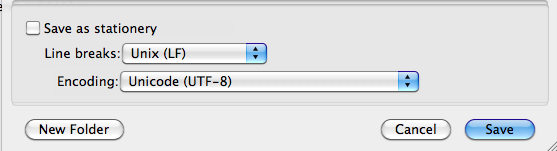
To import text from a file, create your file as is a standard text file (.txt). On the Mac, a good way to create the file is with the free (and terrific) TextWrangler. Save your file as follows:

Format the text with start and end timecodes for each title, like this:

<begin subtitles>
01:00:00:00 01:00:03:00
Directed by Roderick Jaynes

01:00:05:00 01:00:08:00
Produced by Louis B. Mayer

01:00:11:00 01:00:14:00
Edited by John Doe

<end subtitles>

Drag the effect to a segment long enough to handle the titles in your file. (Make sure it covers the master timecode values in the file.) Then click Import Caption Data and navigate to your file. The subcap effect will break the filler into title cards according to your list.

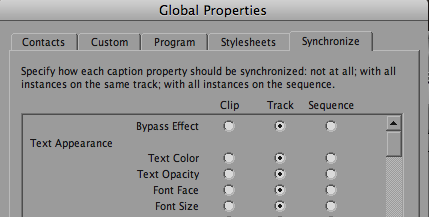
To synchronize your titles, first format one title the way you want it. Then click Edit Global Properties and synchronize all titles to match the one you formatted. You can also create stylesheets and use them to create different looks.

For additional details about the SubCap effect, check out this video on the Avid Community site. (It’s also available on Youtube, and for some reason, the audio is much cleaner.)

Source Track Names in the Timeline

June 11, 2011

With the proliferation of multi-track audio recorders, most of us are now dealing with multi-track sources when editing. In Media Composer that used to present a problem. Once you’d made a cut, it was hard to tell which track you’d used. If you wanted to go back and use the same track, you often had to figure out which was which by looking at a waveform, or by listening. Not anymore. Starting with Version 5, a simple timeline menu pick will display source tracks for all clips in the timeline, alongside the clip name. It’s a small thing, but it’s significantly simplified the way I work with multi-track audio.

If you assign the Clip Tracks menu pick to a keyboard button, you can display source data with a quick tap, and then hide it just as easily.

In Praise of Unified Search

June 6, 2011

I’ve been using MC 5.5.2 for about 2 and a half weeks now and my first impressions are very good. Working with two Unity seats and a reasonable amount of media, it’s been stable, fast and responsive.

A lot has been made of this version’s new phonetic search capability. Certainly the most gee whiz new feature, the system “listens” to your audio, building its index in the background, and then lets you find dialog with surprising accuracy.

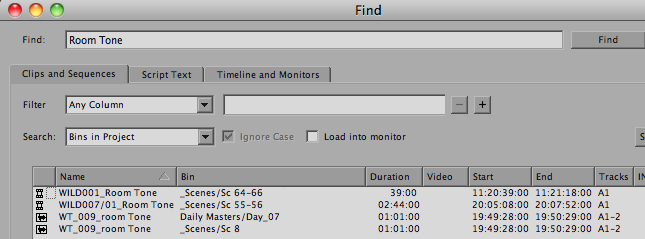
But for a scripted show, it’s the new unified Find feature that wins for me. I was recently looking to to fill a scene that was just too quiet. Nothing in my sound effects library felt like part of the scene and I quickly wanted to listen to all of the room tone that had been recorded. We’ve got dozens of bins and only a few pieces of RT. The prospect of opening all those bins seemed like a lot of effort that might be wasted, but then I realized I could look through them all at once. Fifteen seconds later I had found what I was looking for.

Being able to search for any data in any bin isn’t new in the history of non-linear editing, and it isn’t flashy. But in terms of bread and butter functionality, it’s going to change the way we Media Composer users work every day.

Avid Agility for Kindle

May 21, 2011

Today, I’m very excited to announce the release of Avid Agility for Kindle. As many of you know, I’ve been busy working on this version for months now, hoping to create an ebook that fully incorporates the printed book’s illustrations and looks as good on screen as it does on paper. I’m proud to say that the version I’m releasing today is every bit as effective as the traditional one, especially on larger color screens, and it has some important advantages: it’s easier to carry around, you can quickly search for anything you’re interested in, all cross references are active and clickable — and it’s less expensive.

Remember that you can read Kindle books on all kinds of devices, not just the Kindle itself, where the black and white screen is a limitation. Avid Agility looks particularly good on the iPad, where the big color screen works wonders for the illustrations, and it’s also available on the iPhone and on Android phones and tablets. The free Kindle apps for Mac and PC mean that you can have the book where you need it most — on your editing system, while you work.

The new Kindle version is also available in many European countries, where you can get it without having to pay shipping charges.

The book has gotten terrific reviews: from some of the most important editors in Hollywood to relative neophytes. You can be reading it in seconds by ordering from Amazon’s Kindle Store. Find out more about it here. I hope you like it as much as I do.