Archive for April 2008

Time for the EDL Change List

April 19, 2008

There are some features that have been on the wish list for so long that we no longer remember that there could be a better way. The EDL change list is one such feature. When you online a show and need to make further changes, you want to use the first online as a source. The only way to do that is to digitize the online, load it into a new video track and cut it along with your normal material. That is an unnecessary burden, which slows down the editorial process and makes simple changes much too complicated.

The whole process is especially frustrating because the Media Composer could easily create the list you need, comparing your old sequence with your new one and creating a list that references the first as a source. This isn’t totally trivial, but in 2008 it’s not rocket science.

Avid mentions this in a recently posted FAQ about the new systems:

Avid FilmScribe will export XML for all sequences with all source and record side metadata. All standard Avid columns as well as user custom metadata will be output as a single XML file. Transforms can applied to the master XML to create EDLs, Change List EDLs, Scan lists, etc. Transforms can be created by users and manufacturers and easily shared as needed.

Indeed, XML export is an important new feature and it will pave the way for many new capabilities. But the problem here is in the words “created by users and manufacturers.” We shouldn’t have to wait for a third party application to implement this important feature. We’ve been asking for it since the mid-’90s. It’s time for Avid to put it into every Media Composer.
Technorati Tags: , , ,

Adrenaline RIP

April 15, 2008

Avid formally announced their new product line yesterday and the name “Adrenaline” was not part of the lineup. Mainstream “offline” editing will now be based on Media Composer software running the Mojo DX box, at a price point of $10,000 (CPU extra) with full HD support included. Editors will also be able to purchase the more powerful Nitris DX and use it with Media Composer software for $15,000 (CPU extra). Symphony/DS now costs $36,000 with the CPU included.

The new hardware intelligently uses all the CPU cores that you have, along with the processing power of your graphics card, and it connects to the CPU via PCIe, rather than Firewire. This adds up to what the company claims is the fastest and most stable Media Composer ever. MC moves to version 3.0 and will run under either OSX Leopard or Windows Vista.

The system handles many new file-based media formats natively and does not require rendering for DNXHD playout. Other announcements include a realtime burn-in effect, XML output via FilmScribe, and Metafuse, which helps turn DPX scan files into DNXHD media.

The details are in this press release.

Meanwhile, longtime Avid-l member Frank Capria announced that he will be joining Avid in May as product designer for Media Composer. Frank has been an outspoken and trenchant critic of the company and should bring plenty of new thinking to a reenergized Avid. Welcome aboard, Frank.

Technorati Tags: , , ,

Avid DX Sneak Preview

April 10, 2008

Avid offered a sneak preview of their new hardware offerings at Universal Tuesday night. To my everlasting frustration, I was unable to go, but the details are emerging. CEO Gary Greenfield and new head of the video division Kirk Arnold were there, along with Matt Feury and Michael Phillips and a host of engineers and others. The message seemed to be: “We understand you (better than the other guys). And we want your input (unlike the old Avid).” And from what I heard, the audience thought they made both points effectively.

The big announcement was new hardware across the product line. Adrenaline is gone, to be replaced by something called “Mojo DX,” a high-def, rack-mounted box that does away with the old and slow Firewire connection and replaces it with an extension to the much-faster PCI-e bus. Symphony DX will likewise get powerful new hardware. Media Composer will move to version 3 and offer some new features, including a real-time timecode burn in effect, and improved multi-stream effects capabilities. It’ll be able to intelligently address multiple CPU cores and also use the DSP power of your graphics processor and should be a lot more responsive as a result. And it will run under Leopard and Vista.

Michael Phillips demonstrated Avid’s new XML export functionality, with an architecture that allows other manufacturers to write small conversion programs (“droplets”), so that they’ll be able to import sequence and bin information (but apparently not effects descriptions).

Pricing has come down dramatically, and there will be several upgrade alternatives for current owners.

More specifics will emerge at Avid’s events at the Hard Rock in Vegas this Sunday and Monday. For more about Wednesday’s event, see these articles: Digital Production Buzz and HD Head.

Technorati Tags: , , ,

Multi-format Timeline Gotcha

April 5, 2008

As you all know, I’ve been experimenting with animated titles created in Motion and imported into the MC. And yesterday I got hit with a new and arcane gotcha, shortly before a big screening (of course).

I’ve been importing the Motion titles at 1:1, even though my project is 14:1. This creates cleaner keys. The Media Composer has been happy to play these 1:1 titles without rendering — until we built the individual reels of our show into a long sequence. That’s when the titles started freezing. Nothing we could think of would solve the problem. The titles played fine in a shorter sequence. But once the timeline got to be over an hour or so, they’d freeze and stutter. Rendering the titles didn’t make any difference.

An hour of experimentation produced no improvement. Restarting the machine and the DNA, rebuilding the media database on the render drive, re-rendering to another drive, recreating the sequence — nothing helped. After a lot of adrenaline (of the biological kind), and with the hour of our screening rapidly approaching, we finally figured out what was happening — thanks to the insight of Josh Rizzo at Wexler. Even though our project was 14:1 and we thought we were rendering at 14:1, those titles were being rendered at 1:1. And thus playing them, even in their rendered state, still meant using the MC’s real-time multi-format capabilities. And it was those capabilities that were choking on the long timeline.

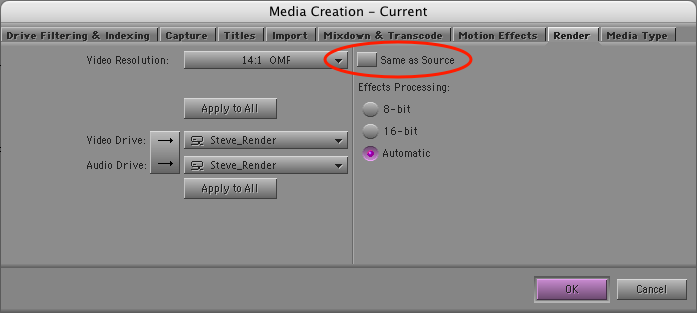
The solution is in the Media Creation settings, under the render tab. Even though you’ve selected “14:1,” there’s a checkbox that tells the system to render effects at the resolution of the underlying source. There’s no explanation for the meaning of this setting — and it’s checked by default — so we’d left it alone. Here’s the setting dialog. Be sure you de-select the circled checkbox.

Render Settings

With “same as source” deselected, I re-rendered the titles. And voila! — they played fine, no matter how long the timeline was, because now they were rendered at 14:1. This didn’t seem to hurt the quality of the titles much. The effect isn’t nearly as severe as bringing them in at 14:1 in the first place. (But I’ll be doing more experimentation with this in the future.)

Bottom line — watch out for that multi-format timeline. It’s wonderful when it’s working, but when it chokes, figuring out what happened can be awfully confusing.

Technorati Tags: , ,

Introduction to the FCC

April 5, 2008

The FCC gets virtually zero news coverage on network, but it has a huge influence over what Americans see and hear in their media and how all of that gets paid for. The result is that the five FCC commissioners have a big, if hidden, influence over our political system.

I’m a fan of Robert McChesney’s radio show and podcast, Media Matters. Two weeks ago he interviewed FCC commissioner Jonathan Adelstein. If you’re looking for a concise introduction to the FCC — what it does and why it matters — check out the show via podcast. You can download the mp3 here, or subscribe to the podcast on the iTunes store here.

Technorati Tags:

