Archive for January 2010

The Clip Info Window

January 26, 2010

Here’s a feature that’s been around forever, but many people don’t seem to be aware of it. Say you want to find a piece of data logged for a particular clip. You open the appropriate bin, but the column containing the info you’re interested in isn’t displayed. You could open the bin’s Fast Menu, select Headings and display the appropriate column. But there’s a quicker way. Just Command-Option-click on the clip’s icon (in any view, including frame view). A window will open showing you all the data logged for that clip.

Better yet, you can do the same thing for clips in the source or record monitors. In this case, click and hold in the space between the source and record monitor position bars. Do it on the left side of that area and your window reveals data for the clip in the source monitor. Do it on the right side and you’ll see data for the clip in the record monitor.

The Mouseless Interface

January 25, 2010

Some of you would probably kill for the user interface that Tom Cruise employs in “Minority Report,” with big images displayed on transparent screens and a gestural language that interprets your body movements. My sense is that an editor could get pretty tired working that way all day, but the giant canvas and the shear flexibility and organic quality of it are very compelling, to say the least.

Until now, interfaces like that required the user to wear motion capture gloves that are seen by cameras installed in the ceiling. But Microsoft is working on an add-on for XBox 360 that uses a single camera under the monitor. I was pretty skeptical about what this could do, but an article in this month’s Scientific American made me think again. The system, called Project Natal, is remarkably sophisticated, watching your body in three dimensions at 30 fps, and matching the movements of your skeletal joints to a database of biometric data they’ve developed.

Of course, we’re not playing video games in our editing rooms. And the demos Microsoft has come up with aren’t exactly my idea of an editing interface. But games mean sales volume and volume drives down costs. I could easily imagine a more focused incarnation of this technology based on the motion of your hands working in a more confined space — say the area above your keyboard. That might get pretty interesting as a way to interact with a machine.

Sony says that its similar “Motion Control” technology will be the primary interface for the upcoming Playstation 3. And other companies are working on the idea, too, including Canesta, Hitachi, GestureTek and Oblong Industries (they were technology advisors on “Minority Report”).

Video games have been a big driver in pushing down the price of graphics processors, which in turn has helped empower our editing applications. With competition between Sony and Microsoft heating up development, this technology might work the same way. The mouse has served us well for a long time now, much longer than its developers at the Stanford Research Institute probably imagined, but it can’t be the best we can do.

Sleeping or Surfing

January 22, 2010

With Apple’s rumored tablet computer supposedly coming out next Wednesday, the release this week of a survey on young Americans’ digital proclivities couldn’t have been more timely. The short version of the results, compiled by the Kaiser foundation, show that the average kid age 8 to 18 spends their time like this:

  • Watching TV: 4.5 hours
  • Playing Music: 2.5 hours
  • Using a Computer: 1.5 hours
  • Playing Video Games: 1.25 hours
  • Reading: 38 min
  • Watching movies: 25 min
  • Texting: 1.5 hours
  • Cell phone: 30 min

If your thinking that this adds up to more time than a lot of people are awake, you’re right — these activities are happening simultaneously.

Anybody who thinks this isn’t changing the way we think and behave might ponder the fact that the heaviest users had mostly C grades or lower and were more likely to be bored or sad or get into trouble. Another clear takeaway: TV and especially movies, are losing out to other forms of digital entertainment.

The details are here: If Your Kids Are Awake, They’re Probably Online

Slick Photojournalism Blog

January 21, 2010

The NY Times is expanding its internet offerings in some slick ways. I’ve recently discovered their “Lens” blog, which seeks to highlight new photojournalism. Every post is focused around a gallery of photographs. Some summarize the day in pictures, others offer perspective on the news or a look at a specific photographer. The interface is nice, too. You can scroll through recent posts and view a slideshow without leaving the home page, or you can make the whole thing full screen. I’ve been checking it every day.

I should also mention that the Times offers something called Times Reader, an Adobe Air application (similar to Flash) that allows you to read the paper in a very attractive way — easy to scan, and more attractive than the web page, with a lot less advertising.

MC Audio Dissolves Come in Two Flavors

January 13, 2010

Have you ever created an audio dissolve and heard an audible volume dip in the middle of the effect? Perhaps when you’re trying to join two similar pieces of fill? If it’s happened to you, you know how maddening it can be to eliminate. Final Cut offers a neat solution: two kinds of audio dissolves, one of which raises the level in the middle of the effect by 3 db. Audio editing applications typically permit even more choices.

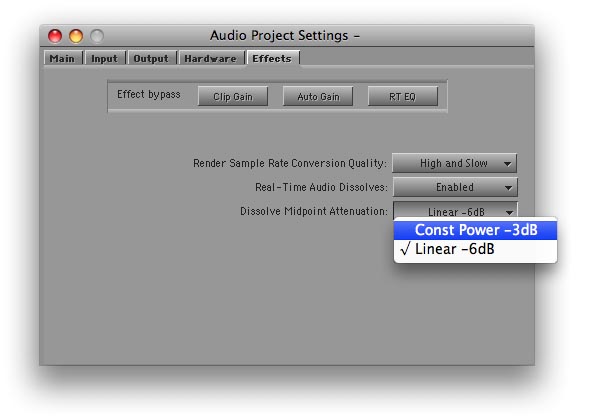
It turns out that the Media Composer offers a choice of dissolve types, too. But the feature is hidden in a setting and barely mentioned in the docs. I had thought it altered all dissolves, including the ones you’ve already made. But in fact, it affects new dissolves only; old ones are left alone. The setting is labeled “Dissolve Midpoint Attenuation.” You’ll find it in the Effects tab of the Audio Project settings panel. Similar to Final Cut, your choices are Constant Power, which adds a 3 db boost in the center of the dissolve, and Linear, which is the default.
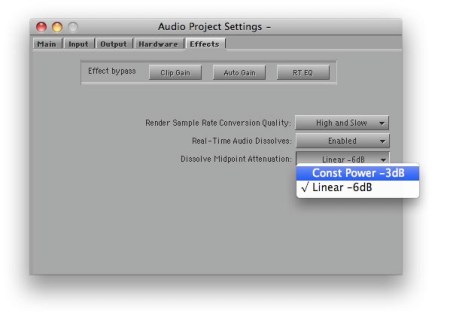
The trouble with this implementation is that it’s hard to quickly alter an existing dissolve and compare options. And you have no indication in the timeline of the type of dissolve you’ve created. FCP allows you to change a dissolve type with a contextual menu pick, and it labels each effect in the timeline.

But while not ideal, in practice you can make the MC method work. Simply duplicate your Audio Project setting (select it and hit Command-D). Then open each setting by double-clicking, adjust one to be Constant Power and the other Linear, and name them appropriately. Once you’re created these settings, you can quickly switch between them by clicking in the area to the left of the setting name (putting a check mark there).
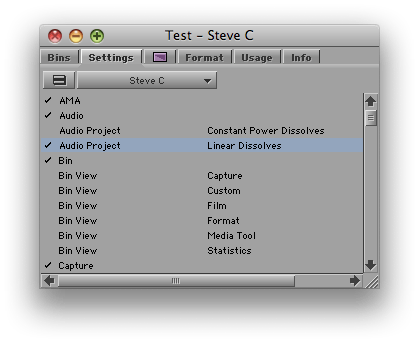
You probably want to let Constant Power be your default. For most dissolves, it’s more likely to produce a smooth transition. For fades, you may prefer the Linear setting.

I’m wondering whether readers here have used this feature. It was a new for me and I’m curious whether you’ve tried it and how it’s worked in practice. Please share your impressions in the comments.

And You Thought You Were Buried

January 11, 2010

Whatever you think of the remote controlled drones the US is using in Iraq, Pakistan and Afghanistan, they generate a huge amount of video — 24 years worth so far. Predator drones employ only one camera, but the newer Reapers use ten. The Air Force has thousands of people watching these feeds in real time, but making effective use of that much material presents fundamental problems, and the military is turning to techniques used in sports broadcasting to annotate and categorize it all. With newer drones expected to carry either 30 or 65 cameras, the scale is unprecedented, and I suspect it’ll soon be driving basic research in high-volume storage, access and organization. This NY Times article provides the details.