Archive for the ‘Avid’ category

Sally Menke Interview

March 1, 2011

Elvis Mitchel has posted a thoughtful, sensitive interview with editor Sally Menke this week for his LA-based show “The Treatment.” Elvis is something of an LA institution, operating out of KCRW. His interviews are consistently penetrating, and this one is no different. Having helped run the Editors Guild Magazine for four years, I can tell you that it’s not an easy thing to interview editors with respect and without resorting to a host of cliches. This one does both.

You can listen on line at this link or via itunes as a podcast. It’s tight–just 30 minutes long. But it offers something more sensitive than you might expect, and gives you a sense of what made Menke such a special person.

As many of you know, Sally spent much of her working life cutting Quentin Tarantino’s pictures. She died tragically last year, while hiking in Griffith Park.

Media Copy

February 26, 2011

With cutting rooms more and more portable, many of us like to take a portion of a project’s media home and work on it from there. In Media Composer this can be a real pain because it’s so hard to identify the media files that go with a large group of clips. There’s a way to do it that I described in a previous post, but it’s complicated, and Avid should have simplified it long ago. Now Wes Plate and his company, Automatic Duck, seem to have done what Avid couldn’t with their program Media Copy. With Version 3, just released, you can identify a bin or bins and ask the program to collect all media files associated with all the clips in those bins and copy them to another drive. That seems simple enough, but we’ve been waiting for it so long now, it seems damn near miraculous.

Fair warning — I haven’t used the program, so I can’t speak for its reliability. But Automatic Duck has made some supremely usable utilities over the years and I suspect this one is no different. Thanks to Oliver Peters for drawing my attention to it and to Wes for getting it done.

Final Cut Pro Rumors

February 23, 2011

We haven’t seen a new version of Final Cut Pro in over two years, and with Apple hiring new UI engineers not so long ago, rumors of a new version have cropped up repeatedly. Apple apparently showed off the new version recently and impressed some people. Mac Rumors breaks the news, here. And Larry Jordan mentions in on his blog, here. Nothing specific — just enough to whet your appetite, in classic Apple fashion. Steve Jobs’ competitive strategy has always been based on the idea that Apple has to aggressively lead, breaking old rules and creating new paradigms. Will this FCP do that? What would a new user interface look like? Will it offer a new  interaction model to replace the old play-stop-adjust-play-stop-adjust cycle we’re all so used to? Multi-touch? Will it use modern CPUs and GPUs to speed things up the way Premiere does? And most important for those of us in the trenches — will it interface with current technology or force changes throughout the pipeline? Looks like we’ll be finding out soon.

CinemaEditor Reviews Avid Agility

February 21, 2011

My special thanks to Edgar Burcksen for a great review of Avid Agility in the American Cinema Editor’s magazine, CinemaEditor. Hot off the presses, the latest issue was distributed at A.C.E.’s terrific Eddie Awards ceremony Saturday night and should be in members’ mailboxes and on select newsstands shortly. My heartfelt congratulations to all the winners and honorees, including Burcksen himself, who, along with Vincent Lo Brutto, took home the Robert Wise Award for writing about editing.

Here are a few quotes from the review:

A comprehensive guide to making the Avid fade into the background when you’re working your editorial magic.

I was amazed at how, as a veteran editor who has worked on many iterations of [Media Composer] … I was still able to discover valuable features.

Cohen’s book will guide you to the next exciting level of the art of editing.

I hope all readers feel the same way. You’ll find more reviews, as well as pdf samples, on this page.

You can pick up Avid Agility at Amazon.

Avid Announces Media Composer 5.5

February 15, 2011

Avid announced Media Composer 5.5, Symphony 5.5 and Newscutter 9.5 today. The new versions aren’t on the street yet — expect that prior to NAB — but the company is showing off the many new features, which include the following:

  • A unified Find function that builds and maintains a project-wide database, letting you search all bin data throughout the project from a single window.
  • PhraseFind, a $500 add-on that listens to your dialog, indexes it, and allows you to do phonetic searches throughout the project.
  • A new Transition Tool that enables you to change dissolve lengths by dragging in the timeline.
  • Support for the AJA Io Express for capture, monitoring and output.
  • Modifications to the Smart Tool that make it easier to turn it off.
  • A “legacy trim mode,” available if you don’t use the Smart Tool for trimming. (This was in patch builds of 5.0. See this link.)
  • Support for Euphonics controllers via the EUCON protocol.

Avid’s MC 5.5 product page is here. You’ll find videos demonstrating some of the new features on this page. The press release is here. There’s an FAQ about this release here, one covering PhraseFind here and one on the Io Express here. And you can download a chart comparing the various Avid hardware options here. The price to upgrade from v5 to v5.5 will be just $150.

I’ve been a beta tester, and have found an awful lot to like in this new version. A host of bugs have been fixed, the Smart Tool is more usable, legacy trim mode is even more familiar, and the unified Find function is welcome and effective. The pièce de résistance, PhraseFind, is nothing short of remarkable. It’s not for everybody, but if you need to find your way through hours of dialog, you’re going to love it.

MC Chapter Markers to DVD Studio Pro

February 3, 2011

Converting Media Composer sequences to DVDs without a realtime burner isn’t difficult. But creating a proper DVD with a chapter menu on a Mac still isn’t for the faint of heart. To make the DVD, you’ll export a QT reference movie and burn it with the DVD application of your choice. But adding chapter markers and making a chapter menu takes some alchemy.

The trick is to create locators in the MC timeline, export them, do a bit of editing on the resulting text file, and import it into DVD Studio Pro. For a full chapter menu, it’s easiest to import into Compressor first.

Start by creating locators where you want chapter breaks. Put them all in the same track and color them the same way. That’ll make it easier to distinguish them from locators you’ve used for other purposes. Add the chapter name to each locator as locator text. Then open the Locators window (Tools > Locators), select the locators you’re interested in by Command-clicking and choose Export Locators from the Fast Menu at the bottom of the window.
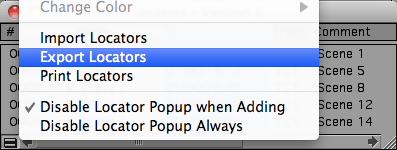
In the dialog box that follows, export selected locators only. The result is a simple, tab-delimited text file containing only the locators you selected. Open the file in a text editor and remove header information and all columns except timecode and locator text. In Apple’s TextEdit or Microsoft Word you can select and delete entire columns by Option-dragging over them — you shouldn’t have to get into regular expression searches. Your resulting file should have just two columns, like this:
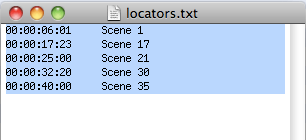
You must reference the same starting timecode as DVDSP does or the markers won’t line up properly. DVDSP defaults to hour 0. Avid sequences default to hour 1. In this example I simply changed all the values to start with hour 0.

Once you’ve got this cleaned-up text file, export your sequence from MC as a QT reference movie with “same as source” settings. MC renders all effects and generates a new audio track, and links the QT reference to your Avid media.

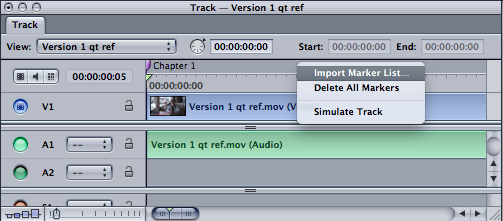
Then create a new project in DVDSP, select the menu tab, drag the movie in, and when you see the drop palette, select Create Button and Track. DVDSP picks up your QT movie and a button is created for it. You can customize the button or the DVD any way you like. Then open the Track Editor (Cmd-9). Right-click the marker track and select Import Markers. Navigate to your text file and select it. All your locators appear in the DSP timeline, named with your locator text.

Test the DVD by clicking Simulate. You should be able to jump from marker to marker. (The markers won’t be exactly where you put them — they’ll be shifted slightly to fall on MPEG I-frames.)

The last step is to create a chapter menu — a list that appears when you first load the DVD. DVDSP will do this automatically with exports from FCP, but, as far as I can tell, not from an imported marker list. You have to create each chapter menu individually. To do it automatically, you’ll need a different workflow, importing into Compressor and then DVDSP.

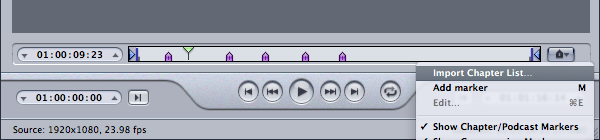
Start by opening Compressor, dragging in your Quicktime reference and applying a DVD setting. With the video selected in the Job window, click the marker menu in the Preview window and select Import Chapter List. Navigate to your text file. The markers will appear under video in the preview window. (Compressor reads the source timecode correctly, so you shouldn’t have to change the timecode hour in your text file.)
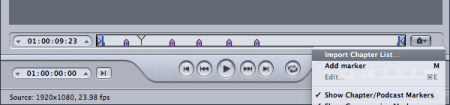
Compress the file and then drag it into DVDSP, and select Create Chapter Index from the drop palette. The video is imported and the chapter menu is created and linked automatically. Simulate and burn the DVD.

This is fairly straightforward, but it’s not exactly trivial, and you have to have a decent understanding of all four programs involved to make it work. Avid could make it a lot simpler if MC would convert locators to chapter markers in exported Quicktimes. Then you could bring them into the program of your choice with a lot less hassle.

For more tips like this, check out my new book, Avid Agility. It’s available from Amazon.