Archive for the ‘Avid’ category

Screen Time is Bad for Your Health

January 13, 2011

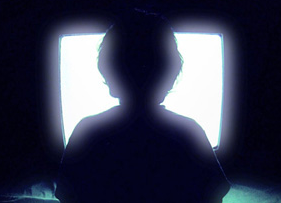
In a new large-scale study examining the relationship between screen time and heart problems, scientists found something dramatic. Just sitting in front of a screen for four or more hours a day correlates with a doubling of heart disease risk compared to less than two hours. And it was associated with a 50% higher death rate, as well.

The study, led by Emmanuel Stamatakis at the University College of London and published in the January 18th issue of the Journal of the American College of Cardiology, looked at “leisure” screen time, what the scientists called “recreational sitting,” and followed study participants for four years. Whether the same correlation would be found regarding work-related screen time wasn’t studied, but it doesn’t take much imagination to assume that there would be a link there, as well. We editors spend way more than four hours a day sitting in front of a screen. And we do it for a lot longer than four years. What is it doing to us?

Here’s a more complete look at the research. And here’s the abstract of the original article.

Syncing Dailies

January 12, 2011

In 2011, hand syncing of dailies seems downright anachronistic. Doesn’t timecode make all that trivial? Yes, with digital cameras, automatic syncing is standard practice. But this inevitably involves two clocks, and that means they are subject to drift. It doesn’t take much drift to put you out of sync a frame or two. Production is supposed to jam (synchronize) their clocks several times a day, but in the heat of battle that doesn’t always happen. The result is that picture and sound slowly drift out of sync.

In my editing rooms, we always check sync using slates, and resync if necessary. This takes time, but sync starts with dailies. If you’re in sync there, you have a shot at staying in sync further down the food chain.

Media Composer allows us to sync in two ways. First, you can use Autosync to merge audio and video clips. If your clips are pre-synchronized, load them into the source monitor, select video or audio and subclip to separate picture and sound. Then mark the slates and autosync to merge them again.

Second, and even better, you can use the Perf Slip feature to sync to the nearest 1/4 frame. Perf Slip is slick and quick but it comes with some limitations. You have to turn on film options when you first create your project — even if you never plan to touch a frame of film. It only works in 24 or 23.976 projects. And it only works on subclips. It comes with a couple of other minor limitations, as well, but I used it successfully on my last Red show, and wouldn’t want to be without it.

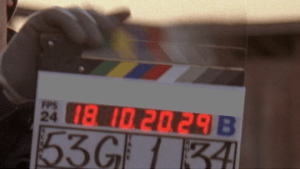
Either way, you’ll have to check every slate by eye. That’s trivial, right? You just line up the visual slate closure with the sound clap and you’re all set. True, but many slates are ambiguous. How you handle them is crucial to good sync. When we worked with film there was plenty of debate among assistant editors about this. Today, it’s a lost art. Here’s my interpretation.

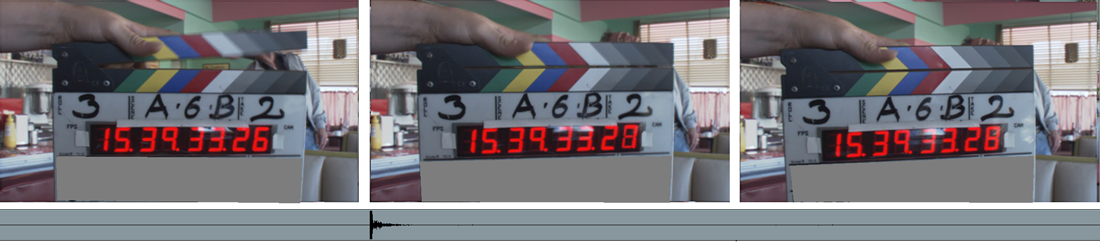
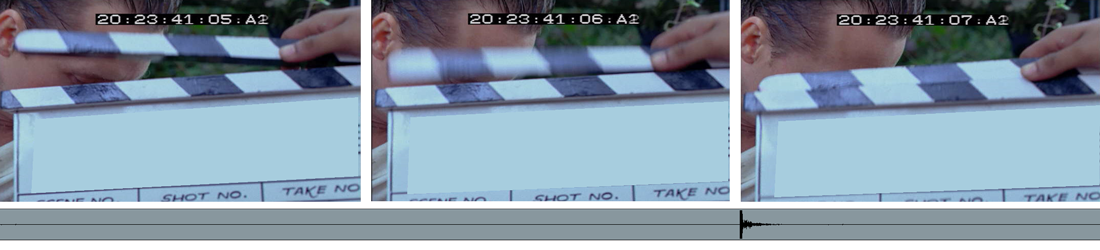
First, you can’t sync properly without checking at least three frames — the frame where the slate closes, the frame before it, and the frame after it. Only with that context can you understand what happened at the slate closure. There are three possible cases.

Case 1 — Normal

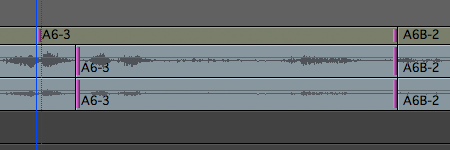
In the first frame, the slate is clearly open, in the second it’s clearly closed, and in the third, it’s closed, as well. That’s the standard situation — no ambiguity, no blurred images. We make the assumption that the camera is making its exposure in the middle of each frame. In frame one, the slate is open. In frame two, it’s closed. So the slate hit somewhere between those two exposures. Check the images below (click to blow them up). The waveform of the clap is lined up at the head of frame two. That’s as close as we can get.

Case 2 — Blurred but Closed

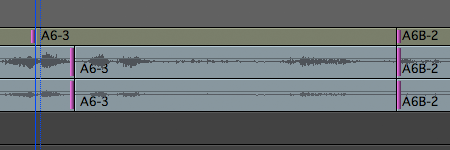
Here we see a blurred frame 2. To decide where to put the audio clap, we have to examine that blurred image carefully. Did the slate close while the shutter was open? Notice that within the blurred image you can see both the top and bottom of the closed slate. The shutter was open when the slate closed and the camera captured an image of the closed slate within the blur. The audio clap goes in the middle of that frame. (Click to blow it up.)

Case 3 — Blurred but Open

Here, the second frame is blurred, but if we look closely, it remains open. The camera captured the slate in motion, but not in its fully closed position. The first closed frame is frame 3. So we sync between frame 2 and 3.
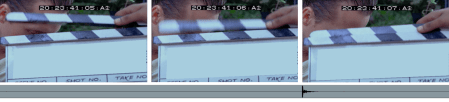
Syncing with this kind of accuracy takes work — blurred slates are always somewhat ambiguous. But if you look carefully, you can generally assign all slates to one of these three cases. If you’re syncing to the nearest frame, you won’t be able to achieve this much precision, but at least you’ll know what you’re aiming for.

Keep in mind that in a 24-frame environment, the camera is typically shooting at about 1/50th of a second and that the exposure occurs in the middle of a frame that’s being displayed for a 24th of a second. With that idea in mind, you should be able to sync as precisely as anyone ever did in a film editing room.

If you’re interested in more Media Composer techniques like this, check out my new book, Avid Agility. You can find out more about it here on the blog, or at Amazon.
Slipping and Sliding in MC5

December 6, 2010

In Media Composer 4, if you lassoed a clip from right to left, you selected it for slipping. Adding the Option key (Alt in the PC world) selected it for sliding. Many people have bemoaned the loss of this functionality in Version 5, but, in fact, it’s still there. The modifier keys have changed, and there’s also a hidden gotcha that can make you think the functionality has been lost.

Lassoing from right to left still works as before, selecting a clip for slipping. But the Option key is now used to let you lasso clips anywhere in the timeline. So to select a clip for sliding you have to add another modifier: Option+Shift.

The trick is that this works a lot better if no clips are selected in the timeline.

So here’s the drill:

  1. First, click above the topmost video track or below the bottommost audio track to deselect all clips.
  2. Then, to slip, lasso or Option-lasso a clip or clips from right to left. Rollers will appear at the interior edges, ready for slipping.
  3. To slide, Shift-Option-lasso from right to left. Rollers appear on the outside edges of the clip(s), ready for sliding.

That’s it. Once you know the technique, it’s easy to use. Just don’t forget to deselect all clips before you start. You may be able to get into slip or slide anyway, but things will work more predictably if nothing is selected.

This is the quickest way to slip or slide a group of clips at once. But you can slip or slide clips in several other ways, as well. Get into trim mode any way you like. Then double-click a roller to select the clip it’s on for slipping. Double-click the roller a second time to slide. Or right-click on a roller to open a contextual menu and select slip or slide from there. Or use either of the Trim Smart Tools and select rollers, as needed.

Conforming Headaches

November 24, 2010

For better or worse, high-end feature films and television still follow an offline/online model, cutting with some kind of lower-res proxy and conforming a higher-res original. The dirty little secret of our new file-based workflows is that despite the many advances we’ve seen, conforming is still a pain in the butt. Why? Because no conforming system can fully conform Avid effects. Sure, cuts and dissolves can be handled easily, but more often than not, effects work has to be painstakingly rebuilt by eye. That seems downright crazy to me — in the wonderful, all-digital, file-based workflow of the future, people are still studying the locked cut, figuring out what the heck was done, and reconstructing it by eye.

Yes, there are exceptions. If you do your offline in Media Composer and finish in Avid Symphony, everything comes across. That’s a wonderful thing and if you work that way, you become dependent on it quickly. But unless you color correct in Symphony, you’re going to have to export, which means baking in a look and accepting a maximum raster size of HD video. On the Final Cut side, the XML export format opens the door to full conforms, but even then, in many DI environments you still don’t get everything.

I had a chat with a product marketing person at one of the DI system manufacturers recently, and I asked him why. His answer surprised me. His view is that we editors don’t care — we expect and have no problem with a by-eye conform. That might have been true once, but not today. Once you start doing complex effects work and see it conformed perfectly with little or no effort, you start wondering why things should work any other way. And you start to chafe at all the behind-the-scenes effort expended by editors and assistants, just trying to get back to something that worked just fine in the offline editing room.

This is a long-standing, Tower-of-Babel problem — there is no standard effects language. And it seems that each manufacturer has their own selfish reasons for not spending the money needed to make really good translations possible. That was tolerable in the days of film and HD, but in the all-digital present, it seems more and more anachronistic to me.

Hacking Kinect

November 22, 2010

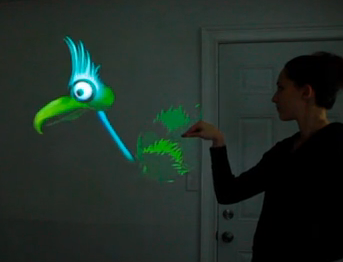
After some initial resistance, Microsoft is now permitting hackers to create novel applications for its Kinect hands-free game controller, and less than three weeks after the device’s release, some fascinating projects are already starting to appear. An article in today’s NY Times lays out some of the early ideas. This video gives you a small sense of what’s possible. The author, Oliver Kreylos, has extracted images from two of the device’s cameras — the depth image and the color image, as he calls them, and uses them to reconstruct video that can be moved and reshaped in 3D space. In this video, Mehmet Akten uses the box to do some crude in-the-air drawing with his hands. At in this one, designers Theo Watson and Emily Gobeille use the device (apparently connected to a Mac) to make a projected puppet track hand movements. Not bad for a couple of short weeks! This technology may or may not be precise enough for useful work, but I’d sure like to see somebody try connecting it to an editing interface.

Splice Here Becomes Splice Now

November 20, 2010

Today, the Splice Here blog officially becomes Splice Now. The old name was taken from the last frame of the standard SMPTE Picture Academy — the leader that was once attached to the head of every reel of cut film in most US editing rooms. The new name doesn’t have the same historical resonance, but I hope it conveys a sense of the transformative energy that has been buffeting post production lately. (As I mentioned earlier, the name change was necessitated when a post house in Minneapolis trademarked the phrase “splice here,” making those words proprietary.)

Of course, we rarely splice anything physical anymore — we just attach strings of ones and zeros together. Splicing has become a metaphor, but it remains the essence of what we do, connecting material at just the right moment, creating conflict or synthesis, generating new ideas and manipulating space and time. Without it, filmmaking would be a very different animal.

Needless to say, the substance of this blog won’t change: I’ll continue to focus on digital post production from the unique perspective of the editing room, with a healthy dose of Media Composer technical tips. And as before, I’ll include occasional thoughts about media and society, as well.

Please be sure to update your bookmarks and RSS feeds. The old ones should continue to work for a while, but it’s better to be safe than sorry. The new url is http://splicenow.com. The new feed is feed://splicenow.com/feed/ (For more about RSS, click here.)

I’d like to take this moment to thank you, my readers. With file-based cameras taking over and competition heating up between editing system manufacturers, post production is experiencing yet another wave of change, and editors need all the information they can get. I hope to reward your loyalty with plenty of useful discussion here. Many thanks for your attention and for your comments.