Archive for the ‘Avid’ category

The Clip Info Window

January 26, 2010

Here’s a feature that’s been around forever, but many people don’t seem to be aware of it. Say you want to find a piece of data logged for a particular clip. You open the appropriate bin, but the column containing the info you’re interested in isn’t displayed. You could open the bin’s Fast Menu, select Headings and display the appropriate column. But there’s a quicker way. Just Command-Option-click on the clip’s icon (in any view, including frame view). A window will open showing you all the data logged for that clip.

Better yet, you can do the same thing for clips in the source or record monitors. In this case, click and hold in the space between the source and record monitor position bars. Do it on the left side of that area and your window reveals data for the clip in the source monitor. Do it on the right side and you’ll see data for the clip in the record monitor.

The Mouseless Interface

January 25, 2010

Some of you would probably kill for the user interface that Tom Cruise employs in “Minority Report,” with big images displayed on transparent screens and a gestural language that interprets your body movements. My sense is that an editor could get pretty tired working that way all day, but the giant canvas and the shear flexibility and organic quality of it are very compelling, to say the least.

Until now, interfaces like that required the user to wear motion capture gloves that are seen by cameras installed in the ceiling. But Microsoft is working on an add-on for XBox 360 that uses a single camera under the monitor. I was pretty skeptical about what this could do, but an article in this month’s Scientific American made me think again. The system, called Project Natal, is remarkably sophisticated, watching your body in three dimensions at 30 fps, and matching the movements of your skeletal joints to a database of biometric data they’ve developed.

Of course, we’re not playing video games in our editing rooms. And the demos Microsoft has come up with aren’t exactly my idea of an editing interface. But games mean sales volume and volume drives down costs. I could easily imagine a more focused incarnation of this technology based on the motion of your hands working in a more confined space — say the area above your keyboard. That might get pretty interesting as a way to interact with a machine.

Sony says that its similar “Motion Control” technology will be the primary interface for the upcoming Playstation 3. And other companies are working on the idea, too, including Canesta, Hitachi, GestureTek and Oblong Industries (they were technology advisors on “Minority Report”).

Video games have been a big driver in pushing down the price of graphics processors, which in turn has helped empower our editing applications. With competition between Sony and Microsoft heating up development, this technology might work the same way. The mouse has served us well for a long time now, much longer than its developers at the Stanford Research Institute probably imagined, but it can’t be the best we can do.

MC Audio Dissolves Come in Two Flavors

January 13, 2010

Have you ever created an audio dissolve and heard an audible volume dip in the middle of the effect? Perhaps when you’re trying to join two similar pieces of fill? If it’s happened to you, you know how maddening it can be to eliminate. Final Cut offers a neat solution: two kinds of audio dissolves, one of which raises the level in the middle of the effect by 3 db. Audio editing applications typically permit even more choices.

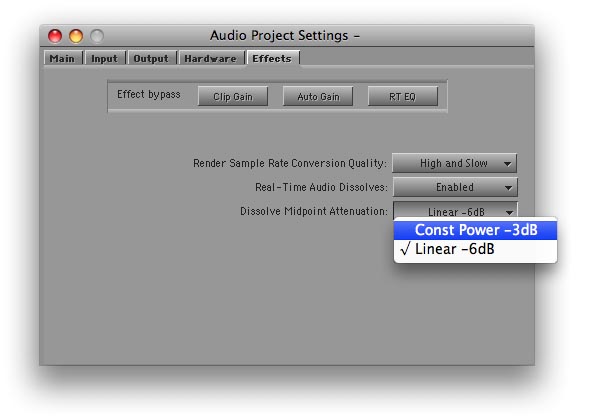
It turns out that the Media Composer offers a choice of dissolve types, too. But the feature is hidden in a setting and barely mentioned in the docs. I had thought it altered all dissolves, including the ones you’ve already made. But in fact, it affects new dissolves only; old ones are left alone. The setting is labeled “Dissolve Midpoint Attenuation.” You’ll find it in the Effects tab of the Audio Project settings panel. Similar to Final Cut, your choices are Constant Power, which adds a 3 db boost in the center of the dissolve, and Linear, which is the default.
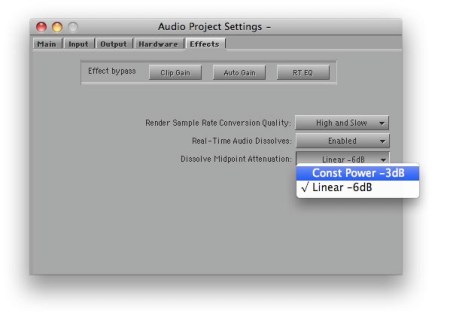
The trouble with this implementation is that it’s hard to quickly alter an existing dissolve and compare options. And you have no indication in the timeline of the type of dissolve you’ve created. FCP allows you to change a dissolve type with a contextual menu pick, and it labels each effect in the timeline.

But while not ideal, in practice you can make the MC method work. Simply duplicate your Audio Project setting (select it and hit Command-D). Then open each setting by double-clicking, adjust one to be Constant Power and the other Linear, and name them appropriately. Once you’re created these settings, you can quickly switch between them by clicking in the area to the left of the setting name (putting a check mark there).
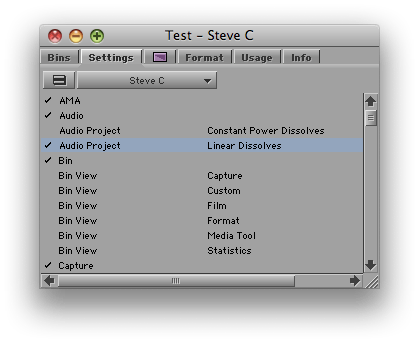
You probably want to let Constant Power be your default. For most dissolves, it’s more likely to produce a smooth transition. For fades, you may prefer the Linear setting.

I’m wondering whether readers here have used this feature. It was a new for me and I’m curious whether you’ve tried it and how it’s worked in practice. Please share your impressions in the comments.

Final Cut User Group Videos

December 12, 2009

Video from the LA Final Cut Pro User Group meeting I spoke at is now available for download via the Open Television Network. The meeting covered new features in MC 4.0 and featured presentations from me, Walter Murch and Shane Ross. Details are in this post. The video has been divided into three parts, one for each of the presenters. It’s not free, but the prices are minimal and the quality is excellent. Go to the LAFCPUG page on the Open Television Network and enter your credit card information. Click the link to subscribe to the feed via iTunes. Buttons for all recent episodes will appear in the iTunes podcast page. Take a look at the free previews or download each segment in full. It sounds like a hassle, but it worked well for me and only took a minute or two. You’ll get a signup discount of $5, so watching all three parts will cost you a whopping $2.47.

Media Composer Makes Nice with Snow Leopard

November 23, 2009

Avid released Media Composer version 4.0.4 this afternoon. The big news is that the new release is certified to work with Snow Leopard (OS X 10.6.2). The bad news is that Avid recommends a clean install of Snow Leopard, not an upgrade.

Here’s the relevant section from the ReadMe (page 4):

This release has been qualified with Mac OS® X Snow Leopard® v10.6.2.

You cannot perform an upgrade from the Leopard to the Snow Leopard OS. You must perform a clean install of Snow Leopard in order for the editor installer to install properly. See your Apple documentation for information on performing a clean install.

The upgrade is also reputed to fix a critical bug with Nitris and Mojo DX systems, where Fast Scrub would cause much-too-frequent waveform redraws. See this post for details. MC 4.0.4 will also work with Leopard, version 10.5.8.

Avid at the FCP User Group

November 19, 2009

I spoke at a very interesting meeting of the LA Final Cut Pro User Group last night, along with Walter Murch and Shane Ross. Walter talked about moving back to MC after years with FCP and described in fascinating detail the relative merits of each application. Shane went over Avid Media Access, which makes it possible to work with file-based media without conversion, and offered an impressive demo of Avid’s Mix and Match capability, putting all kinds of material into a single timeline and playing it without a hiccup. I gave a brief introduction to Transition Preservation, Advanced Keyframes and Trim Mode, and I tried to convey my sense that Avid is a renewed company that is innovating aggressively. In other words, there was plenty of substance to chew on.

For me, the main takeaway was that the world is becoming a lot more balanced. A couple of years ago the Final Cut community was unanimous in its disdain for all things Avid. Last night was far more open. There was a powerful sense that both applications are worthy of consideration, that they have different strengths and weaknesses, and that newbies would be well advised to know both.

This can only be good for us as editors. Our internecine rivalries can be fun, but we should always remember that regardless of the tools we use, our shared goal is to create beautiful and compelling cinema, to shape space and time, to move audiences. We may prefer one tool or another, but the big win is that we have a choice. These applications aren’t finished — there’s plenty more to do. And as the manufacturers leapfrog each other, we editors can only benefit. I hope to see more events like last night, where content is king and bias is minimized. I learned a great deal, and I hope those of you who were present did, too. Please share your comments. I’m eager to know what you thought.

My special thanks go to Mike Horton, the heart and soul of LAFCPUG, for hosting this meeting. The group is a terrific resource and a critical part of the Los Angeles editing community. Video will be uploaded soon at this page on the Open Television Network and I’ll link to it when it’s available.