Media Composer 5.5 Goes Live

Posted March 8, 2011 by Steve
Categories: Avid

Media Composer 5.5 began shipping today. Announced three weeks ago, the new release builds upon version 5 in many important ways:

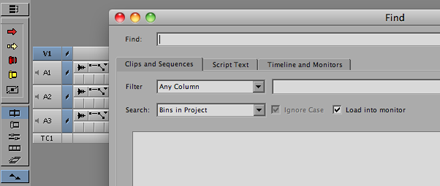
  1. A new, universal Find window has been added, allowing you to search throughout the entire project for clip information and display the results in a single window. (And as a side benefit, Find Bin, which uses the same engine, should work more consistently.)
  2. For an extra fee, you can add PhraseFind, giving you the ability to search for dialog throughout your project. The system listens to your tracks, indexes them and then searches for any text you enter. Slick. (For details, see this video.)
  3. MC now supports the AJA I/O Express box for low cost monitoring, as well as the Avid Artist (Euphonix) control surfaces for mixing and transport. See Avid’s Hardware Options page for details, this video on the controllers, or this pdf covering I/O choices.
  4. The Smart Tool now includes a Transition Tool, allowing you to adjust transition effects by dragging them.
  5. The Keyframe tool has been moved out of the Smart Tool palette so that it can be controlled independently (and left on permanently).
  6. It’s easier to turn off the rest of the Smart Tool and keep it off.
  7. “Legacy Trim Mode” is now a standard part of the application. If you leave the Smart Tool off, and enter Trim by lassoing or with the Trim Mode button, it will feel like it did in Version 4. (See this post for more.)
  8. More media types are accessible via AMA (but you now have to do a separate install for almost everything except Quicktime).
  9. You can now do source colorspace modifications on Quicktime AMA files, letting you adjust field dominance and RBG/709 status with a preview window.
  10. You can set the stereo/mono status of a file’s audio tracks when importing.

I’ve been beta testing this version, and so far, have been very happy with it. I would not hesitate to use it on a show. The changes to the Smart Tool are reason enough to upgrade, and the Find window and PhraseFind are fundamental improvements that might change the way you work. Fair warning — I’ve been using it on a small project with a software-only laptop and don’t have any experience with it in the trenches yet. Avid beta testing is more thorough than in the past, and this one went longer than most, but as with all Avid releases, there will probably be surprises when the software gets into the wild.

A software-only upgrade from 5.0 to 5.5 will run you $149. If you’ve got a support contract, it’s free. Students who bought version 5, should be able to get it for free, as well. PhraseFind costs $495. Pricing is here. For more information about 5.5 check out Avid’s Media Composer page.


Another Great Review of Avid Agility

Posted March 7, 2011 by Steve
Categories: Avid, Avid Agility

The Editors Guild magazine has just published a great review of my book, Avid Agility, in their March/April issue. To quote it briefly: “Avid Agility is very much a definitive book about the Media Composer environment. [It] may well be the ultimate book on customizing Avid’s unique capabilities for individual creative editing.”

My special thanks to Ray Zone and the Editors Guild Magazine for their terrific writeup. You can get the book at Amazon. If you’re looking to get beyond the basic Media Composer documentation, this is the best and easiest way to do it. Details are here.

FCP Speculation

Posted March 5, 2011 by Steve
Categories: Avid, Avid vs. Final Cut, Final Cut

Phil Hodgetts and Terry Curren devote their latest podcast (websiteitunes) to speculation about the upcoming Final Cut Pro 8, and what might have transpired at the super-secret demo that Apple held for 100 luminaries on Feb 17. The main takeaway: no viewer/source monitor (as in iTunes), no tape I/O, background rendering, all 64-bit, running on a new modern codebase that is no longer tied to Quicktime — and all purely speculative, of course. But it makes for interesting listening. The release is promised this Spring.

Pre-NAB Editors Lounge

Posted March 1, 2011 by Steve
Categories: Avid, Avid vs. Final Cut, Education, Workflow

Later this month I’ll be participating in the what I hope will be an insightful and provocative Pre-NAB Editors Lounge Panel Discussion, hosted by Terry Curren and his company AlphaDogs in partnership with Key Code Media. The Editors Lounge is a great place to meet other editors, get questions answered, and generally stay current. And the food ain’t bad, either. This event will also feature a demo of Sony’s new OLED production monitor (list price, just $26,000).

Panelists: Debra Kaufman, Lucas Wilson, Mark Raudonis, Michael Bravin, Terry Curren and me.

Date and Time: Friday, 3/25 at 6:15 pm

Location: Key Code Media, 270 S. Flower St, Burbank, CA 91502

Complete Details are Here

Sally Menke Interview

Posted March 1, 2011 by Steve
Categories: Avid, Media and Society

Elvis Mitchel has posted a thoughtful, sensitive interview with editor Sally Menke this week for his LA-based show “The Treatment.” Elvis is something of an LA institution, operating out of KCRW. His interviews are consistently penetrating, and this one is no different. Having helped run the Editors Guild Magazine for four years, I can tell you that it’s not an easy thing to interview editors with respect and without resorting to a host of cliches. This one does both.

You can listen on line at this link or via itunes as a podcast. It’s tight–just 30 minutes long. But it offers something more sensitive than you might expect, and gives you a sense of what made Menke such a special person.

As many of you know, Sally spent much of her working life cutting Quentin Tarantino’s pictures. She died tragically last year, while hiking in Griffith Park.

Media Copy

Posted February 26, 2011 by Steve
Categories: Avid, Avid Technical Tips, Workflow

With cutting rooms more and more portable, many of us like to take a portion of a project’s media home and work on it from there. In Media Composer this can be a real pain because it’s so hard to identify the media files that go with a large group of clips. There’s a way to do it that I described in a previous post, but it’s complicated, and Avid should have simplified it long ago. Now Wes Plate and his company, Automatic Duck, seem to have done what Avid couldn’t with their program Media Copy. With Version 3, just released, you can identify a bin or bins and ask the program to collect all media files associated with all the clips in those bins and copy them to another drive. That seems simple enough, but we’ve been waiting for it so long now, it seems damn near miraculous.

Fair warning — I haven’t used the program, so I can’t speak for its reliability. But Automatic Duck has made some supremely usable utilities over the years and I suspect this one is no different. Thanks to Oliver Peters for drawing my attention to it and to Wes for getting it done.
