We haven’t seen a new version of Final Cut Pro in over two years, and with Apple hiring new UI engineers not so long ago, rumors of a new version have cropped up repeatedly. Apple apparently showed off the new version recently and impressed some people. Mac Rumors breaks the news, here. And Larry Jordan mentions in on his blog, here. Nothing specific — just enough to whet your appetite, in classic Apple fashion. Steve Jobs’ competitive strategy has always been based on the idea that Apple has to aggressively lead, breaking old rules and creating new paradigms. Will this FCP do that? What would a new user interface look like? Will it offer a new interaction model to replace the old play-stop-adjust-play-stop-adjust cycle we’re all so used to? Multi-touch? Will it use modern CPUs and GPUs to speed things up the way Premiere does? And most important for those of us in the trenches — will it interface with current technology or force changes throughout the pipeline? Looks like we’ll be finding out soon.
Final Cut Pro Rumors
Posted February 23, 2011 by SteveCategories: Avid, Avid vs. Final Cut, Final Cut
CinemaEditor Reviews Avid Agility
Posted February 21, 2011 by SteveCategories: Avid, Avid Agility
 My special thanks to Edgar Burcksen for a great review of Avid Agility in the American Cinema Editor’s magazine, CinemaEditor. Hot off the presses, the latest issue was distributed at A.C.E.’s terrific Eddie Awards ceremony Saturday night and should be in members’ mailboxes and on select newsstands shortly. My heartfelt congratulations to all the winners and honorees, including Burcksen himself, who, along with Vincent Lo Brutto, took home the Robert Wise Award for writing about editing.
Here are a few quotes from the review:
A comprehensive guide to making the Avid fade into the background when you’re working your editorial magic.
I was amazed at how, as a veteran editor who has worked on many iterations of [Media Composer] … I was still able to discover valuable features.
Cohen’s book will guide you to the next exciting level of the art of editing.
I hope all readers feel the same way. You’ll find more reviews, as well as pdf samples, on this page.
Avid Announces Media Composer 5.5
Posted February 15, 2011 by SteveCategories: Avid
 Avid announced Media Composer 5.5, Symphony 5.5 and Newscutter 9.5 today. The new versions aren’t on the street yet — expect that prior to NAB — but the company is showing off the many new features, which include the following:
- A unified Find function that builds and maintains a project-wide database, letting you search all bin data throughout the project from a single window.
- PhraseFind, a $500 add-on that listens to your dialog, indexes it, and allows you to do phonetic searches throughout the project.
- A new Transition Tool that enables you to change dissolve lengths by dragging in the timeline.
- Support for the AJA Io Express for capture, monitoring and output.
- Modifications to the Smart Tool that make it easier to turn it off.
- A “legacy trim mode,” available if you don’t use the Smart Tool for trimming. (This was in patch builds of 5.0. See this link.)
- Support for Euphonics controllers via the EUCON protocol.
Avid’s MC 5.5 product page is here. You’ll find videos demonstrating some of the new features on this page. The press release is here. There’s an FAQ about this release here, one covering PhraseFind here and one on the Io Express here. And you can download a chart comparing the various Avid hardware options here. The price to upgrade from v5 to v5.5 will be just $150.
I’ve been a beta tester, and have found an awful lot to like in this new version. A host of bugs have been fixed, the Smart Tool is more usable, legacy trim mode is even more familiar, and the unified Find function is welcome and effective. The pièce de résistance, PhraseFind, is nothing short of remarkable. It’s not for everybody, but if you need to find your way through hours of dialog, you’re going to love it.
Digital Serfs
Posted February 14, 2011 by SteveCategories: Media and Society
With AOL buying the Huffington Post for about a third of a billion dollars, many have begun to ask how those who originate content in the digital age get paid. Huffington Post was created with mostly unpaid blog posts. The bloggers got a lot of exposure and understood what they were doing, but they may not be so sanguine as they watch the big checks get written. It’s all well and good to say that you are blogging to create PR for yourself, but at some point, you have to put food on the table. David Carr wrote a thoughtful article on this subject for the NY Times today (At Media Companies, A Nation of Serfs). It’s nicely summed up with a quote from Anthony De Rosa, a product manager at Reuters. “The technology of a lot of these sites is very seductive, and it lulls you into contributing,” he said. “We are being played for suckers to feed the beast, to create content that ends up creating value for others.”
We in post production are digital content creators, too, and many are facing declining wages as our technology gets democratized. Will Huffington Post begin to pay everyone? Or will we continue to chase each other to the bottom? Jaron Lanier, in his brilliant book “You Are Not a Gadget,” indicates that creative people are destined to become the peasants of the digital age. “The combination of hive mind and advertising has resulted in a new kind of social contract,” he says. “The basic idea of this contract is that authors, journalists, musicians, and artists are encouraged to treat the fruits of their intellects and imaginations as fragments to be given without pay to the hive mind. Reciprocity takes the form of self-promotion. Culture is to become precisely nothing but advertising” (p83).
MC Chapter Markers to DVD Studio Pro
Posted February 3, 2011 by SteveCategories: Avid, Avid Technical Tips, Avid Wish List & Bugs
Converting Media Composer sequences to DVDs without a realtime burner isn’t difficult. But creating a proper DVD with a chapter menu on a Mac still isn’t for the faint of heart. To make the DVD, you’ll export a QT reference movie and burn it with the DVD application of your choice. But adding chapter markers and making a chapter menu takes some alchemy.
The trick is to create locators in the MC timeline, export them, do a bit of editing on the resulting text file, and import it into DVD Studio Pro. For a full chapter menu, it’s easiest to import into Compressor first.
Start by creating locators where you want chapter breaks. Put them all in the same track and color them the same way. That’ll make it easier to distinguish them from locators you’ve used for other purposes. Add the chapter name to each locator as locator text. Then open the Locators window (Tools > Locators), select the locators you’re interested in by Command-clicking and choose Export Locators from the Fast Menu at the bottom of the window.
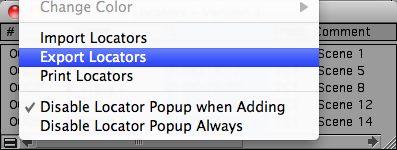
In the dialog box that follows, export selected locators only. The result is a simple, tab-delimited text file containing only the locators you selected. Open the file in a text editor and remove header information and all columns except timecode and locator text. In Apple’s TextEdit or Microsoft Word you can select and delete entire columns by Option-dragging over them — you shouldn’t have to get into regular expression searches. Your resulting file should have just two columns, like this:
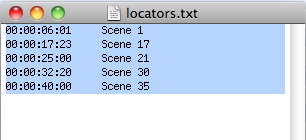
You must reference the same starting timecode as DVDSP does or the markers won’t line up properly. DVDSP defaults to hour 0. Avid sequences default to hour 1. In this example I simply changed all the values to start with hour 0.
Once you’ve got this cleaned-up text file, export your sequence from MC as a QT reference movie with “same as source” settings. MC renders all effects and generates a new audio track, and links the QT reference to your Avid media.
Then create a new project in DVDSP, select the menu tab, drag the movie in, and when you see the drop palette, select Create Button and Track. DVDSP picks up your QT movie and a button is created for it. You can customize the button or the DVD any way you like. Then open the Track Editor (Cmd-9). Right-click the marker track and select Import Markers. Navigate to your text file and select it. All your locators appear in the DSP timeline, named with your locator text.
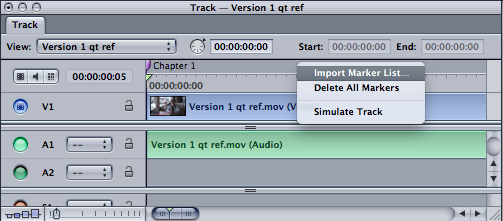
Test the DVD by clicking Simulate. You should be able to jump from marker to marker. (The markers won’t be exactly where you put them — they’ll be shifted slightly to fall on MPEG I-frames.)
The last step is to create a chapter menu — a list that appears when you first load the DVD. DVDSP will do this automatically with exports from FCP, but, as far as I can tell, not from an imported marker list. You have to create each chapter menu individually. To do it automatically, you’ll need a different workflow, importing into Compressor and then DVDSP.
Start by opening Compressor, dragging in your Quicktime reference and applying a DVD setting. With the video selected in the Job window, click the marker menu in the Preview window and select Import Chapter List. Navigate to your text file. The markers will appear under video in the preview window. (Compressor reads the source timecode correctly, so you shouldn’t have to change the timecode hour in your text file.)
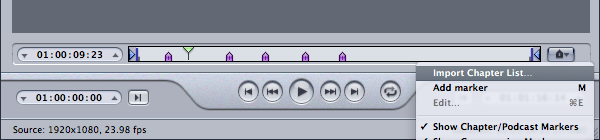
Compress the file and then drag it into DVDSP, and select Create Chapter Index from the drop palette. The video is imported and the chapter menu is created and linked automatically. Simulate and burn the DVD.
This is fairly straightforward, but it’s not exactly trivial, and you have to have a decent understanding of all four programs involved to make it work. Avid could make it a lot simpler if MC would convert locators to chapter markers in exported Quicktimes. Then you could bring them into the program of your choice with a lot less hassle.
For more tips like this, check out my new book, Avid Agility. It’s available from Amazon.
Verizon Sues the FCC
Posted January 22, 2011 by SteveCategories: Media and Society
If anybody was laboring under the illusion that the big internet service providers are benign giants who want us all to share in the democratic bounties of the net, a small article in yesterday’s NY Times should serve as a cautionary reminder that we ain’t living in Mayberry. The FCC recently drafted a grand compromise on network neutrality (remarkably similar to a proposal originally suggested by Google and Verizon) that would force landline internet providers to treat all websites equally, but would let wireless providers block or give priority to whichever sites they choose. Transparency was supposed to prevent abuses, but since, for better or worse, we’re all moving toward the wireless web, most public interest groups thought this wasn’t much of a compromise. And, even thought it was their idea, it just wasn’t good enough for Verizon, which promptly sued, saying that the FCC lacks jurisdiction to regulate them at all.



 Splice Now
Recent Comments