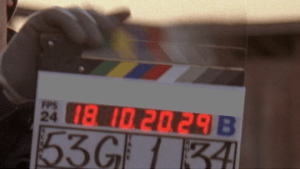
 In 2011, hand syncing of dailies seems downright anachronistic. Doesn’t timecode make all that trivial? Yes, with digital cameras, automatic syncing is standard practice. But this inevitably involves two clocks, and that means they are subject to drift. It doesn’t take much drift to put you out of sync a frame or two. Production is supposed to jam (synchronize) their clocks several times a day, but in the heat of battle that doesn’t always happen. The result is that picture and sound slowly drift out of sync.
In my editing rooms, we always check sync using slates, and resync if necessary. This takes time, but sync starts with dailies. If you’re in sync there, you have a shot at staying in sync further down the food chain.
Media Composer allows us to sync in two ways. First, you can use Autosync to merge audio and video clips. If your clips are pre-synchronized, load them into the source monitor, select video or audio and subclip to separate picture and sound. Then mark the slates and autosync to merge them again.
Second, and even better, you can use the Perf Slip feature to sync to the nearest 1/4 frame. Perf Slip is slick and quick but it comes with some limitations. You have to turn on film options when you first create your project — even if you never plan to touch a frame of film. It only works in 24 or 23.976 projects. And it only works on subclips. It comes with a couple of other minor limitations, as well, but I used it successfully on my last Red show, and wouldn’t want to be without it.
Either way, you’ll have to check every slate by eye. That’s trivial, right? You just line up the visual slate closure with the sound clap and you’re all set. True, but many slates are ambiguous. How you handle them is crucial to good sync. When we worked with film there was plenty of debate among assistant editors about this. Today, it’s a lost art. Here’s my interpretation.
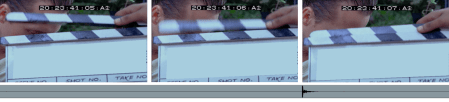
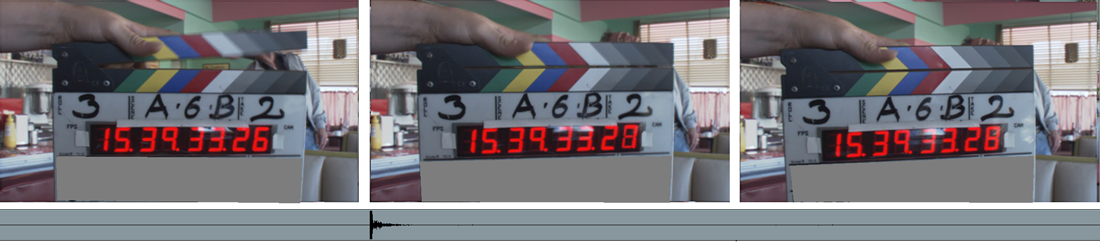
First, you can’t sync properly without checking at least three frames — the frame where the slate closes, the frame before it, and the frame after it. Only with that context can you understand what happened at the slate closure. There are three possible cases.
Case 1 — Normal
In the first frame, the slate is clearly open, in the second it’s clearly closed, and in the third, it’s closed, as well. That’s the standard situation — no ambiguity, no blurred images. We make the assumption that the camera is making its exposure in the middle of each frame. In frame one, the slate is open. In frame two, it’s closed. So the slate hit somewhere between those two exposures. Check the images below (click to blow them up). The waveform of the clap is lined up at the head of frame two. That’s as close as we can get.

Case 2 — Blurred but Closed
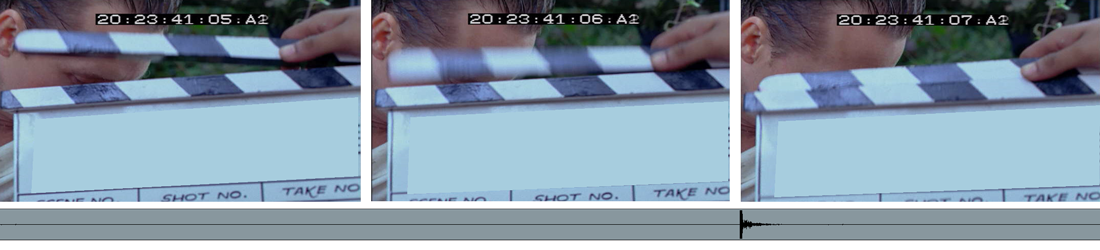
Here we see a blurred frame 2. To decide where to put the audio clap, we have to examine that blurred image carefully. Did the slate close while the shutter was open? Notice that within the blurred image you can see both the top and bottom of the closed slate. The shutter was open when the slate closed and the camera captured an image of the closed slate within the blur. The audio clap goes in the middle of that frame. (Click to blow it up.)

Case 3 — Blurred but Open
Here, the second frame is blurred, but if we look closely, it remains open. The camera captured the slate in motion, but not in its fully closed position. The first closed frame is frame 3. So we sync between frame 2 and 3.
Syncing with this kind of accuracy takes work — blurred slates are always somewhat ambiguous. But if you look carefully, you can generally assign all slates to one of these three cases. If you’re syncing to the nearest frame, you won’t be able to achieve this much precision, but at least you’ll know what you’re aiming for.
Keep in mind that in a 24-frame environment, the camera is typically shooting at about 1/50th of a second and that the exposure occurs in the middle of a frame that’s being displayed for a 24th of a second. With that idea in mind, you should be able to sync as precisely as anyone ever did in a film editing room.
If you’re interested in more Media Composer techniques like this, check out my new book, Avid Agility. You can find out more about it here on the blog, or at Amazon.
 In a new large-scale study examining the relationship between screen time and heart problems, scientists found something dramatic. Just sitting in front of a screen for four or more hours a day correlates with a doubling of heart disease risk compared to less than two hours. And it was associated with a 50% higher death rate, as well.






 Splice Now
Recent Comments