Slick Photojournalism Blog

Posted January 21, 2010 by Steve
Categories: Media and Society

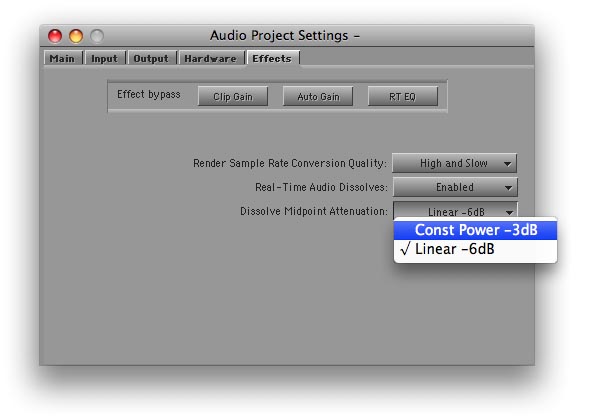
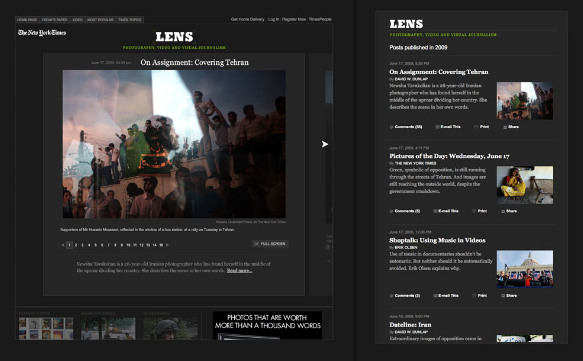
The NY Times is expanding its internet offerings in some slick ways. I’ve recently discovered their “Lens” blog, which seeks to highlight new photojournalism. Every post is focused around a gallery of photographs. Some summarize the day in pictures, others offer perspective on the news or a look at a specific photographer. The interface is nice, too. You can scroll through recent posts and view a slideshow without leaving the home page, or you can make the whole thing full screen. I’ve been checking it every day.

I should also mention that the Times offers something called Times Reader, an Adobe Air application (similar to Flash) that allows you to read the paper in a very attractive way — easy to scan, and more attractive than the web page, with a lot less advertising.

MC Audio Dissolves Come in Two Flavors

Posted January 13, 2010 by Steve
Categories: Audio, Avid, Avid Technical Tips, Avid vs. Final Cut

Have you ever created an audio dissolve and heard an audible volume dip in the middle of the effect? Perhaps when you’re trying to join two similar pieces of fill? If it’s happened to you, you know how maddening it can be to eliminate. Final Cut offers a neat solution: two kinds of audio dissolves, one of which raises the level in the middle of the effect by 3 db. Audio editing applications typically permit even more choices.

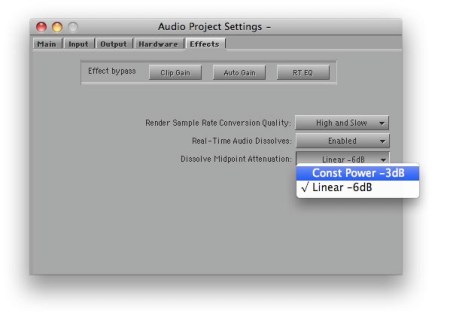
It turns out that the Media Composer offers a choice of dissolve types, too. But the feature is hidden in a setting and barely mentioned in the docs. I had thought it altered all dissolves, including the ones you’ve already made. But in fact, it affects new dissolves only; old ones are left alone. The setting is labeled “Dissolve Midpoint Attenuation.” You’ll find it in the Effects tab of the Audio Project settings panel. Similar to Final Cut, your choices are Constant Power, which adds a 3 db boost in the center of the dissolve, and Linear, which is the default.
The trouble with this implementation is that it’s hard to quickly alter an existing dissolve and compare options. And you have no indication in the timeline of the type of dissolve you’ve created. FCP allows you to change a dissolve type with a contextual menu pick, and it labels each effect in the timeline.

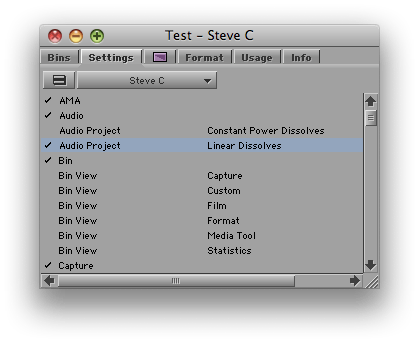
But while not ideal, in practice you can make the MC method work. Simply duplicate your Audio Project setting (select it and hit Command-D). Then open each setting by double-clicking, adjust one to be Constant Power and the other Linear, and name them appropriately. Once you’re created these settings, you can quickly switch between them by clicking in the area to the left of the setting name (putting a check mark there).
You probably want to let Constant Power be your default. For most dissolves, it’s more likely to produce a smooth transition. For fades, you may prefer the Linear setting.

I’m wondering whether readers here have used this feature. It was a new for me and I’m curious whether you’ve tried it and how it’s worked in practice. Please share your impressions in the comments.
And You Thought You Were Buried

Posted January 11, 2010 by Steve
Categories: Media and Society

Whatever you think of the remote controlled drones the US is using in Iraq, Pakistan and Afghanistan, they generate a huge amount of video — 24 years worth so far. Predator drones employ only one camera, but the newer Reapers use ten. The Air Force has thousands of people watching these feeds in real time, but making effective use of that much material presents fundamental problems, and the military is turning to techniques used in sports broadcasting to annotate and categorize it all. With newer drones expected to carry either 30 or 65 cameras, the scale is unprecedented, and I suspect it’ll soon be driving basic research in high-volume storage, access and organization. This NY Times article provides the details.

Waiting Means Watching

Posted January 5, 2010 by Steve
Categories: Editors Guild, Media and Society

Flat screens have made it possible to put TVs in every doctor’s office and, sure enough, they’ve now installed one in the waiting room at the West Side Health Center (part of the IATSE health plan). For your enjoyment, the audio is turned up to full listening volume. There were four of us sitting there recently. Three were reading, the fourth was looking around aimlessly. The TV was tuned to the Food Network. I asked if the sound could be muted, since nobody was watching. No, the receptionist was very clear about this. She has to make the TV available for patients. I didn’t bother to point out that I was a patient, too.

It used to be that putting a blaring TV in a waiting room was cheesy — something you’d find in low-rent diner or a Greyhound bus terminal. But today, with flat panels appearing everywhere, the unwritten rule is changing. Now everybody watches–and listens. In my book, that’s not an improvement. If you’re going to make me wait, at least let me do it in peace.

Multi-Touch Gets Cheaper

Posted January 4, 2010 by Steve
Categories: User Interface

Computer scientists from N.Y.U.’s Media Research Lab have formed a company called Touchco to make a new kind of touch panel that will cost less and be more powerful than the ones you’re familiar with. The new technology allows for unlimited touch points, compared to the current capacitive technology that maxes out at five. And it’s pressure sensitive, so an appropriate application can respond to not only the position of your fingers but how hard they are pressing on the panel. Best of all, it’s cheap — about $10 a square foot.

Think of it as a big, infinitely configurable editing controller. Scrubbing by moving your fingers over a surface, dragging to control multi-speed playback, adjusting visual effects by touching — these are the first things that come to my mind, but I’m sure you can think of other possibilities. Check out  this video on YouTube or the many videos on the Touchco home page and imagine it working in your favorite editing application.

Details and pictures are in this NY Times Blog Post.

Year End Wrap Up

Posted December 31, 2009 by Steve
Categories: User Interface

Looking back, maybe we could say 2009 was the year the playing field got a little more level. It was the year competition seemed to return, the year some of the hoopla subsided and people settled in around the idea that no single application is perfect and that each has its strengths and weaknesses.

For my money that’s a very healthy development, one that can only improve our tools. Competition drives innovation, and our applications are anything but finished. Most of us are eager to see improvements in simplicity, transparency and responsiveness.

In my dreams I hope for an interface like that in Minority Report, with a huge canvas on which to work and a lot of physical feedback. But even without such a fundamental re-imagining, there are big strides that could be made in terms of an interface that’s always on, so you could make changes and continue to work without stoppng video playback. And I look forward to what’s been described as “common timeline,” where all our tools operate on the same sequence and where exporting and importing, when needed, are so transparent that you barely notice them and collaboration becomes a lot simpler.

So, here’s to a brighter year, where our newly flattened playing field will result in significant innovation. I hope you all have a happy, healthy and safe New Year.