“That Post Show” on Media Composer 3.5

Posted May 5, 2009 by Steve
Categories: Avid vs. Final Cut, Workflow

that_Post_show_logo.pngI recently participated in the latest episode of the podcast “That Post Show.” It’s now on line and available for your listening enjoyment.

The group consisted of: Norm Hollyn, Bob Russo, Michael Phillips, Jason Diamond, Scott Simmons, John Flowers and me. We talked mostly about Media Composer 3.5, but also covered the FCP/MC competitive landscape, how to put together a unified set of software tools for editing, and other issues, as well.

For details, bios and to download the show go to John’s site: That Post Show.

Or you can just grab the episode from the iTunes Store.

It was a diverse and interesting group and I thoroughly enjoyed the experience. I’ll be curious to hear what you all think of it.

Whither Apple?

Posted May 4, 2009 by Steve
Categories: Final Cut, User Interface, Workflow

Now that NAB has come and gone and Apple made no big announcements, we turn to the ever-fascinating question of what’s coming from Cupertino. Final Cut Studio has gone two years without an upgrade. They are surely working on something, but they’ve also been distracted with the iPhone.

A story I like is that Final Cut Studio 3 will be revealed at the World Wide Developers Conference on June 8. Several sources suggest that the new version will focus on integration. Apple’s business model so far has been to buy promising Mac software, loosely integrate it, keep the price low, and democratize the market. You have to buy a Mac to use the software, so if necessary, it can be a loss leader.

Regardless of the power of the individual aps, smooth integration is what makes such software effective for editors. I’ve never been a fan of a loosely integrated suite. (See this post: Is the Suite Sweet? for more.) In my ideal editing environment you put all the tools to work on what some people have started calling a “common timeline.” Whether your tools are actually separate aps or simply modules within the same ap, the key is that they don’t create separate projects that have to reconciled. I don’t want to be conforming my own picture changes.

Adobe has promoted one way of doing this in its desktop publishing applications, allowing you to embed, say, an Illustrator file inside an InDesign document—you right-click on the embedded image to open it in Illustrator. That works, but you’ve still got separate files for each ap that you have to manage and back up. At some point, you start to wonder why everything isn’t under the same roof.

Apple is well-positioned now to focus on integration because they’ve already got a good collection of components. The question is whether they can roll it all together in a way that works for editors.

We’ll know soon enough whether Apple’s going to upgrade FCS at WWDC. In the meantime, what are you looking for from them?

Avid’s New Look

Posted April 22, 2009 by Steve
Categories: Avid

avid-logo-imageAvid went live with it’s new look and “brand identity” yesterday, showing off a completely redesigned web site  with a new logo based on symbols from the UI. The idea is integration — bringing the once-separate business units together around a single point of view. My first impression is that the new site is far more appealing than the old one and is much more focused. Bringing Avid’s separate businesses together can’t happen fast enough. The press release is here.

The company also announced official support for Final Cut media on Unity and Isis, as well as new support options for all customers.

The Ground Shifts

Posted April 12, 2009 by Steve
Categories: Avid vs. Final Cut, Workflow

Tags: , , , ,

As we move into NAB time (the show starts Saturday), it seems to me that the Apple/Avid competitive landscape has shifted significantly. Final Cut hasn’t delivered a major upgrade in two years and won’t have a booth in Vegas. But Avid has been busy modernizing their feature set and doing serious work on reliability and performance. Two years ago Final Cut seemed almost unbeatable, and many people were predicting the end of Avid. Today, things look a bit more balanced. I participated in John Flowers’ “That Post Show” podcast recently and the consensus of the participants was that Media Composer’s new “Advanced Media Architecture” (AMA) is a big win for Avid. (The show isn’t online yet. I’ll post a link here when it is.)

You can work with just about any Quicktime media in FCP, and you can do it without conversion. That used to look like an important advantage. But today, many file-based cameras don’t shoot in QT formats. You can usually convert (“rewrap”) your media to QT — but if your format is supported by AMA, MC doesn’t ask you to do any conversion at all. You just grab the media and start cutting. Avid’s Achilles heal, the fact that it forced you to convert everything to its native formats, has morphed into a big advantage. And, strange as it may seem, the fact that Final Cut is tied so strongly to Quicktime begins to look like a limitation.

MC 3.0 brought big performance and stability improvements that were long overdue. I was able to work for three months with version 3.05 and could count the number of crashes I had on one hand. Final Cut isn’t nearly that stable. Version 3.5 brought additional improvements. And MC still beats FCP hands down for precise and complex trimming, something that many long-form editors, myself included, can’t live without.

It would be foolish to assume that Apple has been standing still these last two years, and I expect we’ll hear more from them soon. But in the meantime, MC is looking better and better.

24-fps Turnover to Sound

Posted March 21, 2009 by Steve
Categories: Audio, Avid Technical Tips, Workflow

same-as-source-qt-export1In the old days, film shows turned over to sound via videotape and OMF. That meant sound got a 29.97 version of a show that was cut at 24, complete with the 3/2 telecine-style cadence inserted. It was an awkward and slow hand-over for both picture and sound.

Today, though most shows no longer deliver tapes to sound, many still create 29.97 Quicktimes, often for no better reason than, “it’s what we’ve always done.” But if you’re working on a 24-fps show, the easiest and simplest way to turn over is with 24-fps Quicktime.

Why are 29.97 QTs problematic? First, because creating a 29.97 QT from a 24 or 23.976 fps project doesn’t just mean introducing 3/2 — it means duplicating frames. That makes it awfully hard to cut sound effects precisely. Second, 29.97 QTs take a long time to make, wasting hours that picture assistants don’t have.

But if we turn over 24-fps Quicktimes, what settings should be used? And how should sound handle it in Pro Tools?

I’ve spent several days hashing this out with a music editor friend. I made a simple sync test: a head and tail leader with sync pops, separated by three minutes of filler and overlaid with an Avid Timecode Burn-In effect. From this I exported Quicktimes and OMFs, which my friend imported into PT. Then he added his own counters, compared them with mine and checked the pops. A pulldown sync error is about 1.5 frames per minute, so at the end of 3 minutes, if we’d screwed up, he’d be out by over four frames.

The whole thing is complicated by the fact that the Media Composer allows you to work in two kinds of 24-fps projects: “23.976p” and “24p.” The 23.976p project works like digital videotape. The 24p project works like film. (For details, see the post, Clarifying Avid Project Types. To figure out what kind of project you’re working in, go to the Project window and select the Format tab.)

Either way, you should select “Current” frame rate when you make your Quicktime. This will produce a Quicktime that is frame-for-frame identical to what you’re seeing in the Avid. (In a 23.976p project Quicktime will display a frame rate of 23.98, in a 24p project, it will display 24.)

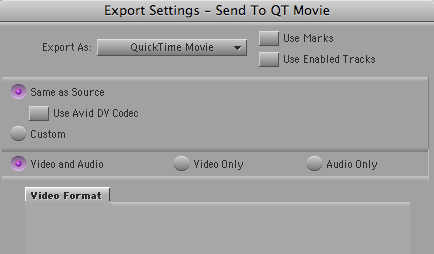
Choose any codec that you and your sound editors prefer. But consider using the Avid codec. That’ll produce the fastest QT conversion, and your sound editors will see exactly what you saw in the Media Composer. You won’t need to fool around with Quicktime export settings, either. Just select “Same as Source” in the Quicktime Export dialog and you’re all set.

To play these QTs, your sound editors will need to install the Avid codec. Many sound editors don’t have this, but it’s a trivial download and a simple install. You’ll find the codec here. (Avid really ought to make it easier to find.)

In Pro Tools, your sound or music editors will work as follows: If you are working in a 24p project, they’ll run picture and timecode at 24-fps. If you’re working in a 23.976p project they’ll run picture and TC at 23.976. Either way, they’ll play back audio at 48K (or 44.1 in the unlikely event that you’ve been working that way in MC).

That’s all there is to it. If you take the time to create a test like I did (always a good idea), your sound editors will see the tail pop from your OMF line up with the tail sync mark in your QT, and their TC counter will line up with yours. They’ll see exactly the same frames you did in the Media Composer, and your exports will be quick and relatively foolproof.

A Balanced View of Media Composer and Final Cut

Posted March 12, 2009 by Steve
Categories: Avid, Avid vs. Final Cut, Final Cut

Tags:

That Post Show” is an interesting new podcast, focusing on editing and post production, created by bay area editor John Flowers. You can get it via the iTunes Store, here or at the show’s website, thatpostshow.com. John has only produced eight shows so far, but they’re already full of good material. The latest episode covers Avid’s recent announcements.

Scott Simmons is a regular contributor, and he hosts his own blog, “The Editblog,” which now offers tech tips for both Media Composer and Final Cut Pro along with some helpful comparisons of the two aps.

What makes these two resources unusual is how balanced and fair-minded they are. After years of hype about Final Cut, it’s refreshing to hear people talk rationally about the real-world strengths and weaknesses of these applications. That kind of dialog will help all of us, and it’ll make both programs better, too.