Business Models 101

Posted July 11, 2007 by Steve
Categories: Avid vs. Final Cut, Workflow

I just listened to a smart speech by Herbert Allison, CEO of TIAA-CREF, the big financial services firm for higher education, talking about how he turned that company around. And boy did it sound like a story about Avid. Same exact problem — the market expands because it’s being democratized, the company doesn’t see the new market because current customers are happy. The company’s business model was designed around their old definition of the customer — and it’s just too disruptive to change the business model to fit the new definition. Everything would have to change.

Old customer — facilities, broadcasters, rental houses. Able to write relatively large checks. Need excellent support. Willing to buy a variety of products to get the job done, as long as they all work well and fit into existing workflows.

New customer — individual film and video makers. Can’t write large checks. Don’t expect one-on-one support. Want an all-in-one product. Have no existing workflows. Workflows can be invented for them.

There are way more of those new customers than old customers. But Avid didn’t recognize them because its business was built on making the old customers happy.

Avid democratized post production in the early ’90s. Apple democratized it further in the early years of the new century. The question now is whether Avid can come back. They still hold the top of the professional world. They have to build from there, and they have to win on points, creating something that does more and works better than FCP. Tall order — but not impossible. And, make no mistake about it, the better they compete the better it is for all of us. Competition brings out the best in everybody.

Allison’s talk, delivered in December at Yale University, makes some interesting recommendations. It’s available as a podcast — item 98 on this page at the iTunes music store.

Technorati Tags: , , , ,

Nutrition in the digital age

Posted July 5, 2007 by Steve
Categories: Quality of Life

A recent study at the University of New Hampshire offers some surprising information about the health and nutrition status of college kids. The study looked at data from more than 800 undergraduates enrolled in a general nutrition course (New York Times / University of New Hampshire).

The findings:

  • Eight percent had “metabolic syndrome,” (predictive of future heart disease and diabetes). More than half had at least one risk factor for it.
  • Almost none got enough fiber.
  • Most women didn’t get enough iron, calcium and folate.
  • Most got less than 30 minutes of activity per day.
  • One third were overweight or obese.
  • Two thirds of the men had high blood pressure.

Yea, you read that right — two thirds of young college men in this study had high blood pressure.

If 18-24 year olds in a nutrition class are this overweight, have this much high blood pressure, and get so little physical activity, what does that say about us digital professionals? Are we really eating better than they are? Are we getting more exercise?

HD Storage Requirements

Posted July 3, 2007 by Steve
Categories: Avid vs. Final Cut, Workflow

Talking to friends about their future plans, I’m learning that the one thing that seems to galvanize Avid folks this year is the possibility that they could soon be cutting HD images in an “offline” environment. In my circle of friends DNX36 is the most interesting thing Avid has introduced in a while.

But that inevitably leads to an obvious question. “How much storage am I going to need and how much is it going to cost?” The question is usually framed in relative terms, namely, “How much MORE storage am I going to need than I use now?”

I can do a rough estimate, of course, but it would be nice to have a calculator that compares 14:1 storage requirements with DNX36 requirements — on 24-fps material. Does such a thing exist? Several searches on Avid’s web site didn’t turn up much of anything. The charts the company offers for DNX storage leave out DNX36 and never compare it to Avid’s SD codecs.

In general, Avid’s web site is impossibly hard to navigate. There’s too much stuff, organized poorly, searches are often ineffective, I rarely find what I’m looking for.

Avid-ites are behind their FCP brethren in the switch to HD, but I think we’re going to be moving there in droves in the next year or two. Avid ought to make the switch easier and more comprehensible. What do you need? How much can you do software only? What’s the simplest and least expensive workflow? If that information were widely disseminated we’d see a lot more people upgrading their aging Meridien systems.

And it would also help if Adrenaline HD wasn’t so much more expensive than FCP with a Blackmagic card.

Technorati Tags: , , , ,

Tab Between Open Windows with Witch

Posted July 2, 2007 by Steve
Categories: Avid Technical Tips, User Interface

Witch Screen Shot

Thanks to a suggestion from Mark Burton (on this page), I’ve been experimenting with a little OSX utility called “Witch” for the last week or so — and I like it a lot. It allows you to quickly switch from one window to another, much as you now switch from one application to another using command-tab.

With Witch installed, you switch between windows with option-tab (or whatever keystroke you prefer). If you hit it once, you go to the last window you used; if you hold it down you can choose from a menu of open windows. It’s simple and intuitive, and on a laptop Avid, where screen real estate is at a premium and overlapping windows are the way to go, I find it really useful.

Witch is free, but if you like it, send the author, Peter Maurer, a donation.

Technorati Tags: , , , ,

More Laptop Issues

Posted June 29, 2007 by Steve
Categories: Avid, Avid Wish List & Bugs, Laptop Editing

Numeric Trim Displays

More and more, I see myself working from various locations on a show — anchored in an editing room, of course, but bringing stuff home or to the set to work on or to show people.

Avid could do some useful work in this area, making it easier for us to edit on the go. I mentioned some of these things yesterday. Here are a couple of additional things I’d like to see:

1. “Pack and Go” — I’d like to be able to select a bin or bins and tell the system to copy all relevant media, and the bins themselves, to another drive or to a laptop. Media should be put in the right place, bins go into the project folder on the laptop. One-click simplicity.

2. The Media Composer expects you to have a dedicated numeric keypad. But laptops don’t have them, and that creates some problems. You can change a dissolve length in the timeline using the regular number keys (at the top of the keyboard). But if you want to trim numerically — or even just move around in the timeline numerically — you’ve got to hit the number lock key, use the embedded keypad (and go blind finding the keys) and then finally turn number lock off, because it locks out all the other keys. Final Cut does not have this problem. You can trim and move around with the normal number keys. And Final Cut adds another bit of finesse — when you customize your keyboard, the template is smart enough to show you the keyboard you’re really using.

Technorati Tags: , , ,

Heads Up Displays

Posted June 28, 2007 by Steve
Categories: Avid, Avid vs. Final Cut, Avid Wish List & Bugs, Laptop Editing, User Interface

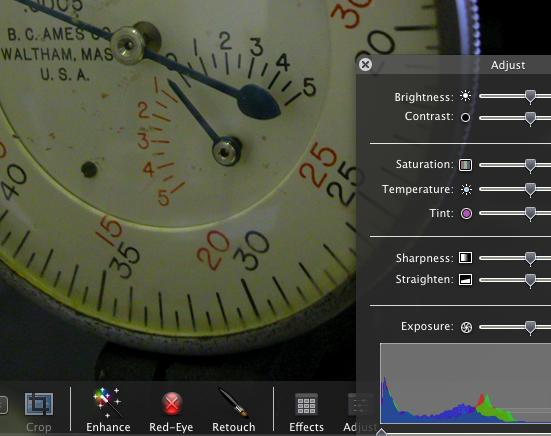
Heads Up Displays in iPhotoMany of the new Apple applications employ what the company calls “heads up displays.” These are control panels that are translucent and appear over the image you’re working on, fading in and out as needed. You can see them in iPhoto, Aperture, Motion and Quicktime. They look cool, but more important, they’re functional, because they let you do useful work on a full-sized image. They’re particularly helpful for small (ie. laptop) displays, where screen real estate is at a premium.

As I use my laptop more and more for cutting, I’m starting to see how valuable such displays could be in a mobile editing environment.

Because, in the laptop environment, the Media Composer definitely has some rough edges. When I’m working with the laptop itself, I want one window layout. But when I plug in to a bigger monitor and use the laptop screen as a bin monitor, I want another. The MC can handle this, but it takes a lot of fiddling around. And even when you have your workspaces all set up the way you want them, the system often does the wrong thing.

In general, the MC needs some tweaking around the issue of window activation. For example, when I double-click on a sequence I want the Composer window and the Timeline to activate and move forward. But now, only the Composer window does so. I also want the ability to quickly tab from bin to bin.

And that leads me back to the subject of heads up displays. How about this? Wouldn’t it be nice to work in full screen mode (video playing full screen) — but with a translucent timeline supered over it? The timeline (and maybe the editing controls from the bottom of the composer window — what Avid calls the ‘mini–composer’) would appear when you move the mouse, and they’d disappear when video plays for a moment. That sure would make for a slick, small-screen editing environment.

Heads up displays would also be great in a redesigned full screen title tool, much as they now allow for full screen editing in iPhoto.

What else could you do with this kind of interface?

Technorati Tags: , , ,