Wish List #3 – Segment Mode

Posted December 18, 2006 by Steve
Categories: Avid, Avid vs. Final Cut, Avid Wish List & Bugs

Editors using Final Cut live in segment mode all the time. Whenever you click in the timeline you’ve selected a clip and you can move it around. That feels like a convenience to Final Cut users, but to me, and to other Avid people, the “segment mode all the time” approach is hard to get used to. I tend to move around in the timeline very quickly and it’s just too easy to grab something and move it unintentionally.

But Final Cut’s segment mode was developed years after Avid’s and in some other ways, it has advantages. Given the war that both sides are engaged in, I have to guess that Avid’s engineers are considering some changes to segment mode. I hope that wholesale alterations are not being considered, but some smaller ones would certainly be nice.

Here are my suggestions:

  1. Clicking in a time track should not turn off segment mode.
    Some people like this feature, but Xpress doesn’t work this way and after cutting a show with it, I have to say I like it better. Sometimes you just want to leave segment mode on for awhile and with MC there’s no way to do that. It should be a preference.
  2. Make sync locks work properly in segment mode.
    Sync locks are supposed to prevent you from throwing your sequence out of sync. I leave them on all the time, because they make trimming so much easier. But sometimes they break down in segment mode, and when they do, you have to turn them off to do what you want to do.
  3. Insert black into the middle of a complex cut.
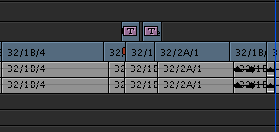
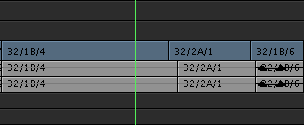
    If I want to open up room in the middle of a complex sequence to add a shot, I’ve got to add an edit in the middle of a clip, insert black, and then drag all the pieces back together. Final Cut allows you to select all clips to the right or left and then drag them. This makes it much easier, but it takes a certain kind of nerve to drag every clip in your sequence just to open up a little space somewhere. Avid’s trim mode lets you trim and add black at the same time (control+option+drag). That’s a great idea, but it was implemented so that you don’t actually add black, you trim material away and replace it with black. That never makes sense to me. I simply want to go from this:
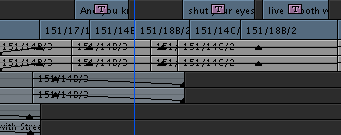
    open-segment-mode-2.png
    to this:
    open-segment-mode-1.png
    It ought to be a lot easier to do.
  4. Slip or slide into sync
    It’s not strictly segment mode, but it sure would be nice if we could option click on an out of sync clip to either slip it or slide it into sync. You can do this in FCP and when you’re moving stuff around in the timeline, it would be very helpful.
  5. Linked selection.
    Finally, in FCP, you click on a picture clip and if it’s associated with sync audio, the audio gets selected too. The problem is that you have to turn linking on globally and that tends to tie your hands. Avid could easily do much the same thing, but in a simpler and more practical way. If you held down a modifier key while selecting a clip, nearby sync audio or video would be selected at the same time.

That’s it. Like I said, Avid’s segment mode generally works quite well. With a few little improvements it could be even better.
More on the Hollywood/Avid Disconnect

Posted December 18, 2006 by Steve
Categories: Avid, Avid Wish List & Bugs

For the moment, it looks like most of the people visiting this site got here from a link on the American Cinema Editors home page. If that’s true, then many of us are ACE members. If you agree with me that Avid hasn’t added features that appeal to us in a long time (see previous post), then you have to wonder what we can do about it. It’s not that the machine can’t be improved. That’s just silly. There are plenty of things that frustrate us, and many of them have been around for years. My contention is that we’re engaged in a vicious circle: we don’t upgrade very often because we don’t see a reason to, and Avid doesn’t see a lot of upgrade money coming in so they think we’re happy and end up ignoring us.

The solution is to come together around some changes that we’d like to see. My impression is that a little bit of consensus might go a long way.

That’s why I’ve been posting some “Wish Lists” here, organized by topic. There are two so far, and a third is coming in a few minutes. (You can find them by clicking on the category “Avid Wish List” on the right side of the home page, or you can click here.)

I’d like to hear your thoughts. If we can find some consensus it might be a lot easier to get things done.

Meridien, Anyone?

Posted December 13, 2006 by Steve
Categories: Avid, Avid vs. Final Cut

Hollywood editors often function as Avid’s poster children — and deservedly so. Despite Final Cut’s inroads into many markets, LA remains primarily an Avid town. But our dirty little secret is that many, and perhaps most, TV and feature editors are still using Meridien systems and don’t want to upgrade. Despite the fact that Adrenaline was introduced nearly four years ago, long-form editors have heard that it’s buggy and slow, and they don’t see a strong reason to switch.

This situation mirrors the one we saw with Meridien. It took Hollywood years to make that move and the town only switched en masse when Avid stopped supporting ABVB. The perception then was that the new version didn’t offer anything important enough to compensate for the pain and expense of an upgrade.

Avid has made much of its terrific user interface and hasn’t wanted to tamper with it. Instead, the focus has been on improved visual effects and finishing capabilities. While these things are wonderful, long-form editors tend to be more interested in bread and butter editing features: the things that help us turn hundreds of thousands of feet of film into coherent stories. And those capabilities, warts and all, haven’t changed much in over a decade.

I’ve used Adrenaline or Xpress on three shows now and would choose it again without hesitation. But I have to wonder how a glacially slow upgrade pace affects Avid and its Hollywood user base. The company can’t get useful feedback because so many of us are using old machines. And Avid isn’t making the money from us that it could be. The result is a self-reinforcing feedback loop. Editors are so certain that nothing will change that they have long since stopped asking for improvements. And Avid isn’t asking because we’re not upgrading.

Editors once drove the upgrade cycle and new features would elicit thunderous applause at user group meetings. That can happen again, but Avid needs to put more focus on figuring out what people like me want and need. The kinds of things that motivate us might not be all that hard to do. For many people here, the most desireable improvement in Adrenaline is the ability to play 16 tracks of audio and use real-time audio dissolves. Not exactly rocket science anymore.

Avid took a commanding lead worldwide in the ’90s partly because the Media Composer won in Hollywood. I hear that the Intel/Mac Media Composer is very fast and I’m hopeful that we’ll see new features introduced in April at NAB. But Avid isn’t going to drive the upgrade cycle here until it offers improvements that Hollywood editors really want.

The Power

Posted December 6, 2006 by Steve
Categories: Media and Society

If you had any doubt about the power of our medium to affect the minds of viewers, here are two recent articles that you might want to think about:

The first describes a review of roughly 50 scientific studies about the effects of cigarettes in the media, specifically on kids. It covers not only cigarette advertising, but also cigarette use by characters in TV shows and features. Among the conclusions: “the psychological effect of tobacco marketing or media exposure increases the odds of taking up smoking almost threefold” and “exposure to positive images of smoking increased the odds that children would smoke by about 90 percent.”

The second article talks about a brain imaging study examining the effects of branding. Strong, well identified brands produce a “pattern of activity in the part of the brain associated with positive emotions, self-identification and rewards.” In other words, looking at the logo of a strong brand not only makes you feel happy, but it makes you feel happy about yourself. Weak brands produce a response in areas associated with “negative emotion as well as memory.”

But if you ask people on the street whether they watch TV commercials, they typically tell you that they ignore them or that they have no effect on them.

Sure.

And while it’s not exactly the same point, I can’t help but mentioning here the amount of money that was spent on advertising for the recent mid-term elections. The total came to no less than three billion dollars. That’s billion — with a B. But we are expected to believe that politicians are not influenced by all that money. That’s just as credible to me as the idea that advertising doesn’t affect people.

Tip #10 – Combining Versions

Posted December 2, 2006 by Steve
Categories: Avid, Avid Technical Tips

One of the trickiest things editors have to do every day is manage versions. I always try to keep one ‘hero’ sequence clearly identified. If I’m not sure about a change, I’ll experiment with it in a shorter sequence and call that an ‘alt.’ Then I can compare the master with the alt, either for myself or for a director or producer.

If I decide that the alternate is an improvement, I have to integrate it into my master sequence. Here’s a trick that uses Avid’s “match frame edit” marks to make that easier. (These marks are modeled after the old “through” marks that we once put on film with a grease pencil — two parallel lines marked across the splice would indicate that it was unintentional.)

First, put your master version in the record monitor and your alt in the source. Here’s the master:

master version

And here’s the alt. Note that two shots have been deleted.

alt version

Our first step is to mark two frames, one before and one after the change, where the alt and the master match each other. We mark in on a frame before the changed area and mark out on a frame after it. We mark the exact same frames in the source and the record, two marks in each, for a total of four marks. I prefer marking on “zero frames” where the frame count equals zero. That’s not strictly necessary but it makes it easier to keep all this marking straight.

Here’s the source monitor with both marks indicated:

source mon

Here’s the record monitor with the same frames marked.

record with marks

Now we’re ready to make the replacement. First check your patching. Everything should go straight across. You don’t want to be moving material from one track to another. Then simply hit extract (the scissors) and insert (the yellow edit button). The old material is deleted and the new material is inserted. This is what the timeline looks like after the insertion:

after extract and insert

Note the unintentional splice marks. That’s the key. They prove that you did the replacement correctly, that the new material dropped in at the right place and the cut points matched up. If you don’t see those marks in every track, you’ve made a mistake. Undo twice, check your marks and try again.

All that remains is to remove the unintentional splices. The easiest way is to lasso them and hit the delete key. Voila, your master version is up to date.

after throughs are removed

MC/FCP Differences

Posted November 26, 2006 by Steve
Categories: Avid, Avid vs. Final Cut, Final Cut

Several people have responded negatively to my suggestion that Final Cut Pro hews closer to a desktop publishing metaphor than Media Composer does. Admittedly, the differences are pretty subtle, but this issue was hotly debated in the early days and I, for one, advocated the idea that editors were more interested in moving pictures and how they look on a screen than on little rectangles and how you can move them around in a timeline. As much as possible, I wanted you to be able to make all editing decisions based on moving video. Avid’s engineers also did without an explicit toolbar and tried to make the cursor smart enough to do what you wanted when you wanted to do it.

In one sense the difference is just one of visual semantics. The MC has a ‘toolbar lite’ at the bottom of the timeline, where you choose effects, trim, segment or source/record mode. So you’re switching modes in both programs. But there are fewer modes in MC than there are tools in FCP, and to me, that makes it more intuitive. People who started working with one of the Adobe applications before learning to edit often find FCP more intuitive.

One question is whether this difference of approach leads to a different kind of editing, or is more appropriate for a different style, or with different kinds of material. One commentator suggested that FCP seems to be used more for documentaries and music videos and the MC more for features and television.

So how’s this for a hypothesis: FCP does a better job in segment mode than MC. It’s easier to drag things around, easier to rearrange clips, easier to create new and unexpected juxtapositions. MC is better in trim mode, better at tying material together, better at making disparate material look like continuous action. FCP is better for montages; MC is better for dialog. FCP is better at making cuts that jar you; MC is better at making cuts that are smooth as silk.

In addition, FCP is better in a standalone, home-brew environment, where you might be working with full-resolution media and doing your own visual effects, sound work or tech support. MC fits better in a world where teams of specialists have to collaborate and work with various kinds of media.