Avid DX Sneak Preview

Posted April 10, 2008 by Steve
Categories: Avid, Workflow

Avid offered a sneak preview of their new hardware offerings at Universal Tuesday night. To my everlasting frustration, I was unable to go, but the details are emerging. CEO Gary Greenfield and new head of the video division Kirk Arnold were there, along with Matt Feury and Michael Phillips and a host of engineers and others. The message seemed to be: “We understand you (better than the other guys). And we want your input (unlike the old Avid).” And from what I heard, the audience thought they made both points effectively.

The big announcement was new hardware across the product line. Adrenaline is gone, to be replaced by something called “Mojo DX,” a high-def, rack-mounted box that does away with the old and slow Firewire connection and replaces it with an extension to the much-faster PCI-e bus. Symphony DX will likewise get powerful new hardware. Media Composer will move to version 3 and offer some new features, including a real-time timecode burn in effect, and improved multi-stream effects capabilities. It’ll be able to intelligently address multiple CPU cores and also use the DSP power of your graphics processor and should be a lot more responsive as a result. And it will run under Leopard and Vista.

Michael Phillips demonstrated Avid’s new XML export functionality, with an architecture that allows other manufacturers to write small conversion programs (“droplets”), so that they’ll be able to import sequence and bin information (but apparently not effects descriptions).

Pricing has come down dramatically, and there will be several upgrade alternatives for current owners.

More specifics will emerge at Avid’s events at the Hard Rock in Vegas this Sunday and Monday. For more about Wednesday’s event, see these articles: Digital Production Buzz and HD Head.
Technorati Tags: , , ,

Multi-format Timeline Gotcha

Posted April 5, 2008 by Steve
Categories: Avid Technical Tips

As you all know, I’ve been experimenting with animated titles created in Motion and imported into the MC. And yesterday I got hit with a new and arcane gotcha, shortly before a big screening (of course).

I’ve been importing the Motion titles at 1:1, even though my project is 14:1. This creates cleaner keys. The Media Composer has been happy to play these 1:1 titles without rendering — until we built the individual reels of our show into a long sequence. That’s when the titles started freezing. Nothing we could think of would solve the problem. The titles played fine in a shorter sequence. But once the timeline got to be over an hour or so, they’d freeze and stutter. Rendering the titles didn’t make any difference.

An hour of experimentation produced no improvement. Restarting the machine and the DNA, rebuilding the media database on the render drive, re-rendering to another drive, recreating the sequence — nothing helped. After a lot of adrenaline (of the biological kind), and with the hour of our screening rapidly approaching, we finally figured out what was happening — thanks to the insight of Josh Rizzo at Wexler. Even though our project was 14:1 and we thought we were rendering at 14:1, those titles were being rendered at 1:1. And thus playing them, even in their rendered state, still meant using the MC’s real-time multi-format capabilities. And it was those capabilities that were choking on the long timeline.

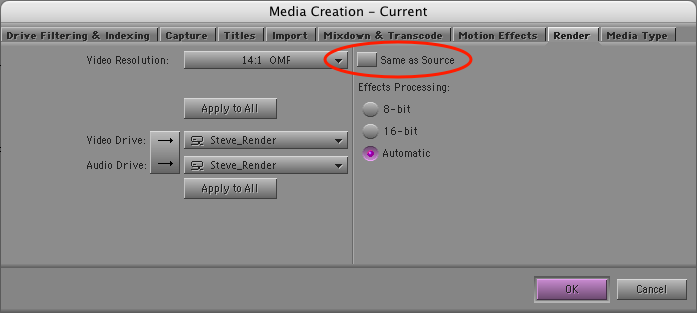
The solution is in the Media Creation settings, under the render tab. Even though you’ve selected “14:1,” there’s a checkbox that tells the system to render effects at the resolution of the underlying source. There’s no explanation for the meaning of this setting — and it’s checked by default — so we’d left it alone. Here’s the setting dialog. Be sure you de-select the circled checkbox.

Render Settings

With “same as source” deselected, I re-rendered the titles. And voila! — they played fine, no matter how long the timeline was, because now they were rendered at 14:1. This didn’t seem to hurt the quality of the titles much. The effect isn’t nearly as severe as bringing them in at 14:1 in the first place. (But I’ll be doing more experimentation with this in the future.)

Bottom line — watch out for that multi-format timeline. It’s wonderful when it’s working, but when it chokes, figuring out what happened can be awfully confusing.

Technorati Tags: , ,

Introduction to the FCC

Posted April 5, 2008 by Steve
Categories: Media and Society

The FCC gets virtually zero news coverage on network, but it has a huge influence over what Americans see and hear in their media and how all of that gets paid for. The result is that the five FCC commissioners have a big, if hidden, influence over our political system.

I’m a fan of Robert McChesney’s radio show and podcast, Media Matters. Two weeks ago he interviewed FCC commissioner Jonathan Adelstein. If you’re looking for a concise introduction to the FCC — what it does and why it matters — check out the show via podcast. You can download the mp3 here, or subscribe to the podcast on the iTunes store here.

Technorati Tags:

Making Titles with Motion

Posted March 30, 2008 by Steve
Categories: Avid, Avid Technical Tips, Avid vs. Final Cut, Avid Wish List & Bugs, Workflow

This week, I finally gave up on using the Avid title tool. Nothing’s changed, of course. It still does what it always did, all the way back to the early ’90s. But back then, a main title meant a series of cards fading in and out. Today, title animation is so common that I felt compelled to try and find another way. And yes, I’ve made a good faith attempt with Avid Marquee, making all my titles with it on at least one show, but it’s way too techie and so badly integrated with the MC that sometimes it’s laughable (for more, check out these posts “Fixing the Title Tool” and “More on the Title Tool.”)

I know that some of you use After Effects, and I realize that it’s very powerful, but for me, it seems to require an awful lot of meticulous attention to keyframes.

Enter Apple’s Motion. Motion offers “behaviors” — canned combinations of keyframed parameters that can be stretched and shrunk to make your animations do all kinds of things that would take hours with other applications. And Apple helpfully allows you to preview these behaviors, and to mix and match them if you don’t see what you want. It is also completely real-time. You never render anything, and that makes it feel very responsive. You can also let it play your animation as a loop and change parameters while it’s running, which makes it seem even more spontaneous.

So I just completed a first draft of a main title with Motion. Though the learning curve was much steeper than I had initially expected, I was able to do things that I couldn’t even contemplate with the MC. Specific impressions follow.

Pros:

  • All real-time. No rendering. Lots of canned effects.
  • Easy to do impressive things quickly, but fine-tuning takes longer.
  • Integrates with the MC fairly well, as long as you’re willing to export and import and you know a few tricks.
  • Good on-line manual. There’s plenty of conceptual explanation, so you can get a high-level look at what you’re trying to accomplish and then dive into the details. Contrast this with MC’s online help, which gets to the nitty gritty, but often skips the big picture.

Cons:

  • Maximum resolution is HD, so it’s not appropriate in a film/DI environment. I’m working on a show that will deliver HD, so it’s not a problem, but I want to use this on film shows, too.
  • Not particularly stable. Crashed regularly and with no warning, making me value Adrenaline’s comparatively bullet-proof performance.
  • Not good with two monitors — I didn’t see a way to split the timeline from the viewer, for example.
  • Despite Apple’s heroic attempt to shield you from keyframes, you’re eventually going to need the program’s keyframe editor. And because it graphs keyframe values in 2D space, it needs lots of screen real estate and isn’t particularly intuitive for AE or MC users.

Tips:

  • If you’re working in a traditional offline/online environment, be sure to set up your project at the screen resolution that you’ll deliver at. Talk to the people who will online your project and work out the specifics before you start.
  • You’ll have to experiment with export choices a bit. I exported at the Motion project resolution, using the default settings, and imported the resulting Quicktime into the MC with “invert alpha” at 1:1 resolution. That created cleaner keys. It helped that my standard-def Avid project is 16×9 squeezed. Thus the aspect ratio in the Avid and in Motion matched. (See this post for more.)
  • I chose to “export selection,” which meant that each title came over as a separate item. If you want to move your entire Motion project into the MC, you can just drag the little icon at the top of the Motion project window directly into an Avid bin.
  • I was able to install MC software and Motion on my laptop and didn’t see any conflicts. But our rental company insisted on creating a dual-boot setup for our Adrenaline systems. That isolates the MC for safety, but it’s awkward.

Bottom line — Avid needs a new title tool. Though I like Motion, I didn’t much enjoy going back and forth between the two programs, and rendering all the mattes in the MC is a pain. Making a small change means going back to Motion and then doing the export/import thing again. The integration is better in the Final Cut environment, but you still have to leave FCP to do your titles. Avid has an opportunity to build a better title tool, and to put it where it belongs — in the editing application.

Technorati Tags: , , , ,

Segment Mode in a Complex Timeline, Part 2

Posted March 19, 2008 by Steve
Categories: Avid, Avid vs. Final Cut, Avid Wish List & Bugs, User Interface

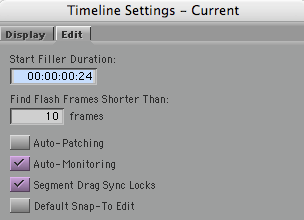
In the previous post on this subject (available here), I left out one big issue, namely how segment drag works with sync locks. There are two choices for this, selected via a checkbox in the timeline settings window:

Sync Locks Setting

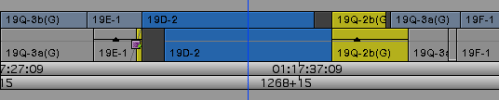
“Segment Drag Sync Locks” inserts black during a segment mode drag and that ought to solve some problems. But it does it in such a strange way that I can’t imagine how anyone would use it. (And you can still throw your timeline out of sync with sync locks on, which shouldn’t be possible.)

Here’s what happens if you drag picture only with that check box selected:

Picture 4-Pix Only Seg Locks On

Sync is no better than when this option is off, and track still gets broken up.

If I drag picture and sound together I get this:

Picture 5-Pix And Track Segment Locks On

Once again, black is added but in a totally unhelpful way and sound is broken up.

None of these methods do what I need, allowing me to move groups of overlapped clips around in the timeline without breaking any of them into parts. There’s no easy way to do that now and there should be.

Technorati Tags: , , ,

Avid Lowers Prices and Drops Xpress

Posted March 17, 2008 by Steve
Categories: Avid

Avid lowered prices for the software-only Media Composer today, dropped Xpress Pro from the product line and launched a new “community” web site with video tutorials and other resources.

The new price for Media Composer software is $2495. Any college student with an ID can get it for $295 (the old policy restricted student discounts to a few big institutions). Existing Xpress Pro customers can upgrade to MC for $495.

The press release is here. The new community site is here.

Technorati Tags: , , ,